Don't miss your chance to take the Fabric Data Engineer (DP-600) exam for FREE! Find out how by attending the DP-600 session on April 23rd (pacific time), live or on-demand.
Learn moreNext up in the FabCon + SQLCon recap series: The roadmap for Microsoft SQL and Maximizing Developer experiences in Fabric. All sessions are available on-demand after the live show. Register now
Hello,
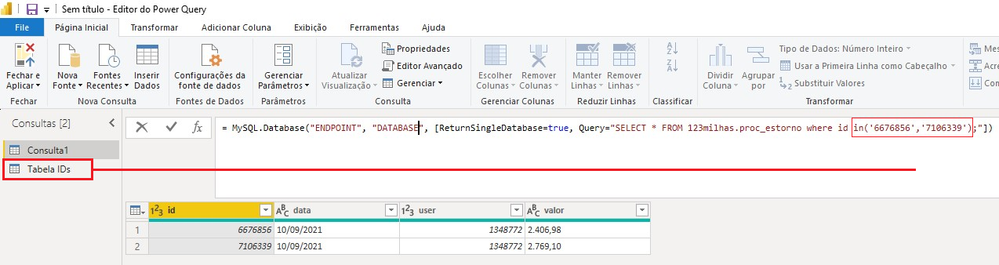
I'm try make a query, find by ID, this ID are in another table in power query, like this example bellow:
SELECT * FROM 123milhas.proc_estorno where id in( TABELA IDs.ID );
Can i do this ?
Solved! Go to Solution.
Hi @Adam_Silva ,
In query editor, click new Source>blank query:
Then using below M codes:
= Table.SelectRows(#"Table",each List.Contains({6676856,7160339},[ID]))
And you will see:
For the related .pbix file,pls see attached.
Best Regards,
Kelly
Did I answer your question? Mark my raeply as a solution!
Hi @Adam_Silva ,
In query editor, click new Source>blank query:
Then using below M codes:
= Table.SelectRows(#"Table",each List.Contains({6676856,7160339},[ID]))
And you will see:
For the related .pbix file,pls see attached.
Best Regards,
Kelly
Did I answer your question? Mark my raeply as a solution!
Even easier than custom SQL is to just use the library function, and instead of IN, use List.Contains:
= Table.SelectRows(Table, each List.Contains(List.Buffer(#"Tabelas IDs"[ID]), [FactTableIDColumnName]))
That should fold, too.
--Nate
Yes. The easiest way is to make your "in" values into a list, then refer to the list. You should make the ID column type text, and then:
Add a new query named "items".
= Text.Combine(List.Buffer(#"Tabela IDs"[ID]), ",")
Now you have a comma separated list named items.
Your IN statement would now be:
IN ("&items&")
As in, end your quote right where you need the list items inserted, &items&, and then start quotes again.
--Nate
If you have recently started exploring Fabric, we'd love to hear how it's going. Your feedback can help with product improvements.
A new Power BI DataViz World Championship is coming this June! Don't miss out on submitting your entry.
Share feedback directly with Fabric product managers, participate in targeted research studies and influence the Fabric roadmap.
| User | Count |
|---|---|
| 6 | |
| 3 | |
| 3 | |
| 3 | |
| 2 |