Don't miss your chance to take the Fabric Data Engineer (DP-600) exam for FREE! Find out how by attending the DP-600 session on April 23rd (pacific time), live or on-demand.
Learn moreNext up in the FabCon + SQLCon recap series: The roadmap for Microsoft SQL and Maximizing Developer experiences in Fabric. All sessions are available on-demand after the live show. Register now
Hi All,
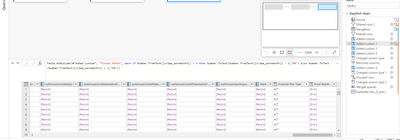
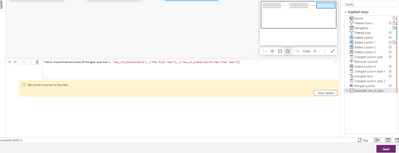
Any idea how to fix the error? I had this custom column for calculating FY working for some time, and now it stopped working. It gives out the error that "We couldn't convert to Number" in the final step. Any help would be appreciated.
Thank you!
Solved! Go to Solution.
There is data that cannot be converted to a number. "abc" would return that error. You have probably two options.
so try this:
if (try Number.FromText([Field]) otherwise 0) > 9 then.....
If [Field] has "100" in it, then it will evaluate to true, it is > 9. If it has "abc" it will return 0, and false. So alter based on your logic needs.
If you want to see why there are values that cannot be converted, create a copy of this query and change field to a number type, then filter on the home ribbon "KEEP ROWS, KEEP ERRORS" and it will show you the records that have the bad data.
DAX is for Analysis. Power Query is for Data Modeling
Proud to be a Super User!
MCSA: BI ReportingThe error maybe data related (a transformation failed, a calculation overflowed, etc), or can be data size related (server gave up returning data, out of memory, driver failed, quota reach, etc)
Regards,
J Wick
It worked! looks like there was bad data coming in.
Thank you!
There is data that cannot be converted to a number. "abc" would return that error. You have probably two options.
so try this:
if (try Number.FromText([Field]) otherwise 0) > 9 then.....
If [Field] has "100" in it, then it will evaluate to true, it is > 9. If it has "abc" it will return 0, and false. So alter based on your logic needs.
If you want to see why there are values that cannot be converted, create a copy of this query and change field to a number type, then filter on the home ribbon "KEEP ROWS, KEEP ERRORS" and it will show you the records that have the bad data.
DAX is for Analysis. Power Query is for Data Modeling
Proud to be a Super User!
MCSA: BI ReportingIf you have recently started exploring Fabric, we'd love to hear how it's going. Your feedback can help with product improvements.
A new Power BI DataViz World Championship is coming this June! Don't miss out on submitting your entry.
Share feedback directly with Fabric product managers, participate in targeted research studies and influence the Fabric roadmap.
| User | Count |
|---|---|
| 6 | |
| 3 | |
| 3 | |
| 3 | |
| 2 |