cancel
Showing results for 
Search instead for 
Did you mean: 

The Power BI Data Visualization World Championships is back! Get ahead of the game and start preparing now! Learn more

Reply
Anonymous
Not applicable

Query Error

Hi All,

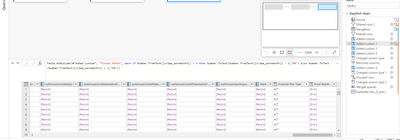
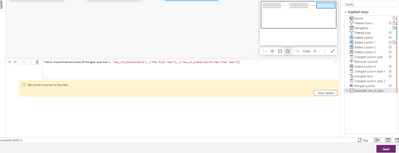
Any idea how to fix the error? I had this custom column for calculating FY working for some time, and now it stopped working. It gives out the error that "We couldn't convert to Number" in the final step. Any help would be appreciated.

Rushi555_0-1646757271705.png


Rushi555_1-1646757357371.png


Thank you!


1 ACCEPTED SOLUTION
edhans
Super User
Super User

There is data that cannot be converted to a number. "abc" would return that error. You have probably two options.

  1. Fix the data so there is only values that can be converted to numbers.
  2. use try/otherwise.

so try this:

if (try Number.FromText([Field]) otherwise 0) > 9 then.....

If [Field] has "100" in it, then it will evaluate to true, it is > 9. If it has "abc" it will return 0, and false. So alter based on your logic needs.


If you want to see why there are values that cannot be converted, create a copy of this query and change field to a number type, then filter on the home ribbon "KEEP ROWS, KEEP ERRORS" and it will show you the records that have the bad data.


Did I answer your question? Mark my post as a solution!
Did my answers help arrive at a solution? Give it a kudos by clicking the Thumbs Up!

DAX is for Analysis. Power Query is for Data Modeling


Proud to be a Super User!

MCSA: BI Reporting

View solution in original post

3 REPLIES 3
Jameswalter
New Member

The error maybe data related (a transformation failed, a calculation overflowed, etc), or can be data size related (server gave up returning data, out of memory, driver failed, quota reach, etc)


Regards,
J Wick

Anonymous
Not applicable

It worked! looks like there was bad data coming in.


Thank you!

edhans
Super User
Super User

There is data that cannot be converted to a number. "abc" would return that error. You have probably two options.

  1. Fix the data so there is only values that can be converted to numbers.
  2. use try/otherwise.

so try this:

if (try Number.FromText([Field]) otherwise 0) > 9 then.....

If [Field] has "100" in it, then it will evaluate to true, it is > 9. If it has "abc" it will return 0, and false. So alter based on your logic needs.


If you want to see why there are values that cannot be converted, create a copy of this query and change field to a number type, then filter on the home ribbon "KEEP ROWS, KEEP ERRORS" and it will show you the records that have the bad data.


Did I answer your question? Mark my post as a solution!
Did my answers help arrive at a solution? Give it a kudos by clicking the Thumbs Up!

DAX is for Analysis. Power Query is for Data Modeling


Proud to be a Super User!

MCSA: BI Reporting

Helpful resources

Announcements
Power BI DataViz World Championships

Power BI Dataviz World Championships

The Power BI Data Visualization World Championships is back! Get ahead of the game and start preparing now!

December 2025 Power BI Update Carousel

Power BI Monthly Update - December 2025

Check out the December 2025 Power BI Holiday Recap!

FabCon Atlanta 2026 carousel

FabCon Atlanta 2026

Join us at FabCon Atlanta, March 16-20, for the ultimate Fabric, Power BI, AI and SQL community-led event. Save $200 with code FABCOMM.