cancel
Showing results for 
Search instead for 
Did you mean: 

The Power BI Data Visualization World Championships is back! Get ahead of the game and start preparing now! Learn more

Reply
Anonymous
Not applicable

Problem with Unix timestamp to Date

Hello,


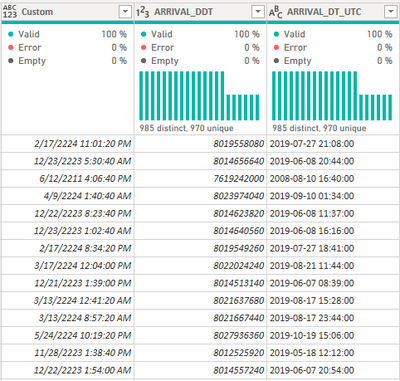
I have what looks like a datetimestamp that I am getting from a Oracle 11.2 database that I need to convert to standard date/time. When I looked this up, I found some of the below solutions, which unfortunately are not working for me:


Custom =

#datetime(1970,1,1,0,0,0) + #duration(0,0,0,[ARRIVAL_DDT])


I get the below


nghtwlker17_0-1632839353760.png

For this particular value, I have a UTC column that has the date/time stamp formatted correctly for comparison. Unfortunately, some of the columns I need to convert do not have this value, so I'm trying to figure out what I'm doing incorrectly on this conversion.


Appreciate any tips or advice on this one, please let me know if I can help with any additional details.


Regards,

Seth


1 ACCEPTED SOLUTION
Anonymous
Not applicable

I did some additional tinkering, and found that the first 5 digits represent a date # that when converted to date and then minus 36522 days, provides the correct date. The second 5 numbers represented a number of seconds. I had to split them, and do multiple levels of custom columns to manipulate them to a correct date/time combined value.


I'll chalk this up to creative coders for Allscripts Horizon software that is nearly 15 years old. I don't have any other explanation.

View solution in original post

5 REPLIES 5
ronrsnfld
Super User
Super User

Those numbers do not appear to be Unix epoch timestamps representing the dates you think they are.  The unix time for 27-Jul-2019 21:08 is 1564261680.  Not sure how that relates to 8019558080.

Anonymous
Not applicable

I did some additional tinkering, and found that the first 5 digits represent a date # that when converted to date and then minus 36522 days, provides the correct date. The second 5 numbers represented a number of seconds. I had to split them, and do multiple levels of custom columns to manipulate them to a correct date/time combined value.


I'll chalk this up to creative coders for Allscripts Horizon software that is nearly 15 years old. I don't have any other explanation.

Glad you found a solution.


When I apply your algorithm, however, I wind up with a dateTime that is off by 5 hours (which, coincidentally, is the time zone difference between my locale Standard time (EST) and UTC.


I don't know if it is any more efficient, but you could combine the steps into a single column formula.

Anonymous
Not applicable

That would probably be more efficient and a lot more elegant. The setup I currently have has roughly six steps for each column in order to end with a date/time column, and the users may ask to apply it to other timestamps in that table.


I'll look into making this a single calculation using VAR / RETURN, thank you for the suggestion!

Here is a formula for a Custom Column that applies your algorithm:


let 
          str = Number.ToText([Column1],"0000000000"),
          dtPart = Text.Start(str,5),
          sec = Number.From(Text.End(str,5))
        in 
          DateTime.From(Number.From(dtPart) - 36522 + sec/86400)

Helpful resources

Announcements
Power BI DataViz World Championships

Power BI Dataviz World Championships

The Power BI Data Visualization World Championships is back! Get ahead of the game and start preparing now!

December 2025 Power BI Update Carousel

Power BI Monthly Update - December 2025

Check out the December 2025 Power BI Holiday Recap!

FabCon Atlanta 2026 carousel

FabCon Atlanta 2026

Join us at FabCon Atlanta, March 16-20, for the ultimate Fabric, Power BI, AI and SQL community-led event. Save $200 with code FABCOMM.

Top Solution Authors