Don't miss your chance to take the Fabric Data Engineer (DP-600) exam for FREE! Find out how by attending the DP-600 session on April 23rd (pacific time), live or on-demand.
Learn moreNext up in the FabCon + SQLCon recap series: The roadmap for Microsoft SQL and Maximizing Developer experiences in Fabric. All sessions are available on-demand after the live show. Register now
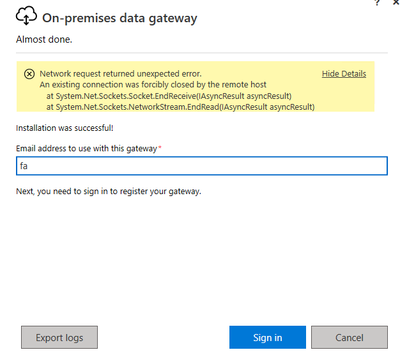
I am just installing the application and when I try to log in with my account I am getting an error that we do not know how to solve. The server where I am installing it does not require a proxy and has direct access to the internet.
Hi @FabianD ,
I'd suggest you go to https://powerbi.microsoft.com/en-us/support/,scroll down and click "CREATE SUPPORT TICKET" for further help if you are a pro user.
Best Regards,
Eyelyn Qin
Hello there
I have enabled ports 5671,5672,9350, 9354, 443 and the error continues.
I want to share the log generated by the application to see if it is easier to identify the error.
the link is as follows:
Hi @FabianD ,
I think it is blocked by firewall or the ports is not supported. The gateway communicates on the following outbound ports: TCP 443, 5671, 5672, and from 9350 through 9354.
To test if the gateway has access to all required ports, please refer to:Adjust communication settings for the on-premises data gateway | Microsoft Docs
Best Regards,
Eyelyn Qin
If this post helps, then please consider Accept it as the solution to help the other members find it more quickly.
Hi @FabianD ,
Have you tried to check the topics here in the community with the same issue as yours?
On-premises data gateway Sign-In issue
Hope this helps
If you have recently started exploring Fabric, we'd love to hear how it's going. Your feedback can help with product improvements.
A new Power BI DataViz World Championship is coming this June! Don't miss out on submitting your entry.
Experience the highlights from FabCon & SQLCon, available live and on-demand starting April 14th.
| User | Count |
|---|---|
| 5 | |
| 3 | |
| 3 | |
| 3 | |
| 2 |
| User | Count |
|---|---|
| 7 | |
| 5 | |
| 5 | |
| 5 | |
| 4 |