This time we’re going bigger than ever. Fabric, Power BI, SQL, AI and more. We're covering it all. You won't want to miss it.
Learn moreLevel up your Power BI skills this month - build one visual each week and tell better stories with data! Get started
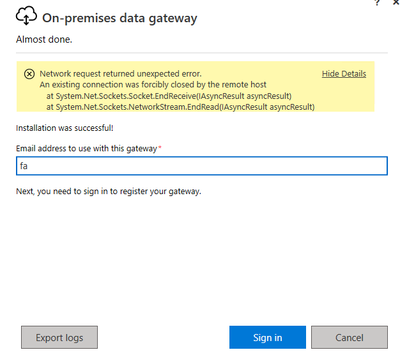
I am just installing the application and when I try to log in with my account I am getting an error that we do not know how to solve. The server where I am installing it does not require a proxy and has direct access to the internet.
Hi @FabianD ,
I'd suggest you go to https://powerbi.microsoft.com/en-us/support/,scroll down and click "CREATE SUPPORT TICKET" for further help if you are a pro user.
Best Regards,
Eyelyn Qin
Hello there
I have enabled ports 5671,5672,9350, 9354, 443 and the error continues.
I want to share the log generated by the application to see if it is easier to identify the error.
the link is as follows:
Hi @FabianD ,
I think it is blocked by firewall or the ports is not supported. The gateway communicates on the following outbound ports: TCP 443, 5671, 5672, and from 9350 through 9354.
To test if the gateway has access to all required ports, please refer to:Adjust communication settings for the on-premises data gateway | Microsoft Docs
Best Regards,
Eyelyn Qin
If this post helps, then please consider Accept it as the solution to help the other members find it more quickly.
Hi @FabianD ,
Have you tried to check the topics here in the community with the same issue as yours?
On-premises data gateway Sign-In issue
Hope this helps
Check out the April 2026 Power BI update to learn about new features.
Sign up to receive a private message when registration opens and key events begin.
If you have recently started exploring Fabric, we'd love to hear how it's going. Your feedback can help with product improvements.