cancel
Showing results for 
Search instead for 
Did you mean: 

The Power BI Data Visualization World Championships is back! Get ahead of the game and start preparing now! Learn more

Reply
SohaibCheema
New Member

Problem at integrations while using multiple office 365 accounts

I have come across a scenario while doing some integrations and testing. Following goes my scenario.

I have got two office365 accounts

  1. Office365 account for Dynamics AX7 (Consider it #1 throughout discussion)

          This account has access of Dynamics AX 7 only.

    2.  Office 365 Enterprise E3 account (Consider it #2 throughout discussion)

         This account has access of Skype for business, Office 365 email, Yammer etc.


Now, if I go for integrations e.g. integration of Dynamics AX7 with Power BI, I get not data on Power BI. It’s because of following reason.


#1 is eligible to sign in and use AX7 only. #1 cannot receive and send emails.

#2 can receive and send emails. But #2 cannot be an AX7 tenant as this account is not eligible to use AX7.


I cannot sign up on PowerBI with #1, because it is only for AX7, it cannot receive email. SO at time when I will sign up on PowerBI, it will ask me to go and check my inbox, to activate PowerBi account. But no way, I cannot check email using#1, as it is only for AX7, and not for email.


Summarizing it; using two office365 accounts has made it very hard and ultimately I get no data on Power BI dashboard.

Looking ahead for some suggestions.


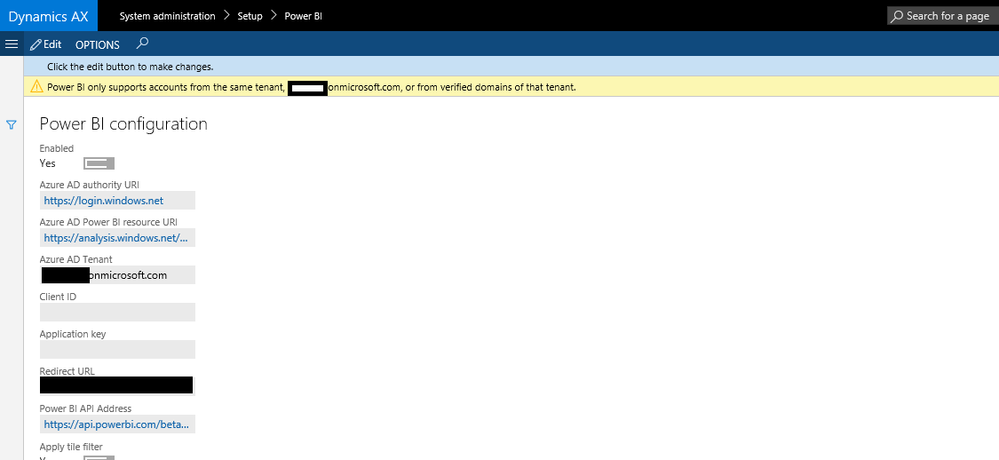
(You may have  a look at next screenshot which is from AX7)


POCPBI2.png

1 REPLY 1
Anonymous
Not applicable

Hi @SohaibCheema,

To integrate Dynamics AX and Power BI, there are some prerequisites as follows. Reference: https://ax.help.dynamics.com/en/wiki/configuring-powerbi-integration/ .

  • At least one AAD account in your tenant must be registered with PowerBI.com.
  • You must have AAD administrator privileges.
  • You must be assigned to the System Administrator role in Dynamics AX.
  • You must be using the same tenant for both your deployment and the user logon. For example, if the environment was deployed under the contosoax7.onmicrosoft.com tenant, the user logon for both Dynamics AX and Power BI should be in the format myname@contosoax7.onmicrosoft.com.

However, from your description, the accounts used for Dynamics AX and Power BI are not in the same tenant, this is not supported. In your scenario, you would need to solve the Office 365 tenant issue, I would recommend post the question about Office 365 tenant in the Office forum to get dedicated support.


Thanks,
Lydia Zhang

Helpful resources

Announcements
Power BI DataViz World Championships

Power BI Dataviz World Championships

The Power BI Data Visualization World Championships is back! Get ahead of the game and start preparing now!

December 2025 Power BI Update Carousel

Power BI Monthly Update - December 2025

Check out the December 2025 Power BI Holiday Recap!

FabCon Atlanta 2026 carousel

FabCon Atlanta 2026

Join us at FabCon Atlanta, March 16-20, for the ultimate Fabric, Power BI, AI and SQL community-led event. Save $200 with code FABCOMM.