cancel
Showing results for 
Search instead for 
Did you mean: 

The Power BI Data Visualization World Championships is back! Get ahead of the game and start preparing now! Learn more

Reply
Anonymous
Not applicable

PowerQuery, use value from Row Below

Hi


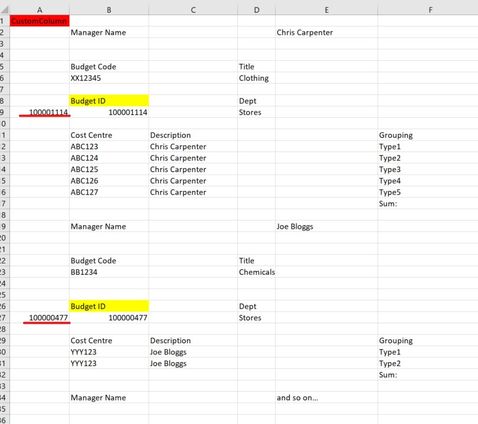
I trying extract a Budegt ID value from my table.  In my example I want to get the 'Budget ID' number, which happens to be on the row just below this title(txt in yellow).  I can create a custom column to identify when the value 'Budget ID' is present but I dont now how to get the next row down below this. The Budget ID appears at diffent points, it doe snot always folow its 10 rows down etc.  Once I get the actaul value moved across I can use fill down, for example, to populate the table or rows that are related to that 'Budget ID' - 


Examples:

Start:

Start of DataStart of Data

The actual Budget ID value various in length, which is a shame a I cant even create custom formula based on value_length.

What I would like to do:(Identified the 'Budget ID' is present then populate the custom field with that value; 'Budget ID' +1 row down)

Want to identify the actual Budget IDWant to identify the actual Budget ID

I want to do this in PowerQuery rather then DAX.


Any help appriciated

Chris

rawData:


Manager Name  Chris Carpenter     
         
         
Budget Code Title      
XX12345 Clothing      
         
Budget ID Dept    StartEnd
100001114 Stores    01/01/202231/01/2022
         
Cost CentreDescription  GroupingBudgetSpendOtherBal
ABC123Chris Carpenter  Type120101010
ABC124Chris Carpenter  Type220101010
ABC125Chris Carpenter  Type320101010
ABC126Chris Carpenter  Type420101010
ABC127Chris Carpenter  Type520101010
    Sum:100505050
         
Manager Name  Joe Bloggs     
         
         
Budget Code Title      
BB1234 Chemicals      
         
         
Budget ID Dept    StartEnd
100000477 Stores    01/02/202228/02/2022
         
Cost CentreDescription  GroupingBudgetSpendOtherBal
YYY123Joe Bloggs  Type120101010
YYY123Joe Bloggs  Type220101010
    Sum:40202020
         
Manager Name  and so on…     


1 ACCEPTED SOLUTION
artpil
Resolver II
Resolver II

Hi

Maybe something like this

let
    Source = Table.FromRows(Json.Document(Binary.Decompress(Binary.FromText("zVTBaoQwEP0V8bzQJMZaemvcUlpoe+geVmQPYQ0aUCMxHvr3jbpxhca4LC2tmAmTmXk8M/NMU/+V1jRn0nujFfM3vndacSF568VUNqxWTM4i53XYpJbT67NIl+VMebHIDJMdVyVz1uz3EAU4NKxLoQpe5z9H5nl7Ot2yRlmSPxSV/fljnQ1lEOgHQoinuJCstRQCeKNfBBDSTnB2LmcYi1Zflm6PZAO/9ih5o7ioZ5lPUnTNeCHjB/WUdEszvb+rYmgsoeWA90BifZfO3u8+Gwb1joA2cG4mALwKgNwA4SpA4Aa4XQXAboBoFSBcBPg2H111P0T7nHBuLm/0gkRfBPNIKfLcNl7/Q52E9Or0zS+FVfxISzvdX6R8lYYBjqIp7tAwMhpGd5PzdxpOkmTUsHU43PJdr11W7sLYY2AqjDkcvgA=", BinaryEncoding.Base64), Compression.Deflate)), let _t = ((type nullable text) meta [Serialized.Text = true]) in type table [Column1 = _t, Column2 = _t, Column3 = _t, Column4 = _t, Column5 = _t, Column6 = _t, Column7 = _t, Column8 = _t, Column9 = _t]),
    IndexStep = Table.Buffer(Table.AddIndexColumn(Source, "Index", 0, 1, Int64.Type)),
    #"Added Custom" = Table.AddColumn(IndexStep, "BudgetID", each try if [Column1]="Budget ID" then IndexStep[Column1]{[Index] +1} else null otherwise null),
    #"Filled Down" = Table.FillDown(#"Added Custom",{"BudgetID"})
in
    #"Filled Down"

THis code gets the valu from the next row: IndexStep[Column1]{[Index] +1}

Hope this will help 

Artur

View solution in original post

2 REPLIES 2
artpil
Resolver II
Resolver II

Hi

Maybe something like this

let
    Source = Table.FromRows(Json.Document(Binary.Decompress(Binary.FromText("zVTBaoQwEP0V8bzQJMZaemvcUlpoe+geVmQPYQ0aUCMxHvr3jbpxhca4LC2tmAmTmXk8M/NMU/+V1jRn0nujFfM3vndacSF568VUNqxWTM4i53XYpJbT67NIl+VMebHIDJMdVyVz1uz3EAU4NKxLoQpe5z9H5nl7Ot2yRlmSPxSV/fljnQ1lEOgHQoinuJCstRQCeKNfBBDSTnB2LmcYi1Zflm6PZAO/9ih5o7ioZ5lPUnTNeCHjB/WUdEszvb+rYmgsoeWA90BifZfO3u8+Gwb1joA2cG4mALwKgNwA4SpA4Aa4XQXAboBoFSBcBPg2H111P0T7nHBuLm/0gkRfBPNIKfLcNl7/Q52E9Or0zS+FVfxISzvdX6R8lYYBjqIp7tAwMhpGd5PzdxpOkmTUsHU43PJdr11W7sLYY2AqjDkcvgA=", BinaryEncoding.Base64), Compression.Deflate)), let _t = ((type nullable text) meta [Serialized.Text = true]) in type table [Column1 = _t, Column2 = _t, Column3 = _t, Column4 = _t, Column5 = _t, Column6 = _t, Column7 = _t, Column8 = _t, Column9 = _t]),
    IndexStep = Table.Buffer(Table.AddIndexColumn(Source, "Index", 0, 1, Int64.Type)),
    #"Added Custom" = Table.AddColumn(IndexStep, "BudgetID", each try if [Column1]="Budget ID" then IndexStep[Column1]{[Index] +1} else null otherwise null),
    #"Filled Down" = Table.FillDown(#"Added Custom",{"BudgetID"})
in
    #"Filled Down"

THis code gets the valu from the next row: IndexStep[Column1]{[Index] +1}

Hope this will help 

Artur

Anonymous
Not applicable

Artur


Thats great, just what I was looking for, I did not know how to add the code/paramter to get the next row, brilliant thanks.  

Helpful resources

Announcements
Power BI DataViz World Championships

Power BI Dataviz World Championships

The Power BI Data Visualization World Championships is back! Get ahead of the game and start preparing now!

December 2025 Power BI Update Carousel

Power BI Monthly Update - December 2025

Check out the December 2025 Power BI Holiday Recap!

FabCon Atlanta 2026 carousel

FabCon Atlanta 2026

Join us at FabCon Atlanta, March 16-20, for the ultimate Fabric, Power BI, AI and SQL community-led event. Save $200 with code FABCOMM.