Get certified for free when you join Fabric Data Days 2026 and dive into Fabric, Power BI, SQL, AI, and other essential data skills.
Join nowData Days is here! Join us now for 60+ days of learning, challenges, and connection. Learn more
Hi
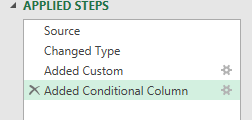
In Power Query it's easy to undo the last step I've done by clicking the "X" on the LHS of "Applied Steps":
If, however, I delete a step by accident, is there any equivalent of the "Redo" used in all standard Microsoft Deskto products?
Thanks for your help!
Solved! Go to Solution.
Hi @Anonymous,
nope, it isn't. Once deleted step is lost forever, unfortunately.
Hi @Anonymous ,
Based on my research, it is not supported yet currently. There is an idea about that you can vote it up to make this feature coming sooner.
Maybe this was obvious to everyone already, but if you exit Power Query and choose to "Update Later" AND then choose "Discard Changes" you can undo all the changes since you last hit save in Power Query. Sometimes that's better than trying to recreate something you accidentally vaporized. Might also be able to get clever with a Save As in Power BI to have a before and after picture.
Hi @Anonymous ,
Based on my research, it is not supported yet currently. There is an idea about that you can vote it up to make this feature coming sooner.
Hi @Anonymous,
nope, it isn't. Once deleted step is lost forever, unfortunately.
Don't miss out on Data Days, June 15 through August 7. Learn Fabric, Power BI, SQL, AI and more.
Check out the May 2026 Power BI update to learn about new features.
| User | Count |
|---|---|
| 4 | |
| 4 | |
| 3 | |
| 2 | |
| 1 |
| User | Count |
|---|---|
| 11 | |
| 11 | |
| 5 | |
| 4 | |
| 3 |