This is best Fabric, Power BI, SQL and AI community event. How do we know? The last event sold out! Save €200 with code FABCMTY200.
Register nowA new Data Days event is coming soon! This time we’re going bigger than ever. Fabric, Power BI, SQL, AI and more. Don't miss out.
Hi
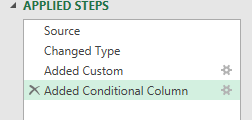
In Power Query it's easy to undo the last step I've done by clicking the "X" on the LHS of "Applied Steps":
If, however, I delete a step by accident, is there any equivalent of the "Redo" used in all standard Microsoft Deskto products?
Thanks for your help!
Solved! Go to Solution.
Hi @Anonymous,
nope, it isn't. Once deleted step is lost forever, unfortunately.
Hi @Anonymous ,
Based on my research, it is not supported yet currently. There is an idea about that you can vote it up to make this feature coming sooner.
Maybe this was obvious to everyone already, but if you exit Power Query and choose to "Update Later" AND then choose "Discard Changes" you can undo all the changes since you last hit save in Power Query. Sometimes that's better than trying to recreate something you accidentally vaporized. Might also be able to get clever with a Save As in Power BI to have a before and after picture.
Hi @Anonymous ,
Based on my research, it is not supported yet currently. There is an idea about that you can vote it up to make this feature coming sooner.
Hi @Anonymous,
nope, it isn't. Once deleted step is lost forever, unfortunately.
Check out the May 2026 Power BI update to learn about new features.
Sign up to receive a private message when registration opens and key events begin.
If you have recently started exploring Fabric, we'd love to hear how it's going. Your feedback can help with product improvements.
| User | Count |
|---|---|
| 7 | |
| 6 | |
| 6 | |
| 5 | |
| 4 |