cancel
Showing results for 
Search instead for 
Did you mean: 

July 7 - July 17 | Round 2 of the Power BI Dataviz World Championships. Don't miss your chance! Learn more

Reply
mieltn
New Member

PowerQuery reads SQLite3 table integers as Binary data

Good afternoon everyone,


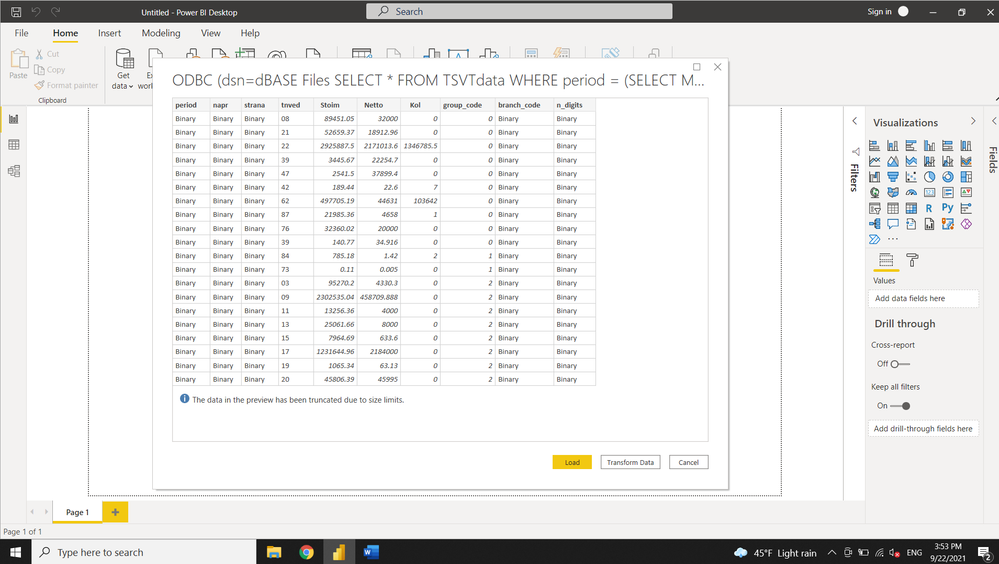
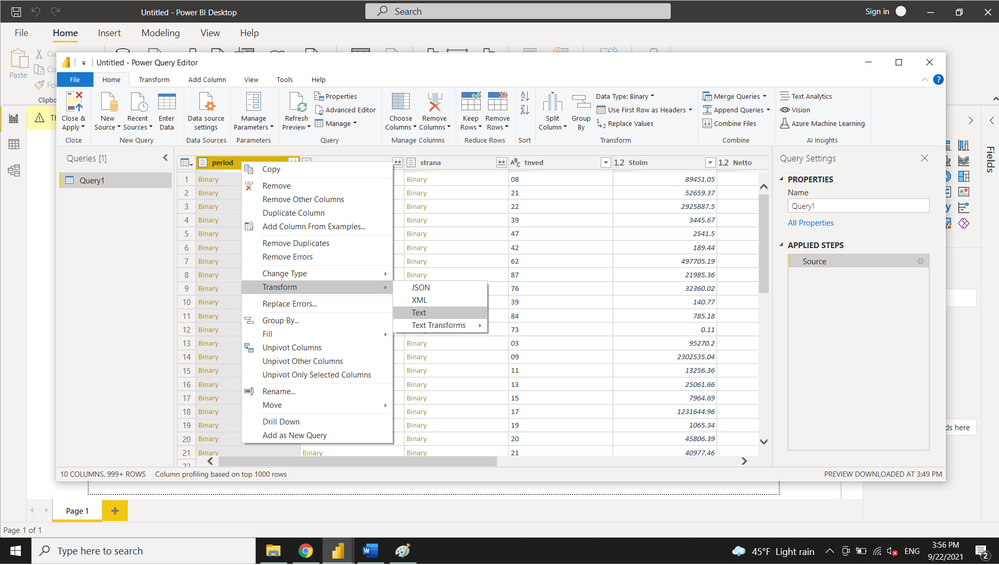
I'm trying to connect to SQLite3 database from PowerBi. When the PowerQuery opens, integer columns appears to be Binary format. I wrote table from Jupyter notebook using sqlalchemy and pandas to_sql(). Then, the file was opened in DB Browser for SQLite. Everything looked fine, so it seems to be sort of a Power BI issue. I can convert to text and then to Whole Number, but since such connections supposed to be created frequently, it's inconvinient to apply 2-steps convertion for 7 columns every time. Why PowerQuery reads integers as Binary?


Attaching some photos.


powerquery_binary.pngpowerquery_binary_convert.pngpowerquery_binary_converted.png


Any advise will be appriciated, very confused with the issue.

1 ACCEPTED SOLUTION
KNP
Super User
Super User

Hi @mieltn,


Not 100% sure of the cause, but one possible issue.

Did you explicitly set the data types in the Python script?


dtype={'period':  sqlalchemy.types.INTEGER()}


Kim

Have I solved your problem?
Please click Accept as Solution so I don't keep coming back to this post, oh yeah, others may find it useful also ;).
xOIEmaj

If you found this post helpful, please give Kudos.
It gives me a sense of instant gratification and, if you give me Kudos enough times, magical unicorns will appear on your screen.
If you find my signature vaguely amusing, please give Kudos.
image
fabric-SUbadge
Proud to be a Super User!

View solution in original post

3 REPLIES 3
rufengli
Microsoft Employee
Microsoft Employee

Hi, @mieltn ,


Power BI ODBC connector read the data absed on what driver returns.  It looks like Access dBase driver that you use returned the data as binary, you should notify Access team about the issue if you have verified the data is indeed integer in SQLite. 

KNP
Super User
Super User

Hi @mieltn,


Not 100% sure of the cause, but one possible issue.

Did you explicitly set the data types in the Python script?


dtype={'period':  sqlalchemy.types.INTEGER()}


Kim

Have I solved your problem?
Please click Accept as Solution so I don't keep coming back to this post, oh yeah, others may find it useful also ;).
xOIEmaj

If you found this post helpful, please give Kudos.
It gives me a sense of instant gratification and, if you give me Kudos enough times, magical unicorns will appear on your screen.
If you find my signature vaguely amusing, please give Kudos.
image
fabric-SUbadge
Proud to be a Super User!

Thank you very much! Explicitly initializing dtypes before writing to SQLite3 was the issue.

Helpful resources

Announcements
FabCon and SQLCon Barcelona 2026

FabCon & SQLCon – Barcelona 2026

Join us in Barcelona for FabCon and SQLCon, the Fabric, Power BI, SQL, and AI community event. Save €200 with code FABCMTY200.

60 days of Data Days Carousel

Data Days 2026

Join Fabric Data Days 2026: 60 days of free live/on-demand sessions, challenges, study groups, and certification opportunities.

Power BI DataViz World Championships carousel

Power BI DataViz World Championships - June 2026

A new Power BI DataViz World Championship is coming this June! Don't miss out on submitting your entry.