Join us at FabCon Atlanta from March 16 - 20, 2026, for the ultimate Fabric, Power BI, AI and SQL community-led event. Save $200 with code FABCOMM.
Register now!The Power BI Data Visualization World Championships is back! It's time to submit your entry. Live now!
Hi,
I need help with PowerQuery - thanks in advance.
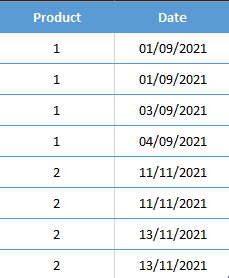
I have a table below:
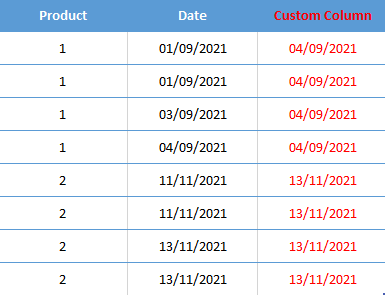
I need to create a Custom Column in PowerQuery showing Max Date per Product.
Result in same table:
Thanks.
Solved! Go to Solution.
@Anonymous thanks.
Hi @mb0307
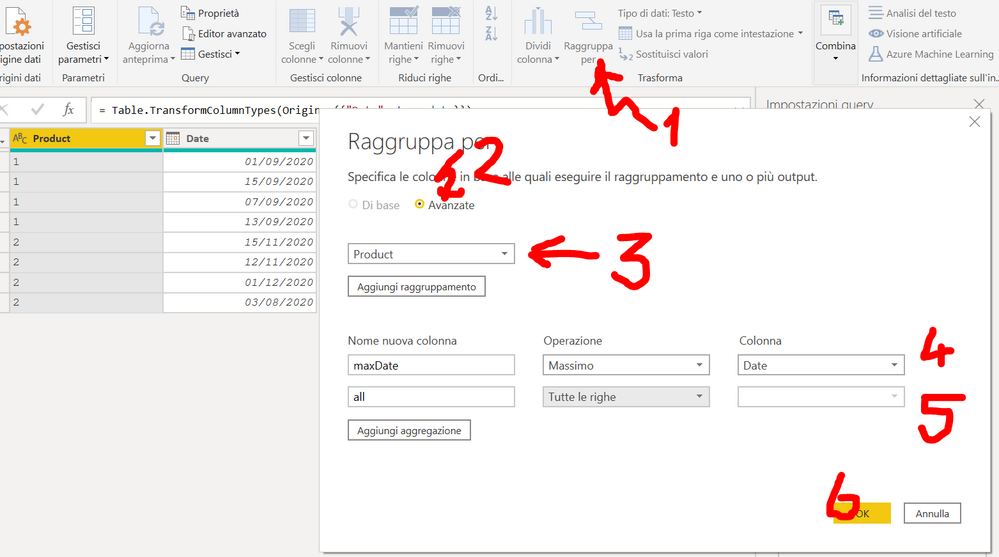
Have a try
let
Source = Table.FromRows(
Json.Document(
Binary.Decompress(
Binary.FromText(
"i45WMlTSUTIw1Dew1DcyMDJUitWBChlhChljCpmgCBkBhQwN9YEIVcgIU8gYU8gEIRQLAA==",
BinaryEncoding.Base64
),
Compression.Deflate
)
),
let
_t = ((type nullable text) meta [Serialized.Text = true])
in
type table [Product = _t, Date = _t]
),
#"Changed Type" = Table.TransformColumnTypes(
Source,
{{"Product", Int64.Type}, {"Date", type date}}
),
#"Grouped Rows" = Table.Group(
#"Changed Type",
{"Product"},
{{"Max", each List.Max([Date]), type nullable date}}
),
#"Merged Queries" = Table.NestedJoin(
#"Changed Type",
{"Product"},
#"Grouped Rows",
{"Product"},
"Grouped Rows",
JoinKind.LeftOuter
),
#"Expanded Grouped Rows" = Table.ExpandTableColumn(
#"Merged Queries",
"Grouped Rows",
{"Max"},
{"Max"}
)
in
#"Expanded Grouped Rows"
Thanks for your response but I am struggling to execute the query due to my limited knowledge. Sorry about that.
I have updated the original post - basically I want result in same table. Is it possible to do in Custom Column window?
Thanks.
The Power BI Data Visualization World Championships is back! It's time to submit your entry.
Check out the January 2026 Power BI update to learn about new features.
| User | Count |
|---|---|
| 16 | |
| 14 | |
| 9 | |
| 8 | |
| 7 |