cancel
Showing results for 
Search instead for 
Did you mean: 

Learn from the best! Meet the four finalists headed to the FINALS of the Power BI Dataviz World Championships! Register now

Reply
mb0307
Responsive Resident
Responsive Resident

PowerQuery - max date by product

Hi,


I need help with PowerQuery - thanks in advance.


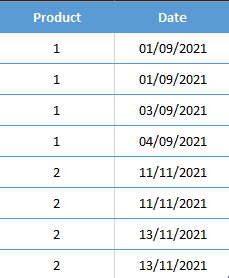
I have a table below:

mb0307_0-1614122238937.png


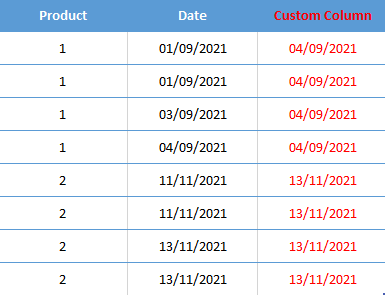
I need to create a Custom Column in PowerQuery showing Max Date per Product.  


Result in same table:

mb0307_0-1614163966524.png


Thanks.


1 ACCEPTED SOLUTION
Anonymous
Not applicable

4 REPLIES 4
mb0307
Responsive Resident
Responsive Resident

@Anonymous  thanks.  

Anonymous
Not applicable


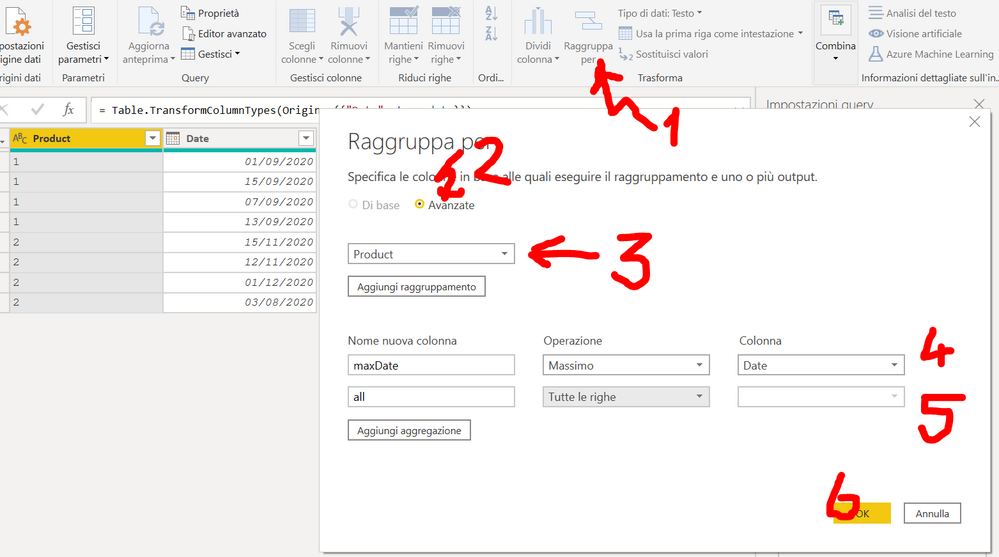
image.png


image.png

Anonymous
Not applicable

Hi @mb0307 


Have a try

let
  Source = Table.FromRows(
    Json.Document(
      Binary.Decompress(
        Binary.FromText(
          "i45WMlTSUTIw1Dew1DcyMDJUitWBChlhChljCpmgCBkBhQwN9YEIVcgIU8gYU8gEIRQLAA==",
          BinaryEncoding.Base64
        ),
        Compression.Deflate
      )
    ),
    let
      _t = ((type nullable text) meta [Serialized.Text = true])
    in
      type table [Product = _t, Date = _t]
  ),
  #"Changed Type" = Table.TransformColumnTypes(
    Source,
    {{"Product", Int64.Type}, {"Date", type date}}
  ),
  #"Grouped Rows" = Table.Group(
    #"Changed Type",
    {"Product"},
    {{"Max", each List.Max([Date]), type nullable date}}
  ),
  #"Merged Queries" = Table.NestedJoin(
    #"Changed Type",
    {"Product"},
    #"Grouped Rows",
    {"Product"},
    "Grouped Rows",
    JoinKind.LeftOuter
  ),
  #"Expanded Grouped Rows" = Table.ExpandTableColumn(
    #"Merged Queries",
    "Grouped Rows",
    {"Max"},
    {"Max"}
  )
in
  #"Expanded Grouped Rows"
mb0307
Responsive Resident
Responsive Resident

@Anonymous 

Thanks for your response but I am struggling to execute the query due to my limited knowledge.  Sorry about that.


I have updated the original post - basically I want result in same table.  Is it possible to do in Custom Column window?


Thanks.

Helpful resources

Announcements
Join our Fabric User Panel

Join our Fabric User Panel

Share feedback directly with Fabric product managers, participate in targeted research studies and influence the Fabric roadmap.

March Power BI Update Carousel

Power BI Community Update - March 2026

Check out the March 2026 Power BI update to learn about new features.