cancel
Showing results for 
Search instead for 
Did you mean: 

A new Data Days event is coming soon! This time we’re going bigger than ever. Fabric, Power BI, SQL, AI and more. Don't miss out.

Reply
Kds1113
Helper I
Helper I

PowerQuery deactivating

I'm having a bizarre issue with my PQ and I haven't been able to find any solutions to this issue posted anywhere.  I was working on an .xlsm file on Friday and everything was working fine.  I come in yesterday, open the same file, now all of the optios on the data tab are greyed out. 
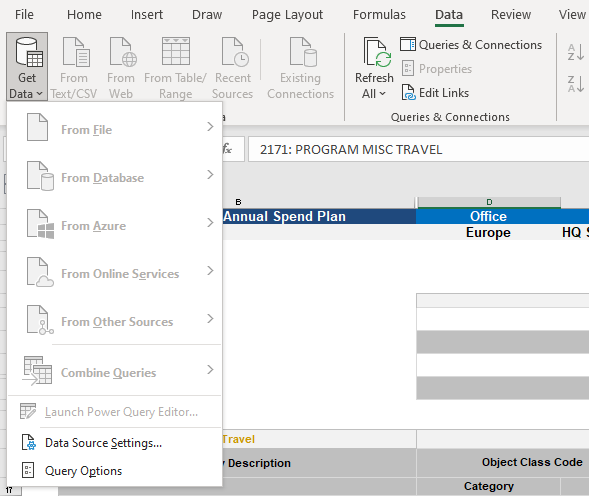
PowerQuery.PNG


The files were on a shared drive, so for kicks and giggles I decided to move them to my local drive.  Great!  All the PQ options were showing again.  Today I go open one of the other files and, again, everything is greyed out.  I've checked everything I can think of... restarted my computer, changed the file to .xlsx, made sure the pages weren't protected.  And it's not happening on all the spreadshseets.... just some.  I have a feeling that the macros in the spreadsheet are causing an issue but i don't know how to resolve it.  I didn't create the workbook.


Any thoughts?

1 ACCEPTED SOLUTION

Hi Gao - I was using tables within the workbook as the source and am using Excel as part of Microsoft 365 Apps for enterprise.  But - i figured out what the issue was.... some of the workbooks had the workbook structure protected and some didn't.  Once I entered the passwod, which luckily was given to me prior to the creator's departure, the PQ options reappeard.

View solution in original post

2 REPLIES 2
Anonymous
Not applicable

Hi @Kds1113 ,


It's hard to say. Could you reveal more details about this issue? What is the version of excel you are using? What is the data source?


Best Regards,
Gao

Community Support Team


If there is any post helps, then please consider Accept it as the solution  to help the other members find it more quickly. If I misunderstand your needs or you still have problems on it, please feel free to let us know. Thanks a lot!

How to get your questions answered quickly -- How to provide sample data

Hi Gao - I was using tables within the workbook as the source and am using Excel as part of Microsoft 365 Apps for enterprise.  But - i figured out what the issue was.... some of the workbooks had the workbook structure protected and some didn't.  Once I entered the passwod, which luckily was given to me prior to the creator's departure, the PQ options reappeard.

Helpful resources

Announcements
May Power BI Update Carousel

Power BI Monthly Update - May 2026

Check out the May 2026 Power BI update to learn about new features.

Fabric SQL PBI Data Days

Data Days 2026 coming soon!

Sign up to receive a private message when registration opens and key events begin.

New to Fabric survey Carousel

New to Fabric Survey

If you have recently started exploring Fabric, we'd love to hear how it's going. Your feedback can help with product improvements.

Power BI DataViz World Championships carousel

Power BI DataViz World Championships - June 2026

A new Power BI DataViz World Championship is coming this June! Don't miss out on submitting your entry.

Top Solution Authors