cancel
Showing results for 
Search instead for 
Did you mean: 

The Power BI Data Visualization World Championships is back! Get ahead of the game and start preparing now! Learn more

Reply
Kds1113
Helper I
Helper I

PowerQuery deactivating

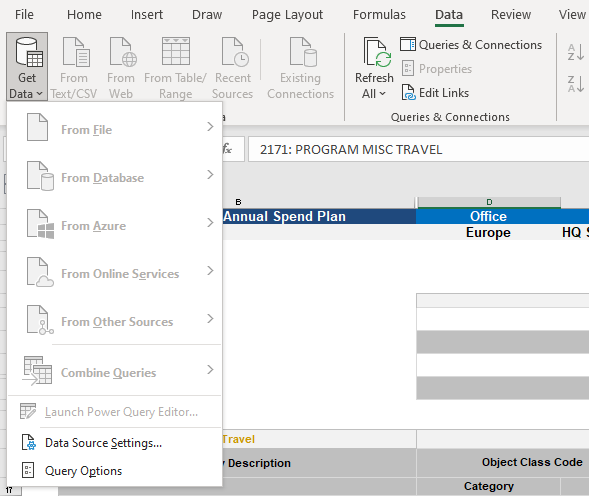
I'm having a bizarre issue with my PQ and I haven't been able to find any solutions to this issue posted anywhere.  I was working on an .xlsm file on Friday and everything was working fine.  I come in yesterday, open the same file, now all of the optios on the data tab are greyed out. 

PowerQuery.PNG


The files were on a shared drive, so for kicks and giggles I decided to move them to my local drive.  Great!  All the PQ options were showing again.  Today I go open one of the other files and, again, everything is greyed out.  I've checked everything I can think of... restarted my computer, changed the file to .xlsx, made sure the pages weren't protected.  And it's not happening on all the spreadshseets.... just some.  I have a feeling that the macros in the spreadsheet are causing an issue but i don't know how to resolve it.  I didn't create the workbook.


Any thoughts?

1 ACCEPTED SOLUTION

Hi Gao - I was using tables within the workbook as the source and am using Excel as part of Microsoft 365 Apps for enterprise.  But - i figured out what the issue was.... some of the workbooks had the workbook structure protected and some didn't.  Once I entered the passwod, which luckily was given to me prior to the creator's departure, the PQ options reappeard.

View solution in original post

2 REPLIES 2
Anonymous
Not applicable

Hi @Kds1113 ,


It's hard to say. Could you reveal more details about this issue? What is the version of excel you are using? What is the data source?


Best Regards,
Gao

Community Support Team


If there is any post helps, then please consider Accept it as the solution  to help the other members find it more quickly. If I misunderstand your needs or you still have problems on it, please feel free to let us know. Thanks a lot!

How to get your questions answered quickly -- How to provide sample data

Hi Gao - I was using tables within the workbook as the source and am using Excel as part of Microsoft 365 Apps for enterprise.  But - i figured out what the issue was.... some of the workbooks had the workbook structure protected and some didn't.  Once I entered the passwod, which luckily was given to me prior to the creator's departure, the PQ options reappeard.

Helpful resources

Announcements
Power BI DataViz World Championships

Power BI Dataviz World Championships

The Power BI Data Visualization World Championships is back! Get ahead of the game and start preparing now!

December 2025 Power BI Update Carousel

Power BI Monthly Update - December 2025

Check out the December 2025 Power BI Holiday Recap!

FabCon Atlanta 2026 carousel

FabCon Atlanta 2026

Join us at FabCon Atlanta, March 16-20, for the ultimate Fabric, Power BI, AI and SQL community-led event. Save $200 with code FABCOMM.