Share feedback directly with Fabric product managers, participate in targeted research studies and influence the Fabric roadmap.
Sign up nowGet Fabric certified for FREE! Don't miss your chance! Learn more
Hi, I am connecting a sharepoint folder to Power Query where I get reports uploaded every morning.
All the reports have the first 10 rows that I do not need as it is just a broadcast data. I can delete the first 10 rows at the top but when the reports are joined below, moving from one date to another I get an error.
How can I make the reports that get uploaded every morning to automactically delete the top 10 rows?
Thank you very much
Solved! Go to Solution.
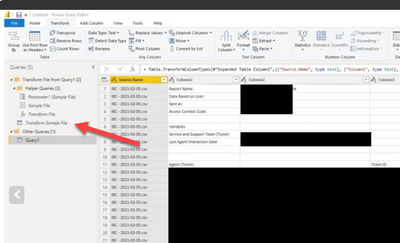
Go to the Transform Sample query step. That is for 1 file, but it is processed for every file.
Use the Remove Top Rows and select 10 in that query.
Then when the files are combined, they will all start with row 11.
DAX is for Analysis. Power Query is for Data Modeling
Proud to be a Super User!
MCSA: BI ReportingGlad to help. That Transform Sample Query is a bit hidden at first, but once you understand what gets applied to each file one at a time vs what you should do after they are all combined it gets easier.
DAX is for Analysis. Power Query is for Data Modeling
Proud to be a Super User!
MCSA: BI ReportingGo to the Transform Sample query step. That is for 1 file, but it is processed for every file.
Use the Remove Top Rows and select 10 in that query.
Then when the files are combined, they will all start with row 11.
DAX is for Analysis. Power Query is for Data Modeling
Proud to be a Super User!
MCSA: BI ReportingThank you!
If you love stickers, then you will definitely want to check out our Community Sticker Challenge!
Check out the January 2026 Power BI update to learn about new features.
| User | Count |
|---|---|
| 13 | |
| 11 | |
| 11 | |
| 7 | |
| 6 |