cancel
Showing results for 
Search instead for 
Did you mean: 

The Power BI Data Visualization World Championships is back! Get ahead of the game and start preparing now! Learn more

Reply
Anonymous
Not applicable

Power query function = need help

Dear all,

I'm a bit stuck on the power query editor.

I have a very small dataset with the product name, the process step, the process cost, and the process date.

I want to create a report per product name, per process step, and per month the cost.

I thought the PQE editor could automate the report.

I thought group by account, sum on cost. But I cant create further analysis, like totals per month. What is my mistake?

Dummy data see link.

https://www.dropbox.com/s/tdwfivd7cf0iwuv/test.xlsx?dl=0


Greetings.


2 ACCEPTED SOLUTIONS
Fowmy
Super User
Super User

@Anonymous 

Your column names in the question are different from what is in the sample file. Anyhow, follow these steps.
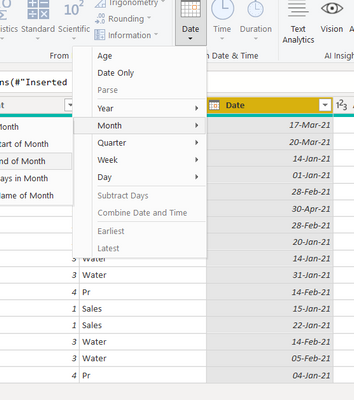
1. Click on the Date Column, Under Add Column > Date > Month > End of Month.

Fowmy_0-1623094244758.png

2. Now group as follows:

Fowmy_1-1623094328666.png


Result:

Fowmy_2-1623094359706.png


Did I answer your question? Mark my post as a solution! and hit thumbs up


Subscribe and learn Power BI from these videos

Website LinkedIn PBI User Group

View solution in original post

Hi @Anonymous ,

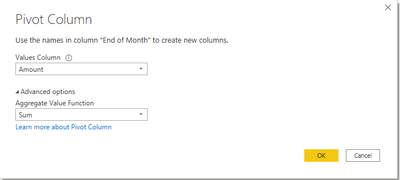
After you get the end of month column, you can use 'Pivot column' to achieve this:

pivot.png

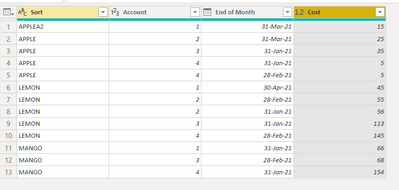
Reorder the column to show the result:

pq.png


Best Regards,
Community Support Team _ Yingjie Li
If this post helps, then please consider Accept it as the solution to help the other members find it more quickly.

View solution in original post

4 REPLIES 4
Fowmy
Super User
Super User

@Anonymous 

Your column names in the question are different from what is in the sample file. Anyhow, follow these steps.
1. Click on the Date Column, Under Add Column > Date > Month > End of Month.

Fowmy_0-1623094244758.png

2. Now group as follows:

Fowmy_1-1623094328666.png


Result:

Fowmy_2-1623094359706.png


Did I answer your question? Mark my post as a solution! and hit thumbs up


Subscribe and learn Power BI from these videos

Website LinkedIn PBI User Group

Anonymous
Not applicable

Thx, how can see the costs per month

Apple 1 - January x February x march x

Apple 2 - January x February x march x

Apple 3 ...

Hi @Anonymous ,

After you get the end of month column, you can use 'Pivot column' to achieve this:

pivot.png

Reorder the column to show the result:

pq.png


Best Regards,
Community Support Team _ Yingjie Li
If this post helps, then please consider Accept it as the solution to help the other members find it more quickly.

@Anonymous 

Like you added Date>Month>End of Month, you can add another two columns Year and Month Name from the same option then include these two columns instead of the End of The Month and Group.


Did I answer your question? Mark my post as a solution! and hit thumbs up


Subscribe and learn Power BI from these videos

Website LinkedIn PBI User Group

Helpful resources

Announcements
Power BI DataViz World Championships

Power BI Dataviz World Championships

The Power BI Data Visualization World Championships is back! Get ahead of the game and start preparing now!

December 2025 Power BI Update Carousel

Power BI Monthly Update - December 2025

Check out the December 2025 Power BI Holiday Recap!

FabCon Atlanta 2026 carousel

FabCon Atlanta 2026

Join us at FabCon Atlanta, March 16-20, for the ultimate Fabric, Power BI, AI and SQL community-led event. Save $200 with code FABCOMM.