cancel
Showing results for 
Search instead for 
Did you mean: 

Learn from the best! Meet the four finalists headed to the FINALS of the Power BI Dataviz World Championships! Register now

Reply
Anonymous
Not applicable

Power Query from web - importing table with subscript / superscript values

Greetings


Data URL: https://docs.microsoft.com/en-us/office365/servicedescriptions/office-online-service-description/off...


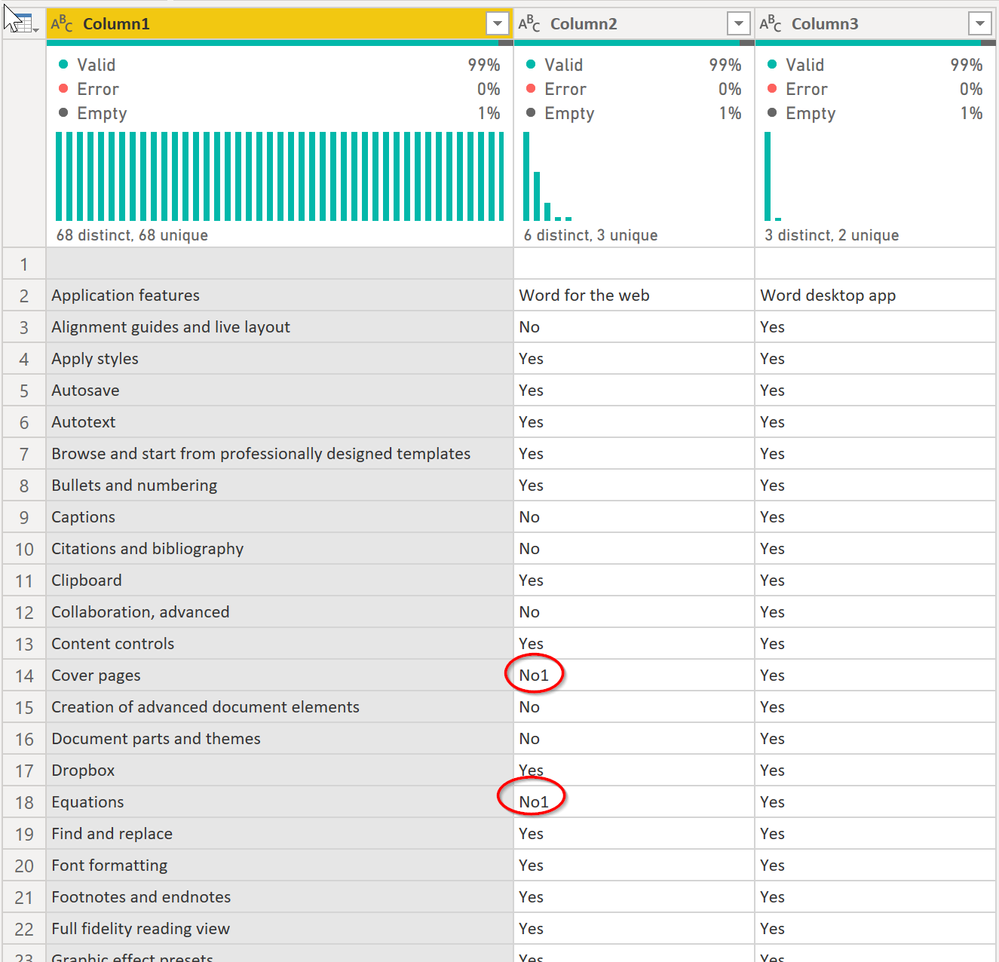
When importing this data from the web using Power Query, the superscript values are omitted from the data. See the example below, where "Yes" is the data imported successfully, and 1 is the superscript value associated with the data that is cut from the import.


Example: Yes1


This import must be automated, we cannot rely on copy/paste methods or any manual updates


Thanks in advance


-CJ


1 ACCEPTED SOLUTION
edhans
Community Champion
Community Champion

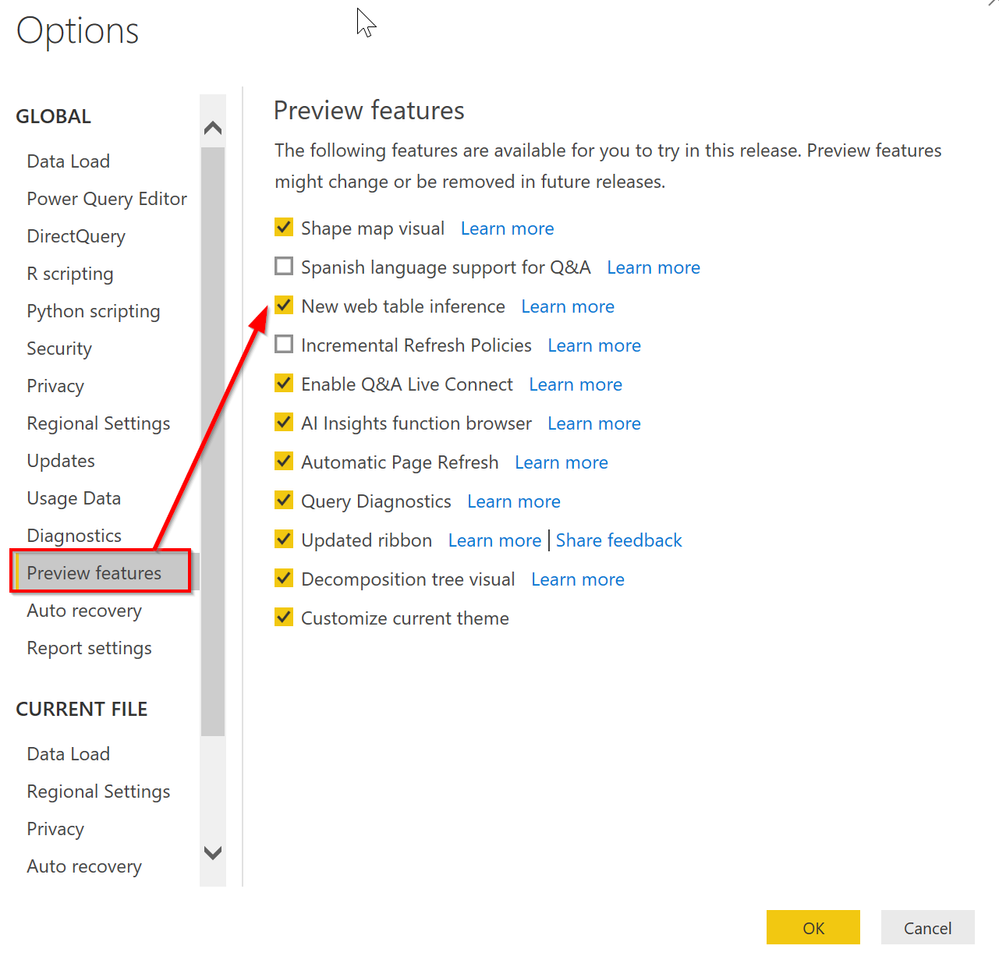
It works fine here, but you may need to enable the new Web Table connector. When I connect to Table1 in the initial connect, the following code is created by Power Query (you can paste this in the Advanced Editor view of a blank query) and it shows the superscripts just fine.


let
    Source = Web.BrowserContents("https://docs.microsoft.com/en-us/office365/servicedescriptions/office-online-service-description/office-online-service-description"),
    #"Extracted Table From Html" = Html.Table(Source, {{"Column1", "MAIN[id='main'] > DIV.table-scroll-wrapper:nth-child(11) > TABLE:nth-child(1) > TR > :nth-child(1), MAIN[id='main'] > DIV.table-scroll-wrapper:nth-child(11) > TABLE:nth-child(1) > * > TR > :nth-child(1)"}, {"Column2", "MAIN[id='main'] > DIV.table-scroll-wrapper:nth-child(11) > TABLE:nth-child(1) > TR > :nth-child(2), MAIN[id='main'] > DIV.table-scroll-wrapper:nth-child(11) > TABLE:nth-child(1) > * > TR > :nth-child(2)"}, {"Column3", "MAIN[id='main'] > DIV.table-scroll-wrapper:nth-child(11) > TABLE:nth-child(1) > TR > :nth-child(3), MAIN[id='main'] > DIV.table-scroll-wrapper:nth-child(11) > TABLE:nth-child(1) > * > TR > :nth-child(3)"}}, [RowSelector="MAIN[id='main'] > DIV.table-scroll-wrapper:nth-child(11) > TABLE:nth-child(1) > TR, MAIN[id='main'] > DIV.table-scroll-wrapper:nth-child(11) > TABLE:nth-child(1) > * > TR"]),
    #"Changed Type" = Table.TransformColumnTypes(#"Extracted Table From Html",{{"Column1", type text}, {"Column2", type text}, {"Column3", type text}})
in
    #"Changed Type"


20200121 11_34_34-Options.png


20200121 11_37_31-Untitled - Power Query Editor.png


Did I answer your question? Mark my post as a solution!
Did my answers help arrive at a solution? Give it a kudos by clicking the Thumbs Up!

DAX is for Analysis. Power Query is for Data Modeling


Proud to be a Super User!

MCSA: BI Reporting

View solution in original post

2 REPLIES 2
edhans
Community Champion
Community Champion

It works fine here, but you may need to enable the new Web Table connector. When I connect to Table1 in the initial connect, the following code is created by Power Query (you can paste this in the Advanced Editor view of a blank query) and it shows the superscripts just fine.


let
    Source = Web.BrowserContents("https://docs.microsoft.com/en-us/office365/servicedescriptions/office-online-service-description/office-online-service-description"),
    #"Extracted Table From Html" = Html.Table(Source, {{"Column1", "MAIN[id='main'] > DIV.table-scroll-wrapper:nth-child(11) > TABLE:nth-child(1) > TR > :nth-child(1), MAIN[id='main'] > DIV.table-scroll-wrapper:nth-child(11) > TABLE:nth-child(1) > * > TR > :nth-child(1)"}, {"Column2", "MAIN[id='main'] > DIV.table-scroll-wrapper:nth-child(11) > TABLE:nth-child(1) > TR > :nth-child(2), MAIN[id='main'] > DIV.table-scroll-wrapper:nth-child(11) > TABLE:nth-child(1) > * > TR > :nth-child(2)"}, {"Column3", "MAIN[id='main'] > DIV.table-scroll-wrapper:nth-child(11) > TABLE:nth-child(1) > TR > :nth-child(3), MAIN[id='main'] > DIV.table-scroll-wrapper:nth-child(11) > TABLE:nth-child(1) > * > TR > :nth-child(3)"}}, [RowSelector="MAIN[id='main'] > DIV.table-scroll-wrapper:nth-child(11) > TABLE:nth-child(1) > TR, MAIN[id='main'] > DIV.table-scroll-wrapper:nth-child(11) > TABLE:nth-child(1) > * > TR"]),
    #"Changed Type" = Table.TransformColumnTypes(#"Extracted Table From Html",{{"Column1", type text}, {"Column2", type text}, {"Column3", type text}})
in
    #"Changed Type"


20200121 11_34_34-Options.png


20200121 11_37_31-Untitled - Power Query Editor.png


Did I answer your question? Mark my post as a solution!
Did my answers help arrive at a solution? Give it a kudos by clicking the Thumbs Up!

DAX is for Analysis. Power Query is for Data Modeling


Proud to be a Super User!

MCSA: BI Reporting
Anonymous
Not applicable

This solved the issue - thank you!

Helpful resources

Announcements
Power BI DataViz World Championships carousel

Power BI DataViz World Championships - June 2026

A new Power BI DataViz World Championship is coming this June! Don't miss out on submitting your entry.

Join our Fabric User Panel

Join our Fabric User Panel

Share feedback directly with Fabric product managers, participate in targeted research studies and influence the Fabric roadmap.

March Power BI Update Carousel

Power BI Community Update - March 2026

Check out the March 2026 Power BI update to learn about new features.