Get certified for free when you join Fabric Data Days 2026 and dive into Fabric, Power BI, SQL, AI, and other essential data skills.
Join nowJuly 28 - August 9 | Final Round of the Power BI Dataviz World Championships. This is your chance. Learn more
Greetings
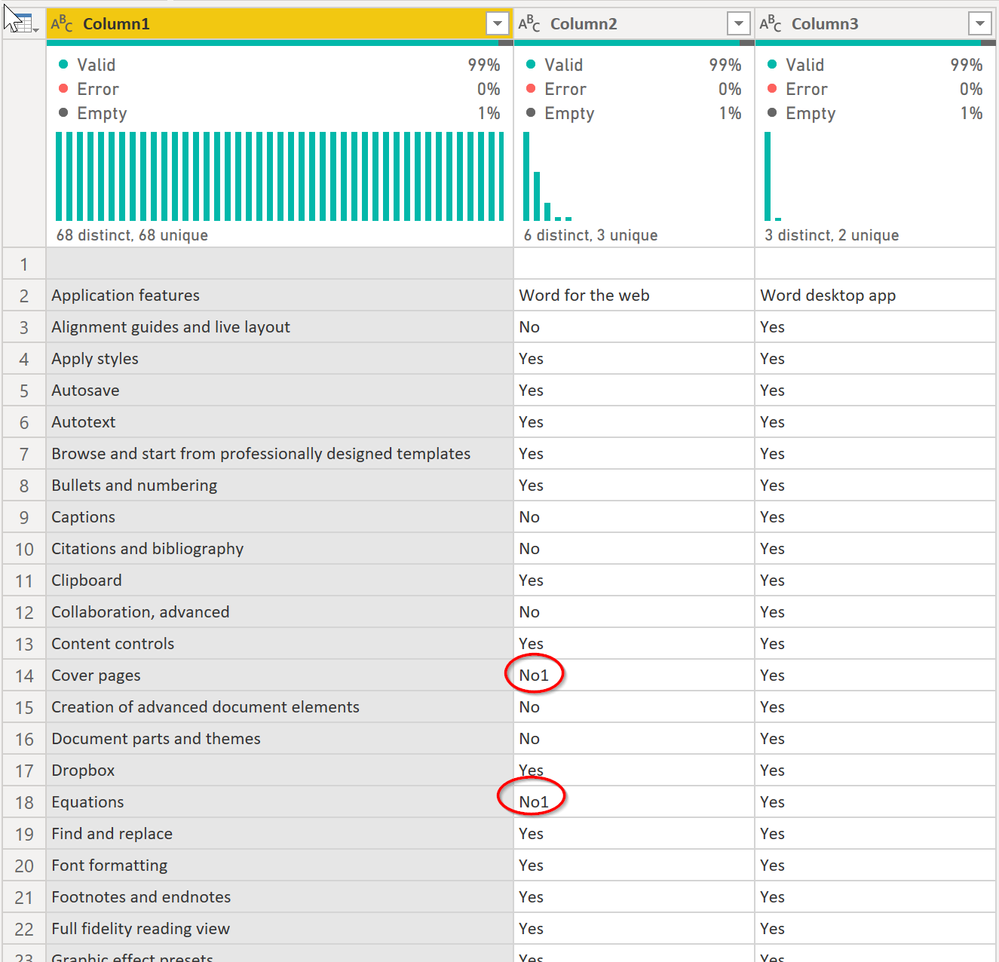
When importing this data from the web using Power Query, the superscript values are omitted from the data. See the example below, where "Yes" is the data imported successfully, and 1 is the superscript value associated with the data that is cut from the import.
Example: Yes1
This import must be automated, we cannot rely on copy/paste methods or any manual updates
Thanks in advance
-CJ
Solved! Go to Solution.
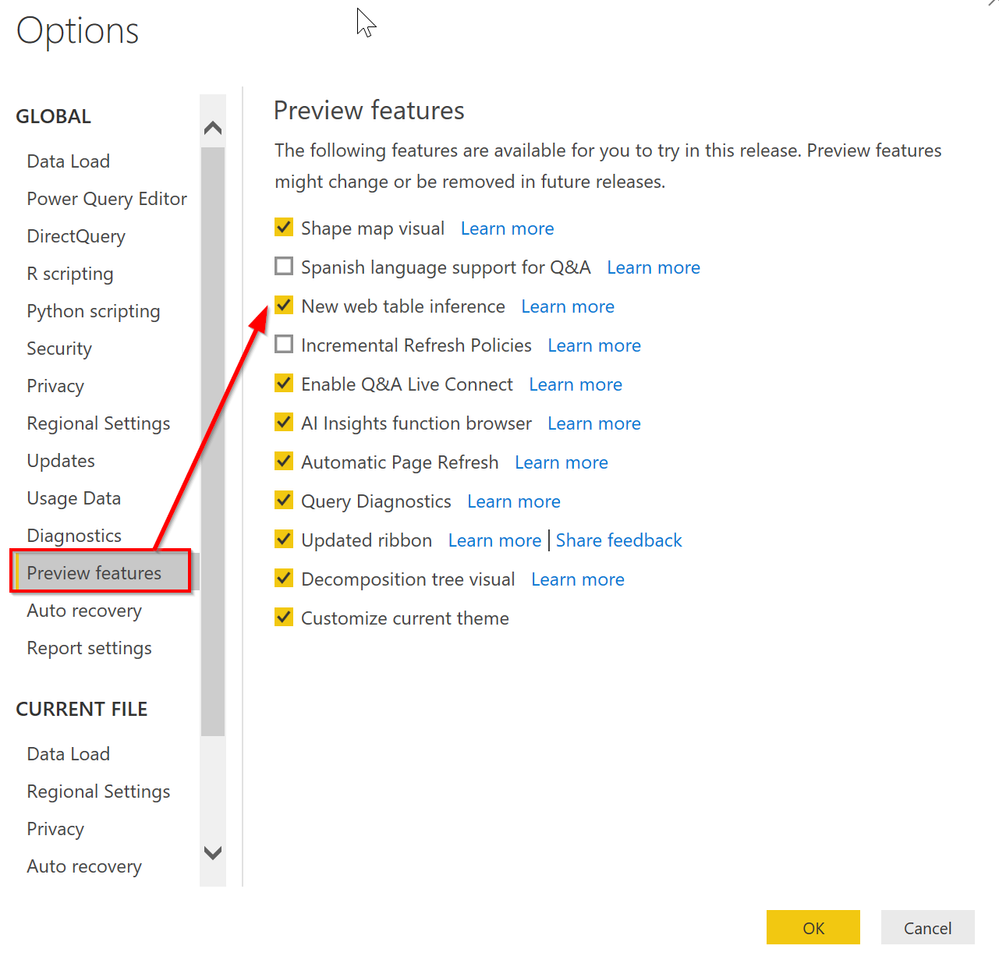
It works fine here, but you may need to enable the new Web Table connector. When I connect to Table1 in the initial connect, the following code is created by Power Query (you can paste this in the Advanced Editor view of a blank query) and it shows the superscripts just fine.
let
Source = Web.BrowserContents("https://docs.microsoft.com/en-us/office365/servicedescriptions/office-online-service-description/office-online-service-description"),
#"Extracted Table From Html" = Html.Table(Source, {{"Column1", "MAIN[id='main'] > DIV.table-scroll-wrapper:nth-child(11) > TABLE:nth-child(1) > TR > :nth-child(1), MAIN[id='main'] > DIV.table-scroll-wrapper:nth-child(11) > TABLE:nth-child(1) > * > TR > :nth-child(1)"}, {"Column2", "MAIN[id='main'] > DIV.table-scroll-wrapper:nth-child(11) > TABLE:nth-child(1) > TR > :nth-child(2), MAIN[id='main'] > DIV.table-scroll-wrapper:nth-child(11) > TABLE:nth-child(1) > * > TR > :nth-child(2)"}, {"Column3", "MAIN[id='main'] > DIV.table-scroll-wrapper:nth-child(11) > TABLE:nth-child(1) > TR > :nth-child(3), MAIN[id='main'] > DIV.table-scroll-wrapper:nth-child(11) > TABLE:nth-child(1) > * > TR > :nth-child(3)"}}, [RowSelector="MAIN[id='main'] > DIV.table-scroll-wrapper:nth-child(11) > TABLE:nth-child(1) > TR, MAIN[id='main'] > DIV.table-scroll-wrapper:nth-child(11) > TABLE:nth-child(1) > * > TR"]),
#"Changed Type" = Table.TransformColumnTypes(#"Extracted Table From Html",{{"Column1", type text}, {"Column2", type text}, {"Column3", type text}})
in
#"Changed Type"
DAX is for Analysis. Power Query is for Data Modeling
Proud to be a Super User!
MCSA: BI ReportingIt works fine here, but you may need to enable the new Web Table connector. When I connect to Table1 in the initial connect, the following code is created by Power Query (you can paste this in the Advanced Editor view of a blank query) and it shows the superscripts just fine.
let
Source = Web.BrowserContents("https://docs.microsoft.com/en-us/office365/servicedescriptions/office-online-service-description/office-online-service-description"),
#"Extracted Table From Html" = Html.Table(Source, {{"Column1", "MAIN[id='main'] > DIV.table-scroll-wrapper:nth-child(11) > TABLE:nth-child(1) > TR > :nth-child(1), MAIN[id='main'] > DIV.table-scroll-wrapper:nth-child(11) > TABLE:nth-child(1) > * > TR > :nth-child(1)"}, {"Column2", "MAIN[id='main'] > DIV.table-scroll-wrapper:nth-child(11) > TABLE:nth-child(1) > TR > :nth-child(2), MAIN[id='main'] > DIV.table-scroll-wrapper:nth-child(11) > TABLE:nth-child(1) > * > TR > :nth-child(2)"}, {"Column3", "MAIN[id='main'] > DIV.table-scroll-wrapper:nth-child(11) > TABLE:nth-child(1) > TR > :nth-child(3), MAIN[id='main'] > DIV.table-scroll-wrapper:nth-child(11) > TABLE:nth-child(1) > * > TR > :nth-child(3)"}}, [RowSelector="MAIN[id='main'] > DIV.table-scroll-wrapper:nth-child(11) > TABLE:nth-child(1) > TR, MAIN[id='main'] > DIV.table-scroll-wrapper:nth-child(11) > TABLE:nth-child(1) > * > TR"]),
#"Changed Type" = Table.TransformColumnTypes(#"Extracted Table From Html",{{"Column1", type text}, {"Column2", type text}, {"Column3", type text}})
in
#"Changed Type"
DAX is for Analysis. Power Query is for Data Modeling
Proud to be a Super User!
MCSA: BI ReportingThis solved the issue - thank you!
If you love stickers, then you will definitely want to check out our community sticker challenge, Barcelona edition!
Check out the July 2026 Power BI update to learn about new features.
| User | Count |
|---|---|
| 4 | |
| 2 | |
| 2 | |
| 2 | |
| 1 |