cancel
Showing results for 
Search instead for 
Did you mean: 

The Power BI Data Visualization World Championships is back! Get ahead of the game and start preparing now! Learn more

Reply
hillandmichael
Regular Visitor

Power Query, comparing two tables, show changes

Hi, 


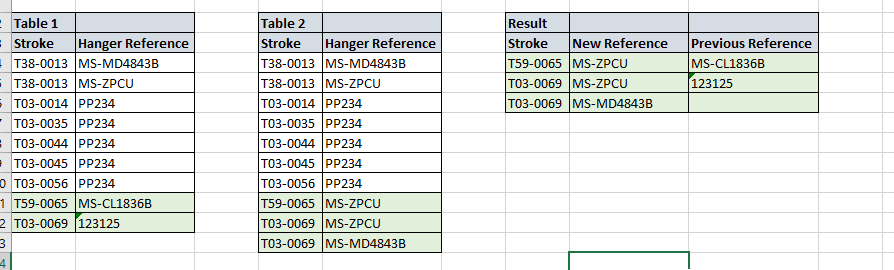
I have two tables and I want to show any changes in table two from table one. For example:


Data change step.PNG


1. The stroke can have more than one row of data 

2. Table 2, not all strokes will have made a change of hanger reference

3. Table 2, new stroke references can be seen (though these should be excluded. 


How do I get a table that matches the result table?


1 ACCEPTED SOLUTION
AlexisOlson
Super User
Super User

One approach would be to start with Table 2, merge in Table 1 matching on Stroke, expand the Table 1 reference column, and then filter the resulting table with the rule [New Reference] <> [Previous Reference]. Note: this would give 123125 twice in the final table instead of having a blank cell.

View solution in original post

5 REPLIES 5
wdx223_Daniel
Community Champion
Community Champion

=let a=Table.Buffer(Table.Group(Table1,"Stroke",{"t",each [Hanger Reference]})) in #table({"Stroke","New Reference","Previous Reference"},List.TransformMany(Table.ToRows(Table.Group(Table2,"Stroke",{"t",each [Hanger Reference]})),each let r1=a{[Stroke=_{0}]}?[t]? ??{} in if List.ContainsAll(r1,_{1}) then {} else List.Zip({List.RemoveItems(_{1},r1),List.RemoveItems(r1,_{1})}),(x,y)=>{x{0}}&y))

Thanks Daniel. will I add this as a query? 

just copy this code in your new step

Sorry i am not following. Where would I add the code? Will this be a new measure or a new column? 

AlexisOlson
Super User
Super User

One approach would be to start with Table 2, merge in Table 1 matching on Stroke, expand the Table 1 reference column, and then filter the resulting table with the rule [New Reference] <> [Previous Reference]. Note: this would give 123125 twice in the final table instead of having a blank cell.

Helpful resources

Announcements
Power BI DataViz World Championships

Power BI Dataviz World Championships

The Power BI Data Visualization World Championships is back! Get ahead of the game and start preparing now!

December 2025 Power BI Update Carousel

Power BI Monthly Update - December 2025

Check out the December 2025 Power BI Holiday Recap!

FabCon Atlanta 2026 carousel

FabCon Atlanta 2026

Join us at FabCon Atlanta, March 16-20, for the ultimate Fabric, Power BI, AI and SQL community-led event. Save $200 with code FABCOMM.

Top Solution Authors