We've captured the moments from FabCon & SQLCon that everyone is talking about, and we are bringing them to the community, live and on-demand. Starts on April 14th. Register now
Hello all,
I come to you with an issue that I encounter on Power Query.
Basically, I have a data set with a column made of all types of data : numbers, texts, dates...
I created an M command as a new row, to show the data type for each cell of that column :
--> Value.Type([Column])
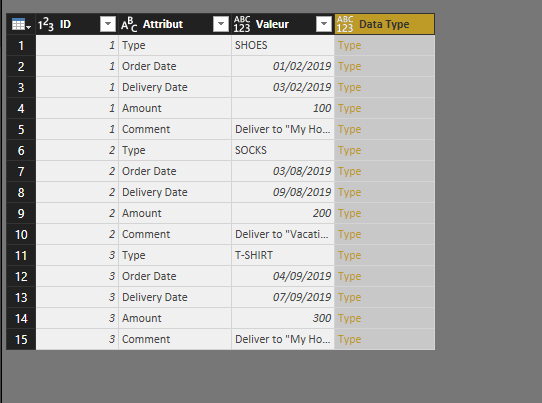
So far, it works relatively well : it creates a column with data displayed in yellow, stating "Type" and when I click on it, it shows the data type.
--> Yet, when I go to Power BI Viz and fetch that column (e.g. in a Table), it shows [Type] and not the actual type inside.
What I want to do is basically create an additionnal column in my data set and have the data type specified next to the value.
- e.g. if it's a date, it is written DATE, etc...
I am new to M and tried several things but it did not do anything good. Furthermore, while checking on the web for other related threads, I haven't found what I'm looking for.
--> I assume this is pretty simple though, as the column is created and the type inside is reckognized.
I have added two photos to illustrate my issue :
- First photo is the command written in M
- Second photo is the visual result in Power Query
Many thanks for your help and explainations in particular !
Regards,
Command in M
Visual Result
Solved! Go to Solution.
Hi @highxsky,
I also don't know any function which can convert a type to text. But I'd like to offer a workaround.
There are only few data types in PowerQuery and you can write a function with some if/else's for each of them. The function checks if the data type is i.e. Text.Type and returns "text" and so on for other data types.
fnTypeToText = (valueType as type) as text =>
if Type.Is(valueType, Text.Type) then
"text"
else if Type.Is(valueType, Number.Type) then
"number"
else
"unknown",
TypeOfValue = Table.AddColumn(Source, "Type of value", each fnTypeToText(Value.Type([Column1])), type text)
Hi @highxsky,
I also don't know any function which can convert a type to text. But I'd like to offer a workaround.
There are only few data types in PowerQuery and you can write a function with some if/else's for each of them. The function checks if the data type is i.e. Text.Type and returns "text" and so on for other data types.
fnTypeToText = (valueType as type) as text =>
if Type.Is(valueType, Text.Type) then
"text"
else if Type.Is(valueType, Number.Type) then
"number"
else
"unknown",
TypeOfValue = Table.AddColumn(Source, "Type of value", each fnTypeToText(Value.Type([Column1])), type text)
If you have recently started exploring Fabric, we'd love to hear how it's going. Your feedback can help with product improvements.
A new Power BI DataViz World Championship is coming this June! Don't miss out on submitting your entry.
Share feedback directly with Fabric product managers, participate in targeted research studies and influence the Fabric roadmap.
| User | Count |
|---|---|
| 6 | |
| 4 | |
| 3 | |
| 2 | |
| 2 |
| User | Count |
|---|---|
| 11 | |
| 10 | |
| 7 | |
| 7 | |
| 6 |