cancel
Showing results for 
Search instead for 
Did you mean: 

The Power BI Data Visualization World Championships is back! Get ahead of the game and start preparing now! Learn more

Reply
highxsky
Regular Visitor

Power Query - M formula issue - Value.Type

Hello all,

I come to you with an issue that I encounter on Power Query.

Basically, I have a data set with a column made of all types of data : numbers, texts, dates...

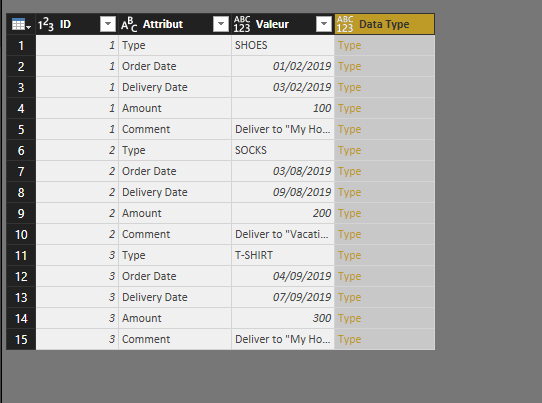
I created an M command as a new row, to show the data type for each cell of that column :
--> Value.Type([Column])

So far, it works relatively well : it creates a column with data displayed in yellow, stating "Type" and when I click on it, it shows the data type.
--> Yet, when I go to Power BI Viz and fetch that column (e.g. in a Table), it shows [Type] and not the actual type inside.

What I want to do is basically create an additionnal column in my data set and have the data type specified next to the value.
- e.g. if it's a date, it is written DATE, etc...

I am new to M and tried several things but it did not do anything good. Furthermore, while checking on the web for other related threads, I haven't found what I'm looking for.
--> I assume this is pretty simple though, as the column is created and the type inside is reckognized.


I have added two photos to illustrate my issue :
- First photo is the command written in M
- Second photo is the visual result in Power Query

Many thanks for your help and explainations in particular !

Regards,

Command in MCommand in MVisual ResultVisual Result

1 ACCEPTED SOLUTION
Nolock
Resident Rockstar
Resident Rockstar

Hi @highxsky,

I also don't know any function which can convert a type to text. But I'd like to offer a workaround.
There are only few data types in PowerQuery and you can write a function with some if/else's for each of them. The function checks if the data type is i.e. Text.Type and returns "text" and so on for other data types.


fnTypeToText = (valueType as type) as text =>
        if Type.Is(valueType, Text.Type) then
            "text"
        else if Type.Is(valueType, Number.Type) then
            "number"
        else
            "unknown",

    
    TypeOfValue = Table.AddColumn(Source, "Type of value", each fnTypeToText(Value.Type([Column1])), type text)

View solution in original post

1 REPLY 1
Nolock
Resident Rockstar
Resident Rockstar

Hi @highxsky,

I also don't know any function which can convert a type to text. But I'd like to offer a workaround.
There are only few data types in PowerQuery and you can write a function with some if/else's for each of them. The function checks if the data type is i.e. Text.Type and returns "text" and so on for other data types.


fnTypeToText = (valueType as type) as text =>
        if Type.Is(valueType, Text.Type) then
            "text"
        else if Type.Is(valueType, Number.Type) then
            "number"
        else
            "unknown",

    
    TypeOfValue = Table.AddColumn(Source, "Type of value", each fnTypeToText(Value.Type([Column1])), type text)

Helpful resources

Announcements
Power BI DataViz World Championships

Power BI Dataviz World Championships

The Power BI Data Visualization World Championships is back! Get ahead of the game and start preparing now!

November Power BI Update Carousel

Power BI Monthly Update - November 2025

Check out the November 2025 Power BI update to learn about new features.

FabCon Atlanta 2026 carousel

FabCon Atlanta 2026

Join us at FabCon Atlanta, March 16-20, for the ultimate Fabric, Power BI, AI and SQL community-led event. Save $200 with code FABCOMM.