Join us at FabCon Atlanta from March 16 - 20, 2026, for the ultimate Fabric, Power BI, AI and SQL community-led event. Save $200 with code FABCOMM.
Register now!The Power BI Data Visualization World Championships is back! Get ahead of the game and start preparing now! Learn more
Hi All,
Can you help, I'm running the latest Power BI Desktop. I'm getting data from a folder. This folder thousands of files.
My thought was to filter out the unrequired files, via steps, then reference these. for the following queries
I would then combine the files, of interest into their own query (all transactions for example); however the performance on filtering the list of files current, is very very slow, any suggestions
If this a problem with Power Query, my technique etc...
Regards,
Mathew
Hi @101Mathew ,
If I understand your requirement correctly that you want to filter out the unrequired files in Query Editor when get data from Folder connector.
If it is, you could use the query below to filter your files.
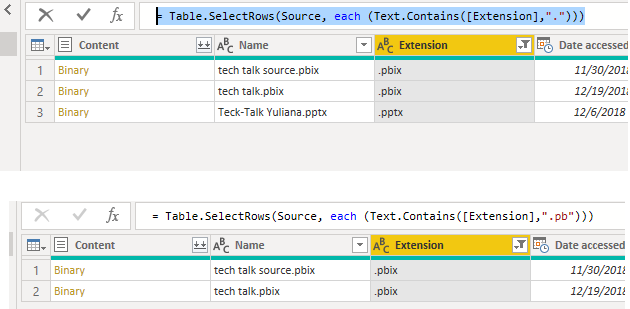
= Table.SelectRows(Source, each (Text.Contains([Extension],"."))) = Table.SelectRows(Source, each (Text.Contains([Extension],".txt")))
Here is the test output.
You also could modify the value in "" based on your requirement.
Best Regards,
Cherry
Hi @v-piga-msft ,
Thanks for taking the time to respond
I understand how to filter, the problem is the performance, it's SO SLOW. It is going through 1000s of files but still
So I'm unsure if my technique of all files, reference all file, then filter to the next sections, then reference and filter the next section is causing the issue.
Regards,
The Power BI Data Visualization World Championships is back! Get ahead of the game and start preparing now!
| User | Count |
|---|---|
| 19 | |
| 10 | |
| 9 | |
| 7 | |
| 6 |