cancel
Showing results for 
Search instead for 
Did you mean: 

July 7 - July 17 | Round 2 of the Power BI Dataviz World Championships. Don't miss your chance! Learn more

Reply
Al_Bundy
Frequent Visitor

Power Query - Dynamically Calculate Rows Weighted Average

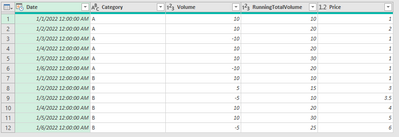
With datatable that is essentially similar to below:

Al_Bundy_0-1660832121329.png

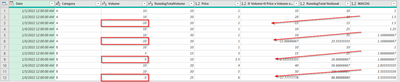
Is there a way to dynamically calculate a rolling weighted average row by row so that when there is a negative value in 'Volume' column it then uses the current inventory value (or previous rows wacog for factor value) to adjust the inventory rather than price so that it would look like below?


Al_Bundy_1-1660832955592.png

For 'RunningNotionalTotal' instead of using the 'Price' column when volume is negative use the previous rows calculated WACOG.  This can be done in standard in excel since the rows can be directly referenced with IF statements but using M or DAX I am getting circular references.

1 ACCEPTED SOLUTION

Hi @Al_Bundy,


Could you please try something like this?

let
    Source = Table.FromRows(Json.Document(Binary.Decompress(Binary.FromText("fY47EsAgCAXvQq0RUOyTazDe/xp+CsYJMcWj2WFnVYESUmJkhgD3GOE80IICfyFeKL9Q3N7K2ShnVH+Me+NzbpxIxrJLnCQudIlrNGNxjYbENZqyQmsd", BinaryEncoding.Base64), Compression.Deflate)), let _t = ((type nullable text) meta [Serialized.Text = true]) in type table [Date = _t, Category = _t, Volume = _t, Price = _t]),
    #"Changed Type" = Table.TransformColumnTypes(Source,{{"Date", type date}, {"Category", type text}, {"Volume", Int64.Type}, {"Price", type number}}),
    fAddColumns = (r, e) => 
        [
            RunningTotalVolume  = Record.FieldOrDefault(e, "RunningTotalVolume", 0) + r[Volume],
            Value = (if r[Volume] < 0 then Record.FieldOrDefault(e, "WACOG", 0) else r[Price]) * r[Volume],
            RunningTotalNotional  = Record.FieldOrDefault(e, "RunningTotalNotional", 0) +  Value,
            WACOG = RunningTotalNotional / RunningTotalVolume
        ]
    ,
    #"Grouped Rows" = Table.Combine(Table.Group(#"Changed Type", {"Category"}, {{"Count", each Table.FromRecords(List.Skip(List.Accumulate(Table.ToRecords(_), {[]}, (a, n)=> a & { n & fAddColumns(n, List.Last(a))} )))}})[Count])
in
    #"Grouped Rows"


Kind regards,

John

View solution in original post

4 REPLIES 4
Al_Bundy
Frequent Visitor

@lbendlin Thanks for the response.  I am going to put something together that will make it clearer what I'm trying to achieve.  


Problem I am having with the Index solution is the number of rows in my datatable - anywhere from ~12-15k rows.  Surprised its having issues with that many rows.  Looking into Buffer and other solutions to get the query to return faster.

Hi @Al_Bundy,


Could you please try something like this?

let
    Source = Table.FromRows(Json.Document(Binary.Decompress(Binary.FromText("fY47EsAgCAXvQq0RUOyTazDe/xp+CsYJMcWj2WFnVYESUmJkhgD3GOE80IICfyFeKL9Q3N7K2ShnVH+Me+NzbpxIxrJLnCQudIlrNGNxjYbENZqyQmsd", BinaryEncoding.Base64), Compression.Deflate)), let _t = ((type nullable text) meta [Serialized.Text = true]) in type table [Date = _t, Category = _t, Volume = _t, Price = _t]),
    #"Changed Type" = Table.TransformColumnTypes(Source,{{"Date", type date}, {"Category", type text}, {"Volume", Int64.Type}, {"Price", type number}}),
    fAddColumns = (r, e) => 
        [
            RunningTotalVolume  = Record.FieldOrDefault(e, "RunningTotalVolume", 0) + r[Volume],
            Value = (if r[Volume] < 0 then Record.FieldOrDefault(e, "WACOG", 0) else r[Price]) * r[Volume],
            RunningTotalNotional  = Record.FieldOrDefault(e, "RunningTotalNotional", 0) +  Value,
            WACOG = RunningTotalNotional / RunningTotalVolume
        ]
    ,
    #"Grouped Rows" = Table.Combine(Table.Group(#"Changed Type", {"Category"}, {{"Count", each Table.FromRecords(List.Skip(List.Accumulate(Table.ToRecords(_), {[]}, (a, n)=> a & { n & fAddColumns(n, List.Last(a))} )))}})[Count])
in
    #"Grouped Rows"


Kind regards,

John

Brilliant!!!  Thank you thank you John.

@jbwtp 

Now to review what you provided so I can understand what is happening!!

lbendlin
Super User
Super User

it then uses the current inventory value (or previous rows wacog for factor value) to adjust the inventory rather than price 


you lost me on this one.  Can you explain again in simpler terms?


Generally in Power Query you add an index column.  That will then allow you to reference the "previous row" data points.  Using List.Accumulate you can then implement the required logic.

Helpful resources

Announcements
FabCon and SQLCon Barcelona 2026

FabCon & SQLCon – Barcelona 2026

Join us in Barcelona for FabCon and SQLCon, the Fabric, Power BI, SQL, and AI community event. Save €200 with code FABCMTY200.

60 days of Data Days Carousel

Data Days 2026

Join Data Days 2026: 60 days of free live/on-demand sessions, challenges, study groups, and certification opportunities.

Power BI DataViz World Championships carousel

Power BI DataViz World Championships - June 2026

A new Power BI DataViz World Championship is coming this June! Don't miss out on submitting your entry.

Top Solution Authors