cancel
Showing results for 
Search instead for 
Did you mean: 

The Fabric community is upgrading! Read all of the details including the timeline and what you can expect. Learn more

Reply
ComputerHabit
Helper II
Helper II

Power Query Connection Refresh Sharepoint Online

I have an Odata connection to Sharepoint Online.  The data from a list is displayed in the spreadhseet that is also saved to Sharepoint Online in the same site.  I would like to open the Excel file online and click the refresh button to update the Sharepoint list data contained in the file.  When I attempt to do so it fails.


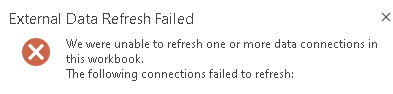
Documenation says data sources can be updated.  I'd think a data source on the same site would be the easiest.  I get the following error


ComputerHabit_0-1631907597569.png


I tried using an APP ID from the Sharepoint site in the data source connection.   That didn't seem to work.  

How do you get a data source to refresh?

6 REPLIES 6
v-kelly-msft
Community Support
Community Support

Hi  @ComputerHabit ,


Pls check a related blog to solve your issue:

http://www.widriksson.com/access-office-365-list-with-power-bi/


Best Regards,
Kelly

Did I answer your question? Mark my reply as a solution!

ComputerHabit
Helper II
Helper II

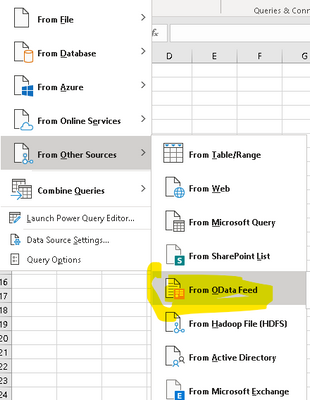
I don't have a specific script.  I'm using the data refresh capablilites of Excel.  The more I read, it may just not be possible.  I'm reading that the data refresh abilities is limited to only MSSQL.  


ComputerHabit_0-1632145112148.png


I'm reading maybe opening up excel with Flows might work.


The ability to refresh a query from within Excel online can depend on how the administrator has set configurations.  Yes, you can do this with Power Automate though.  Here is an example.

https://powerusers.microsoft.com/t5/Building-Flows/Flow-to-automatically-refresh-Excel-file-synced-t... 


Proud to be a Microsoft Data Platforms Super User

I'm the tenant admin.  How would I ensure Excel Online could refresh Odata?

Here is a good resource that describes requirements based on different scenarios.

https://support.microsoft.com/en-us/office/work-with-external-data-in-excel-services-sharepoint-serv... 

Proud to be a Microsoft Data Platforms Super User

jennratten
Super User
Super User

Please post screenshots and/or your scripts so we can better assist.

Proud to be a Microsoft Data Platforms Super User

Helpful resources

Announcements
FabCon and SQLCon Barcelona 2026

FabCon & SQLCon – Barcelona 2026

Join us in Barcelona for FabCon and SQLCon, the Fabric, Power BI, SQL, and AI community event. Save €200 with code FABCMTY200.

Power BI DataViz World Championships carousel

Power BI DataViz World Championships - June 2026

A new Power BI DataViz World Championship is coming this June! Don't miss out on submitting your entry.

Top Kudoed Authors