cancel
Showing results for 
Search instead for 
Did you mean: 

The Power BI Data Visualization World Championships is back! Get ahead of the game and start preparing now! Learn more

Reply
ComputerHabit
Helper II
Helper II

Power Query Connection Refresh Sharepoint Online

I have an Odata connection to Sharepoint Online.  The data from a list is displayed in the spreadhseet that is also saved to Sharepoint Online in the same site.  I would like to open the Excel file online and click the refresh button to update the Sharepoint list data contained in the file.  When I attempt to do so it fails.


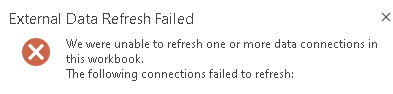
Documenation says data sources can be updated.  I'd think a data source on the same site would be the easiest.  I get the following error


ComputerHabit_0-1631907597569.png


I tried using an APP ID from the Sharepoint site in the data source connection.   That didn't seem to work.  

How do you get a data source to refresh?

6 REPLIES 6
v-kelly-msft
Community Support
Community Support

Hi  @ComputerHabit ,


Pls check a related blog to solve your issue:

http://www.widriksson.com/access-office-365-list-with-power-bi/


Best Regards,
Kelly

Did I answer your question? Mark my reply as a solution!

ComputerHabit
Helper II
Helper II

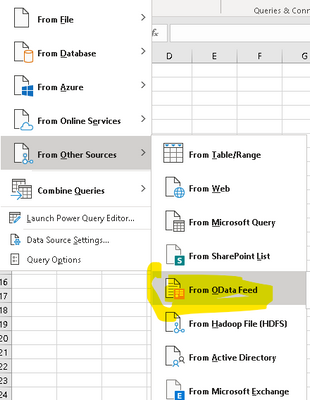
I don't have a specific script.  I'm using the data refresh capablilites of Excel.  The more I read, it may just not be possible.  I'm reading that the data refresh abilities is limited to only MSSQL.  


ComputerHabit_0-1632145112148.png


I'm reading maybe opening up excel with Flows might work.


The ability to refresh a query from within Excel online can depend on how the administrator has set configurations.  Yes, you can do this with Power Automate though.  Here is an example.

https://powerusers.microsoft.com/t5/Building-Flows/Flow-to-automatically-refresh-Excel-file-synced-t... 


I'm the tenant admin.  How would I ensure Excel Online could refresh Odata?

Here is a good resource that describes requirements based on different scenarios.

https://support.microsoft.com/en-us/office/work-with-external-data-in-excel-services-sharepoint-serv... 

jennratten
Super User
Super User

Please post screenshots and/or your scripts so we can better assist.

Helpful resources

Announcements
November Power BI Update Carousel

Power BI Monthly Update - November 2025

Check out the November 2025 Power BI update to learn about new features.

Fabric Data Days Carousel

Fabric Data Days

Advance your Data & AI career with 50 days of live learning, contests, hands-on challenges, study groups & certifications and more!

FabCon Atlanta 2026 carousel

FabCon Atlanta 2026

Join us at FabCon Atlanta, March 16-20, for the ultimate Fabric, Power BI, AI and SQL community-led event. Save $200 with code FABCOMM.