cancel
Showing results for 
Search instead for 
Did you mean: 

The Power BI Data Visualization World Championships is back! Get ahead of the game and start preparing now! Learn more

Reply
nmablv
New Member

Power Query Conditional Column Enter a Value If Statements Using Start and End Dates

Hi,

I am adding a conditional column to enter a value between Week 01 - Week 10 depending on the dates in the start and end date columns. (see below):
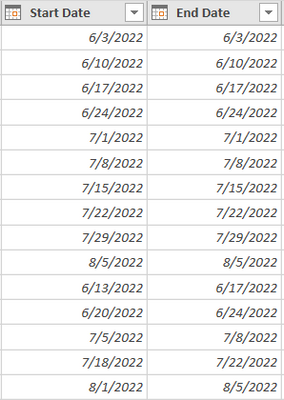
 

nmablv_1-1649794933337.png

and my custom column has the the if and else statements as follows.

=if [Start Date] > #date (2022,30,5) and [End Date] < #date(2022,06,04) then "Week 01" else
if [Start Date] > #date(2022,06,05) and [End Date] < #date(2022,06,11) then "Week 02" else
if [Start Date] > #date(2022,06,12) and [End Date] < #date(2022,06,18) then "Week 03" else
if [Start Date] > #date(2022,06,19) and [End Date] < #date(2022,06,25) then "Week 04" else
if [Start Date] > #date(2022,06,26) and [End Date] < #date(2022,07,02) then "Week 05" else
if [Start Date] > #date(2022,07,03) and [End Date] < #date(2022,07,09) then "Week 06" else
if [Start Date] > #date(2022,07,10) and [End Date] < #date(2022,07,16) then "Week 07" else
if [Start Date] > #date(2022,07,17) and [End Date] < #date(2022,07,23) then "Week 08" else
if [Start Date] > #date(2022,07,24) and [End Date] < #date(2022,07,30) then "Week 09" else
if [Start Date] > #date(2022,07,31) and [End Date] < #date(2022,08,06) then "Week 10" else
"none"


I did not get any syntax error but the above query returned an error in my custom column. 
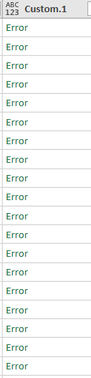
nmablv_2-1649795061107.png

Did I miss anything?  Any help will be much appreciated.


Thank you.


1 ACCEPTED SOLUTION

It's not the problem of trailing zero but you have, only in that case, inverted month with day.

this is the right formula

=if [Start Date] > #date (2022,05,30) and [End Date] < #date(2022,06,04) then "Week 01" else
if [Start Date] > #date(2022,06,05) and [End Date] < #date(2022,06,11) then "Week 02" else
if [Start Date] > #date(2022,06,12) and [End Date] < #date(2022,06,18) then "Week 03" else
if [Start Date] > #date(2022,06,19) and [End Date] < #date(2022,06,25) then "Week 04" else
if [Start Date] > #date(2022,06,26) and [End Date] < #date(2022,07,02) then "Week 05" else
if [Start Date] > #date(2022,07,03) and [End Date] < #date(2022,07,09) then "Week 06" else
if [Start Date] > #date(2022,07,10) and [End Date] < #date(2022,07,16) then "Week 07" else
if [Start Date] > #date(2022,07,17) and [End Date] < #date(2022,07,23) then "Week 08" else
if [Start Date] > #date(2022,07,24) and [End Date] < #date(2022,07,30) then "Week 09" else
if [Start Date] > #date(2022,07,31) and [End Date] < #date(2022,08,06) then "Week 10" else
"none"


View solution in original post

5 REPLIES 5
nmablv
New Member

Thank you Serpiva64.

Vijay_A_Verma
Super User
Super User

Seeing your pattern a shorter formula would also work

= "Week " & Number.ToText(Number.IntegerDivide(Duration.Days([End Date]-#date(2022,5,29)),7)+1,"00")
nmablv
New Member

Correcting  (2022,30,5) to (2022,30,05) did not resolve the error.  I noticed that the date format you show in your example is dd/mm/yyyy while the format I have in my data is mm/dd/yyyy.  Does this make a difference?

It's not the problem of trailing zero but you have, only in that case, inverted month with day.

this is the right formula

=if [Start Date] > #date (2022,05,30) and [End Date] < #date(2022,06,04) then "Week 01" else
if [Start Date] > #date(2022,06,05) and [End Date] < #date(2022,06,11) then "Week 02" else
if [Start Date] > #date(2022,06,12) and [End Date] < #date(2022,06,18) then "Week 03" else
if [Start Date] > #date(2022,06,19) and [End Date] < #date(2022,06,25) then "Week 04" else
if [Start Date] > #date(2022,06,26) and [End Date] < #date(2022,07,02) then "Week 05" else
if [Start Date] > #date(2022,07,03) and [End Date] < #date(2022,07,09) then "Week 06" else
if [Start Date] > #date(2022,07,10) and [End Date] < #date(2022,07,16) then "Week 07" else
if [Start Date] > #date(2022,07,17) and [End Date] < #date(2022,07,23) then "Week 08" else
if [Start Date] > #date(2022,07,24) and [End Date] < #date(2022,07,30) then "Week 09" else
if [Start Date] > #date(2022,07,31) and [End Date] < #date(2022,08,06) then "Week 10" else
"none"


serpiva64
Solution Sage
Solution Sage

Hi, 

there is a typing error in your formula

=if [Start Date] > #date (2022,30,5) and [End Date] < #date(2022,06,04) then "Week 01" else
if [Start Date] > #date(2022,06,05) and [End Date] < #date(2022,06,11) then "Week 02" else
if [Start Date] > #date(2022,06,12) and [End Date] < #date(2022,06,18) then "Week 03" else
if [Start Date] > #date(2022,06,19) and [End Date] < #date(2022,06,25) then "Week 04" else
if [Start Date] > #date(2022,06,26) and [End Date] < #date(2022,07,02) then "Week 05" else
if [Start Date] > #date(2022,07,03) and [End Date] < #date(2022,07,09) then "Week 06" else
if [Start Date] > #date(2022,07,10) and [End Date] < #date(2022,07,16) then "Week 07" else
if [Start Date] > #date(2022,07,17) and [End Date] < #date(2022,07,23) then "Week 08" else
if [Start Date] > #date(2022,07,24) and [End Date] < #date(2022,07,30) then "Week 09" else
if [Start Date] > #date(2022,07,31) and [End Date] < #date(2022,08,06) then "Week 10" else
"none"


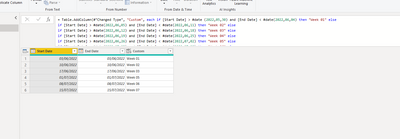
once you correct it everything is ok

serpiva64_0-1649797060438.png

If this post is useful to help you to solve your issue consider giving the post a thumbs up 

 and accepting it as a solution !

Helpful resources

Announcements
Power BI DataViz World Championships

Power BI Dataviz World Championships

The Power BI Data Visualization World Championships is back! Get ahead of the game and start preparing now!

December 2025 Power BI Update Carousel

Power BI Monthly Update - December 2025

Check out the December 2025 Power BI Holiday Recap!

FabCon Atlanta 2026 carousel

FabCon Atlanta 2026

Join us at FabCon Atlanta, March 16-20, for the ultimate Fabric, Power BI, AI and SQL community-led event. Save $200 with code FABCOMM.