cancel
Showing results for 
Search instead for 
Did you mean: 

July 7 - July 17 | Round 2 of the Power BI Dataviz World Championships. Don't miss your chance! Learn more

Reply
Blevels
Frequent Visitor

Power Query CASE to SELECT from another Table

Hello,

How does one recreate the following in Power Query:

SELECT 
COLUMN1, ..., COLUMNX,
(CASE WHEN COLUMNX = '' THEN "DNE"
ELSE (SELECT [VALUE] FROM [CODES_TABLE] WHERE [POSITION] = 1
         AND [LOOKUPVALUE] = SUBSTRING([CODES_TABLE], 1,1)
         ) END) as CUSTOMERTYPE,
.... COLUMNY, COLUMNZ
FROM [CUSTOMERS]


Doing the above where the assumption is that the [CODES_TABLE] is another query and the CUSTOMERTYPE 

column needs to select from the query in a CASE statement? 


Thank you for your response(s) in advance.

1 ACCEPTED SOLUTION

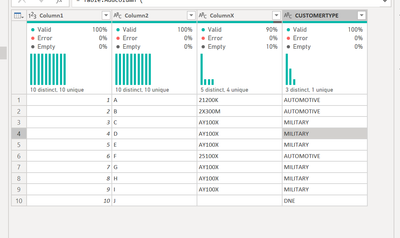
Hello - this will return the expected result.

let
    Source = Table.FromRows(Json.Document(Binary.Decompress(Binary.FromText("Vcw5DsAgDETRu7imsCFkKbNvSk9kcf9rZKCI5MLF+xpZlYQcjTgvnvmm7JQ8OJWUAvNTUwDnsnyFOdXUgItNEVxtasGt/Ip/6sDdrnrwsGkAT5uE4QtHOX8=", BinaryEncoding.Base64), Compression.Deflate)), let _t = ((type nullable text) meta [Serialized.Text = true]) in type table [Column1 = _t, Column2 = _t, ColumnX = _t]),
    #"Changed Type" = Table.TransformColumnTypes(Source,{{"Column1", Int64.Type}, {"Column2", type text}, {"ColumnX", type text}}),
    Result = Table.AddColumn ( 
        #"Changed Type", "CUSTOMERTYPE", each if [ColumnX] = "" then "DNE" else Table.SelectRows(
        Codes, 
        (x)=> 
            x[LookupValue]=Text.Start([ColumnX], 1)
        ){0}[Value], type text 
    )
in
    Result
jennratten_0-1669822262123.png


View solution in original post

3 REPLIES 3
Blevels
Frequent Visitor

CUSTOMERS TABLE:

Column1Column2ColumnXCUSTOMERTYPE

1A21200K 
2B2X300M 
3CAY100X 
4DAY100X 
5EAY100X 
6F25100X 
7GAY100X 
8HAY100X 
9IAY100X 


CODES_TABLE:

IDPositionLookupValueAttributeValue

111Customer TypeHEALTH CARE
212Customer TypeAUTOMOTIVE
313Customer TypeMANUFACTURING
414Customer TypeTECHNOLOGY
515Customer TypePRODUCTION
616Customer TypeCONSTRUCTION
717Customer TypeTRADE
818Customer TypeFINANCE
919Customer TypeEDUCATION
101ACustomer TypeMILITARY


EXPECTED OUTCOME:

Column1Column2ColumnXCUSTOMERTYPE

1A21200KAUTOMOTIVE
2B2X300MAUTOMOTIVE
3CAY100XMILITARY
4DAY100XMILITARY
5EAY100XMILITARY
6F25100XAUTOMOTIVE
7GAY100XMILITARY
8HAY100XMILITARY
9IAY100XMILITARY

Hello - this will return the expected result.

let
    Source = Table.FromRows(Json.Document(Binary.Decompress(Binary.FromText("Vcw5DsAgDETRu7imsCFkKbNvSk9kcf9rZKCI5MLF+xpZlYQcjTgvnvmm7JQ8OJWUAvNTUwDnsnyFOdXUgItNEVxtasGt/Ip/6sDdrnrwsGkAT5uE4QtHOX8=", BinaryEncoding.Base64), Compression.Deflate)), let _t = ((type nullable text) meta [Serialized.Text = true]) in type table [Column1 = _t, Column2 = _t, ColumnX = _t]),
    #"Changed Type" = Table.TransformColumnTypes(Source,{{"Column1", Int64.Type}, {"Column2", type text}, {"ColumnX", type text}}),
    Result = Table.AddColumn ( 
        #"Changed Type", "CUSTOMERTYPE", each if [ColumnX] = "" then "DNE" else Table.SelectRows(
        Codes, 
        (x)=> 
            x[LookupValue]=Text.Start([ColumnX], 1)
        ){0}[Value], type text 
    )
in
    Result

jennratten_0-1669822262123.png


lbendlin
Super User
Super User

Please provide sanitized sample data that fully covers your issue.
https://community.powerbi.com/t5/Community-Blog/How-to-provide-sample-data-in-the-Power-BI-Forum/ba-...
Please show the expected outcome based on the sample data you provided.

https://community.powerbi.com/t5/Desktop/How-to-Get-Your-Question-Answered-Quickly/m-p/1447523

Helpful resources

Announcements
FabCon and SQLCon Barcelona 2026

FabCon & SQLCon – Barcelona 2026

Join us in Barcelona for FabCon and SQLCon, the Fabric, Power BI, SQL, and AI community event. Save €200 with code FABCMTY200.

60 days of Data Days Carousel

Data Days 2026

Join Fabric Data Days 2026: 60 days of free live/on-demand sessions, challenges, study groups, and certification opportunities.

Power BI DataViz World Championships carousel

Power BI DataViz World Championships - June 2026

A new Power BI DataViz World Championship is coming this June! Don't miss out on submitting your entry.