This time we’re going bigger than ever. Fabric, Power BI, SQL, AI and more. We're covering it all. You won't want to miss it.
Learn moreLevel up your Power BI skills this month - build one visual each week and tell better stories with data! Get started
Hello,
How does one recreate the following in Power Query:
SELECT
COLUMN1, ..., COLUMNX,
(CASE WHEN COLUMNX = '' THEN "DNE"
ELSE (SELECT [VALUE] FROM [CODES_TABLE] WHERE [POSITION] = 1
AND [LOOKUPVALUE] = SUBSTRING([CODES_TABLE], 1,1)
) END) as CUSTOMERTYPE,
.... COLUMNY, COLUMNZ
FROM [CUSTOMERS]
Doing the above where the assumption is that the [CODES_TABLE] is another query and the CUSTOMERTYPE
column needs to select from the query in a CASE statement?
Thank you for your response(s) in advance.
Solved! Go to Solution.
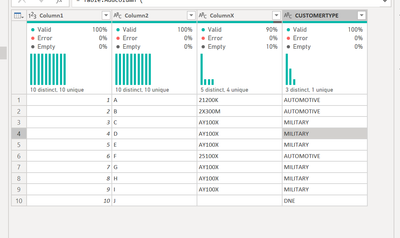
Hello - this will return the expected result.
let
Source = Table.FromRows(Json.Document(Binary.Decompress(Binary.FromText("Vcw5DsAgDETRu7imsCFkKbNvSk9kcf9rZKCI5MLF+xpZlYQcjTgvnvmm7JQ8OJWUAvNTUwDnsnyFOdXUgItNEVxtasGt/Ip/6sDdrnrwsGkAT5uE4QtHOX8=", BinaryEncoding.Base64), Compression.Deflate)), let _t = ((type nullable text) meta [Serialized.Text = true]) in type table [Column1 = _t, Column2 = _t, ColumnX = _t]),
#"Changed Type" = Table.TransformColumnTypes(Source,{{"Column1", Int64.Type}, {"Column2", type text}, {"ColumnX", type text}}),
Result = Table.AddColumn (
#"Changed Type", "CUSTOMERTYPE", each if [ColumnX] = "" then "DNE" else Table.SelectRows(
Codes,
(x)=>
x[LookupValue]=Text.Start([ColumnX], 1)
){0}[Value], type text
)
in
Result
CUSTOMERS TABLE:
Column1Column2ColumnXCUSTOMERTYPE
| 1 | A | 21200K | |
| 2 | B | 2X300M | |
| 3 | C | AY100X | |
| 4 | D | AY100X | |
| 5 | E | AY100X | |
| 6 | F | 25100X | |
| 7 | G | AY100X | |
| 8 | H | AY100X | |
| 9 | I | AY100X |
CODES_TABLE:
IDPositionLookupValueAttributeValue
| 1 | 1 | 1 | Customer Type | HEALTH CARE |
| 2 | 1 | 2 | Customer Type | AUTOMOTIVE |
| 3 | 1 | 3 | Customer Type | MANUFACTURING |
| 4 | 1 | 4 | Customer Type | TECHNOLOGY |
| 5 | 1 | 5 | Customer Type | PRODUCTION |
| 6 | 1 | 6 | Customer Type | CONSTRUCTION |
| 7 | 1 | 7 | Customer Type | TRADE |
| 8 | 1 | 8 | Customer Type | FINANCE |
| 9 | 1 | 9 | Customer Type | EDUCATION |
| 10 | 1 | A | Customer Type | MILITARY |
EXPECTED OUTCOME:
Column1Column2ColumnXCUSTOMERTYPE
| 1 | A | 21200K | AUTOMOTIVE |
| 2 | B | 2X300M | AUTOMOTIVE |
| 3 | C | AY100X | MILITARY |
| 4 | D | AY100X | MILITARY |
| 5 | E | AY100X | MILITARY |
| 6 | F | 25100X | AUTOMOTIVE |
| 7 | G | AY100X | MILITARY |
| 8 | H | AY100X | MILITARY |
| 9 | I | AY100X | MILITARY |
Hello - this will return the expected result.
let
Source = Table.FromRows(Json.Document(Binary.Decompress(Binary.FromText("Vcw5DsAgDETRu7imsCFkKbNvSk9kcf9rZKCI5MLF+xpZlYQcjTgvnvmm7JQ8OJWUAvNTUwDnsnyFOdXUgItNEVxtasGt/Ip/6sDdrnrwsGkAT5uE4QtHOX8=", BinaryEncoding.Base64), Compression.Deflate)), let _t = ((type nullable text) meta [Serialized.Text = true]) in type table [Column1 = _t, Column2 = _t, ColumnX = _t]),
#"Changed Type" = Table.TransformColumnTypes(Source,{{"Column1", Int64.Type}, {"Column2", type text}, {"ColumnX", type text}}),
Result = Table.AddColumn (
#"Changed Type", "CUSTOMERTYPE", each if [ColumnX] = "" then "DNE" else Table.SelectRows(
Codes,
(x)=>
x[LookupValue]=Text.Start([ColumnX], 1)
){0}[Value], type text
)
in
Result
Please provide sanitized sample data that fully covers your issue.
https://community.powerbi.com/t5/Community-Blog/How-to-provide-sample-data-in-the-Power-BI-Forum/ba-...
Please show the expected outcome based on the sample data you provided.
https://community.powerbi.com/t5/Desktop/How-to-Get-Your-Question-Answered-Quickly/m-p/1447523
Check out the April 2026 Power BI update to learn about new features.
Sign up to receive a private message when registration opens and key events begin.
If you have recently started exploring Fabric, we'd love to hear how it's going. Your feedback can help with product improvements.