cancel
Showing results for 
Search instead for 
Did you mean: 

The Power BI Data Visualization World Championships is back! Get ahead of the game and start preparing now! Learn more

Reply
ToddChitt
Super User
Super User

Power Query Auto Complete does not work well

Having an 'auto complete' feature in a coding language is great.

When it work right.

Power Query auto complete does NOT.


Try this: Open a query and click the Custom Column on the Add Column menu. The dialog box opens where you input your M language statement.

Now type into the formula box "Text.Combine" and see the suggestions it brings up and more importantly WHERE IN THE LIST it places the highlight. If you're fast on the keyboard and hit the TAB key without looking at the suggestion it gives, you will get "TextTable.Combine". 

What is TextTable.Combine? That's not even a Power Query Function. It an erroneous amalgamation of the FISRT word I typed plus the full command that it chose.


Look at the screen shot below and note the SUGGESTED row it highlights (the one it will take if you simply hit <Tab>) as opposed to the one three rows below it THAT IS AN EXACT MATCH OF WHAT YOU ARE TYPING
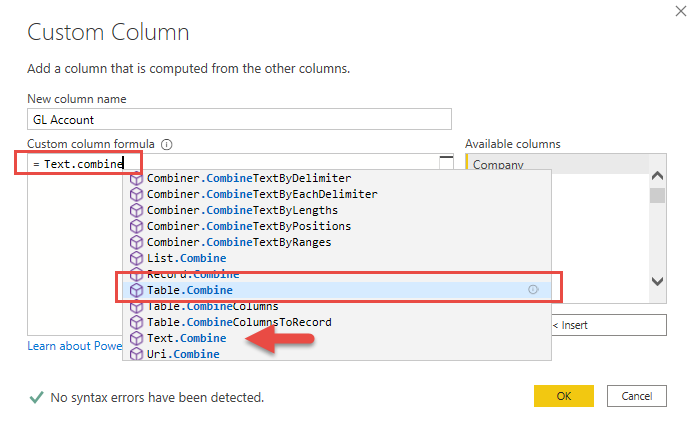
 

Power Query M Auto Complete.png


Really? You can't match "Text.Combine" with "Text.Combine" ? 


I see this as a BUG.


Did I answer your question? If so, mark my post as a solution. Also consider helping someone else in the forums!

Proud to be a Super User!


1 ACCEPTED SOLUTION
edhans
Community Champion
Community Champion

You should put this in the issues forum where the product team will see it. 

100% agreed, there are a number of issues with Intellisense in Power Query. 😐


Did I answer your question? Mark my post as a solution!
Did my answers help arrive at a solution? Give it a kudos by clicking the Thumbs Up!

DAX is for Analysis. Power Query is for Data Modeling


Proud to be a Super User!

MCSA: BI Reporting

View solution in original post

2 REPLIES 2
edhans
Community Champion
Community Champion

You should put this in the issues forum where the product team will see it. 

100% agreed, there are a number of issues with Intellisense in Power Query. 😐


Did I answer your question? Mark my post as a solution!
Did my answers help arrive at a solution? Give it a kudos by clicking the Thumbs Up!

DAX is for Analysis. Power Query is for Data Modeling


Proud to be a Super User!

MCSA: BI Reporting

Done:

https://community.powerbi.com/t5/Issues/Power-Query-Intellisense-not-working-well/idi-p/1275162


Thanks for the link.


Did I answer your question? If so, mark my post as a solution. Also consider helping someone else in the forums!

Proud to be a Super User!


Helpful resources

Announcements
Power BI DataViz World Championships

Power BI Dataviz World Championships

The Power BI Data Visualization World Championships is back! Get ahead of the game and start preparing now!

December 2025 Power BI Update Carousel

Power BI Monthly Update - December 2025

Check out the December 2025 Power BI Holiday Recap!

FabCon Atlanta 2026 carousel

FabCon Atlanta 2026

Join us at FabCon Atlanta, March 16-20, for the ultimate Fabric, Power BI, AI and SQL community-led event. Save $200 with code FABCOMM.

Top Solution Authors