Learn from the best! Meet the four finalists headed to the FINALS of the Power BI Dataviz World Championships! Register now
Having an 'auto complete' feature in a coding language is great.
When it work right.
Power Query auto complete does NOT.
Try this: Open a query and click the Custom Column on the Add Column menu. The dialog box opens where you input your M language statement.
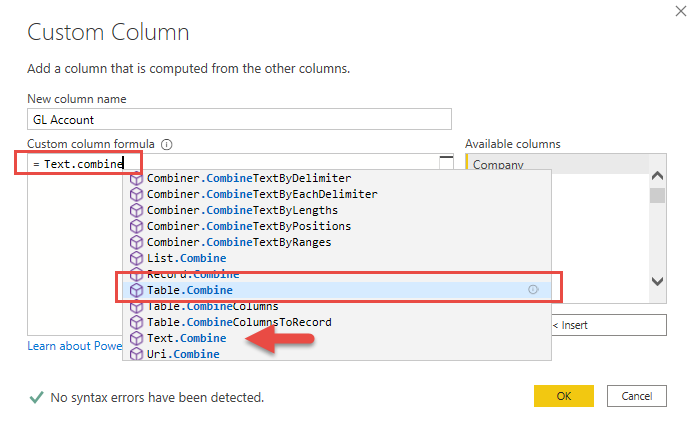
Now type into the formula box "Text.Combine" and see the suggestions it brings up and more importantly WHERE IN THE LIST it places the highlight. If you're fast on the keyboard and hit the TAB key without looking at the suggestion it gives, you will get "TextTable.Combine".
What is TextTable.Combine? That's not even a Power Query Function. It an erroneous amalgamation of the FISRT word I typed plus the full command that it chose.
Look at the screen shot below and note the SUGGESTED row it highlights (the one it will take if you simply hit <Tab>) as opposed to the one three rows below it THAT IS AN EXACT MATCH OF WHAT YOU ARE TYPING
Really? You can't match "Text.Combine" with "Text.Combine" ?
I see this as a BUG.
Proud to be a Super User! | |
Solved! Go to Solution.
You should put this in the issues forum where the product team will see it.
100% agreed, there are a number of issues with Intellisense in Power Query. 😐
DAX is for Analysis. Power Query is for Data Modeling
Proud to be a Super User!
MCSA: BI ReportingYou should put this in the issues forum where the product team will see it.
100% agreed, there are a number of issues with Intellisense in Power Query. 😐
DAX is for Analysis. Power Query is for Data Modeling
Proud to be a Super User!
MCSA: BI ReportingDone:
https://community.powerbi.com/t5/Issues/Power-Query-Intellisense-not-working-well/idi-p/1275162
Thanks for the link.
Proud to be a Super User! | |
If you have recently started exploring Fabric, we'd love to hear how it's going. Your feedback can help with product improvements.
A new Power BI DataViz World Championship is coming this June! Don't miss out on submitting your entry.
Share feedback directly with Fabric product managers, participate in targeted research studies and influence the Fabric roadmap.
| User | Count |
|---|---|
| 6 | |
| 4 | |
| 3 | |
| 2 | |
| 2 |
| User | Count |
|---|---|
| 11 | |
| 10 | |
| 8 | |
| 7 | |
| 7 |