cancel
Showing results for 
Search instead for 
Did you mean: 

July 7 - July 17 | Round 2 of the Power BI Dataviz World Championships. Don't miss your chance! Learn more

Reply
Anonymous
Not applicable

Power BI if statement / replace

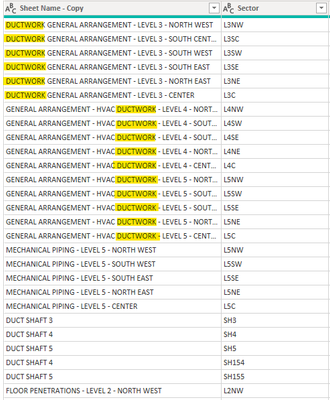
How do I replace whole cells in a column if few of those cells contain a specific text along with other words. As you can see from the picture, I am trying to replace all the cells that contain the word DUCTWORK (highlighted) with HVAC, and would like to replace all the content in that cell with it (HVAC). i.e, If cell contains the word ductwork, replace whole cell with hvac.


Thank you


memad_1-1642772809910.png


1 ACCEPTED SOLUTION
Resty
Frequent Visitor

Hi,

please insert next step that will use this:


= Table.TransformColumns(NameOfPreviousStep, {{"Sheet Name - Copy", each if Text.Contains(_, "DUCTWORK") then "HVAC" else _ }})


just make sure that you will replace NameOfPreviousStep with your previous steps name.

Hope it helps!

View solution in original post

3 REPLIES 3
v-angzheng-msft
Community Support
Community Support

Hi, @Anonymous 

May I ask if your problem has been solved? Is the above post helpful to you?

If  it does, could you please mark the post which help as Answered? It will help the others in the community find the solution easily if they face the same problem with you. Thank you.


Based on my research, the formula provided by @Resty  will work for you
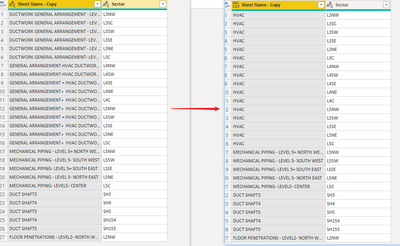
Result:

vangzhengmsft_0-1643096486113.png


Best Regards,
Community Support Team _ Zeon Zheng

If this post helps, then please consider Accept it as the solution to help the other members find it more quickly.

jennratten
Super User
Super User

There are a couple of enhancements that may be helpful to include in your script - please see below.

If you start with these values (note, row 2 includes DUCTWORK but it is lowercase):
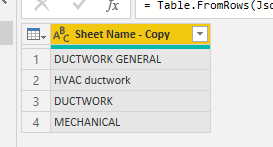
 

jennratten_3-1642796069809.png


Option 1 - replacements are case sensitive and the resulting column is not of type text:

Table.TransformColumns(#"Changed Type", {{"Sheet Name - Copy", each if Text.Contains(_, "DUCTWORK") then "HVAC" else _}})

Replaces instances in which the keyphrase with matching case is found. The result also returns type any instead of type text, creating an additional step for you to change back to text.
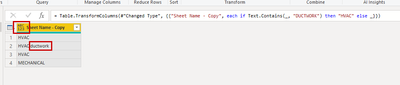
 

jennratten_4-1642796094488.png


Option 2 - make the replacements perform without case sensitivity and the resulting column is of type text.

Returning the column as text is done by specifying "type text" as the third argument inside of the transformation function.

Performing the replacements with case insensitivity is done by specifying "Comparer.OrdinalIgnoreCase" as the third argument inside of the Text.Contains function.

Table.TransformColumns(#"Changed Type", {{"Sheet Name - Copy", each if Text.Contains(_, "DUCTWORK", Comparer.OrdinalIgnoreCase) then "HVAC" else _, type text}})

 

jennratten_5-1642796300865.png


Resty
Frequent Visitor

Hi,

please insert next step that will use this:


= Table.TransformColumns(NameOfPreviousStep, {{"Sheet Name - Copy", each if Text.Contains(_, "DUCTWORK") then "HVAC" else _ }})


just make sure that you will replace NameOfPreviousStep with your previous steps name.

Hope it helps!

Helpful resources

Announcements
FabCon and SQLCon Barcelona 2026

FabCon & SQLCon – Barcelona 2026

Join us in Barcelona for FabCon and SQLCon, the Fabric, Power BI, SQL, and AI community event. Save €200 with code FABCMTY200.

60 days of Data Days Carousel

Data Days 2026

Join Data Days 2026: 60 days of free live/on-demand sessions, challenges, study groups, and certification opportunities.

Power BI DataViz World Championships carousel

Power BI DataViz World Championships - June 2026

A new Power BI DataViz World Championship is coming this June! Don't miss out on submitting your entry.

Top Solution Authors