Join us at FabCon Atlanta from March 16 - 20, 2026, for the ultimate Fabric, Power BI, AI and SQL community-led event. Save $200 with code FABCOMM.
Register now!Vote for your favorite vizzies from the Power BI Dataviz World Championship submissions. Vote now!
Solved! Go to Solution.
Modify the T-SQL query will return one additional row which contains date "2017-4-1" compares to the original result.
You can try those two ways in your desktop.
Best Regards,
Qiuyun Yu
Hi @Anonymous,
Assume you write the T-SQL query when you get data from SQL Server database to filter data between date range '2017-03-01', '2017-03-31', you can open Query Editor -> Advanced Editor, then modify the T_SQL query to include 1st April (eg: replace "2017-3-31" as "2017-4-1")
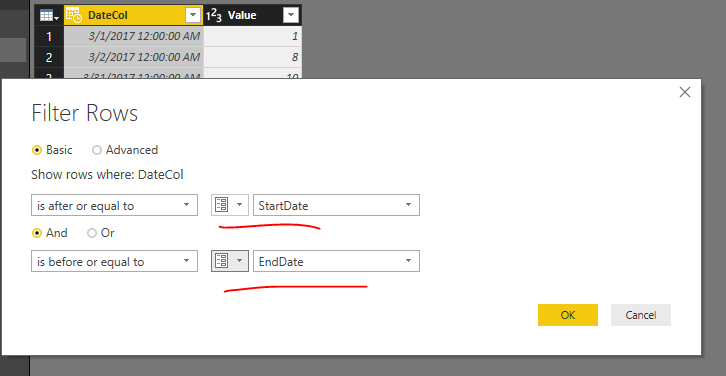
In Power BI desktop, there is Query Parameter feature for us to filter data dynamically. You can create two parameters "StartDate" and "EndDate", then use those two parameters to filter date column. For more information, see: Deep Dive into Query Parameters and Power BI Templates .
Best Regards,
Qiuyun Yu
Thanks v-qiuyu-MSFT,
But does it will replace all data in the query or just append 1st Apr data. I don't want duplicates data.
Modify the T-SQL query will return one additional row which contains date "2017-4-1" compares to the original result.
You can try those two ways in your desktop.
Best Regards,
Qiuyun Yu
If you love stickers, then you will definitely want to check out our Community Sticker Challenge!
Check out the January 2026 Power BI update to learn about new features.
| User | Count |
|---|---|
| 11 | |
| 10 | |
| 7 | |
| 7 | |
| 6 |