Join us at FabCon Atlanta from March 16 - 20, 2026, for the ultimate Fabric, Power BI, AI and SQL community-led event. Save $200 with code FABCOMM.
Register now!Vote for your favorite vizzies from the Power BI Dataviz World Championship submissions. Vote now!
Hi guys,
I really need your help
I want to change the table (table one) from this one
| Column1 |
| 1 |
| A |
| B |
| 2 |
| C |
| 3 |
| D |
| E |
| 4 |
| F |
| G |
| 5 |
| H |
to this one (table two)
| No | Manchester | Arsenal |
| 1 | A | B |
| 2 | C | |
| 3 | D | E |
| 4 | F | G |
| 5 | H |
For table one, all the text below Number will go for Manchester, and All Text below text will go for Arsenal. That`s why if you see cell (2, Arsenal) or (5, Arsenal), you will see blank or null cell.
Solved! Go to Solution.
let
Source = Excel.CurrentWorkbook(){[Name="Table1"]}[Content],
group = Table.Group(
Source,
"Column1",
{"x", (x) => x[Column1]},
GroupKind.Local,
(s, c) => Number.From(c is number)
),
z = Table.FromList(group[x], (x) => x, {"No", "Manchester", "Arsenal"})
in
z
let
Source = Excel.CurrentWorkbook(){[Name="Table1"]}[Content],
group = Table.Group(
Source,
"Column1",
{"x", (x) => x[Column1]},
GroupKind.Local,
(s, c) => Number.From(c is number)
),
z = Table.FromList(group[x], (x) => x, {"No", "Manchester", "Arsenal"})
in
z
Oh my God, you are awesome!
Thanks!, it works!
You can extract the text into a new column using if each List.Contains({0..9}, [Column1])then [Column1] else null) and then fill down that column. Then remove any rows where Column1 = number column. Then group by filldown column, and extract to new columns. I can't write out the code right now, but logically, thats how I would do it.
--Nate
Dear Watkinnc, thanks for your reply
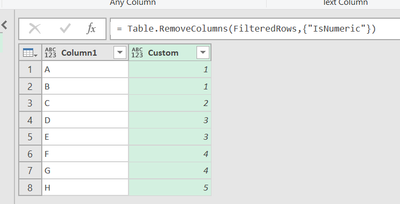
I have been here
and my current M code as below:
let
Source = Excel.CurrentWorkbook(){[Name="Table1"]}[Content],
#"Changed Type" = Table.TransformColumnTypes(Source,{{"Column1", type any}}),
#"Added Custom" = Table.AddColumn(#"Changed Type", "Custom", each if Value.Is(Number.From([Column1]), type number) then [Column1] else null),
#"Replaced Errors" = Table.ReplaceErrorValues(#"Added Custom", {{"Custom", null}}),
#"Filled Down" = Table.FillDown(#"Replaced Errors",{"Custom"}),
#"AddedCustom" = Table.AddColumn(#"Filled Down", "IsNumeric", each if Value.Is(Value.FromText([Column1]), type number) then "Numeric" else "Non-numeric"),
#"FilteredRows" = Table.SelectRows(#"AddedCustom", each ([IsNumeric] = "Non-numeric")),
#"RemovedCustom" = Table.RemoveColumns(FilteredRows,{"IsNumeric"})
in
RemovedCustom
I still don`t understand with : "Then group by filldown column, and extract to new columns", to return the final table I desired.
Vote for your favorite vizzies from the Power BI World Championship submissions!
If you love stickers, then you will definitely want to check out our Community Sticker Challenge!
Check out the January 2026 Power BI update to learn about new features.
| User | Count |
|---|---|
| 7 | |
| 6 | |
| 5 | |
| 4 | |
| 3 |
| User | Count |
|---|---|
| 11 | |
| 10 | |
| 6 | |
| 6 | |
| 6 |