Don't miss your chance to take the Fabric Data Engineer (DP-700) exam on us!
Learn moreWe've captured the moments from FabCon & SQLCon that everyone is talking about, and we are bringing them to the community, live and on-demand. Starts on April 14th. Register now
Hi guys,
I really need your help
I want to change the table (table one) from this one
| Column1 |
| 1 |
| A |
| B |
| 2 |
| C |
| 3 |
| D |
| E |
| 4 |
| F |
| G |
| 5 |
| H |
to this one (table two)
| No | Manchester | Arsenal |
| 1 | A | B |
| 2 | C | |
| 3 | D | E |
| 4 | F | G |
| 5 | H |
For table one, all the text below Number will go for Manchester, and All Text below text will go for Arsenal. That`s why if you see cell (2, Arsenal) or (5, Arsenal), you will see blank or null cell.
Solved! Go to Solution.
let
Source = Excel.CurrentWorkbook(){[Name="Table1"]}[Content],
group = Table.Group(
Source,
"Column1",
{"x", (x) => x[Column1]},
GroupKind.Local,
(s, c) => Number.From(c is number)
),
z = Table.FromList(group[x], (x) => x, {"No", "Manchester", "Arsenal"})
in
z
let
Source = Excel.CurrentWorkbook(){[Name="Table1"]}[Content],
group = Table.Group(
Source,
"Column1",
{"x", (x) => x[Column1]},
GroupKind.Local,
(s, c) => Number.From(c is number)
),
z = Table.FromList(group[x], (x) => x, {"No", "Manchester", "Arsenal"})
in
z
Oh my God, you are awesome!
Thanks!, it works!
You can extract the text into a new column using if each List.Contains({0..9}, [Column1])then [Column1] else null) and then fill down that column. Then remove any rows where Column1 = number column. Then group by filldown column, and extract to new columns. I can't write out the code right now, but logically, thats how I would do it.
--Nate
Dear Watkinnc, thanks for your reply
I have been here
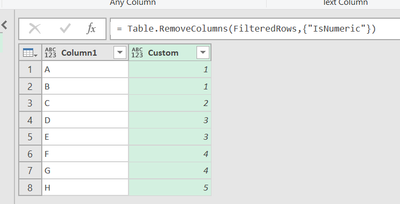
and my current M code as below:
let
Source = Excel.CurrentWorkbook(){[Name="Table1"]}[Content],
#"Changed Type" = Table.TransformColumnTypes(Source,{{"Column1", type any}}),
#"Added Custom" = Table.AddColumn(#"Changed Type", "Custom", each if Value.Is(Number.From([Column1]), type number) then [Column1] else null),
#"Replaced Errors" = Table.ReplaceErrorValues(#"Added Custom", {{"Custom", null}}),
#"Filled Down" = Table.FillDown(#"Replaced Errors",{"Custom"}),
#"AddedCustom" = Table.AddColumn(#"Filled Down", "IsNumeric", each if Value.Is(Value.FromText([Column1]), type number) then "Numeric" else "Non-numeric"),
#"FilteredRows" = Table.SelectRows(#"AddedCustom", each ([IsNumeric] = "Non-numeric")),
#"RemovedCustom" = Table.RemoveColumns(FilteredRows,{"IsNumeric"})
in
RemovedCustom
I still don`t understand with : "Then group by filldown column, and extract to new columns", to return the final table I desired.
If you have recently started exploring Fabric, we'd love to hear how it's going. Your feedback can help with product improvements.
A new Power BI DataViz World Championship is coming this June! Don't miss out on submitting your entry.
Share feedback directly with Fabric product managers, participate in targeted research studies and influence the Fabric roadmap.
| User | Count |
|---|---|
| 5 | |
| 4 | |
| 3 | |
| 3 | |
| 2 |
| User | Count |
|---|---|
| 9 | |
| 8 | |
| 7 | |
| 6 | |
| 5 |