cancel
Showing results for 
Search instead for 
Did you mean: 

July 7 - July 17 | Round 2 of the Power BI Dataviz World Championships. Don't miss your chance! Learn more

Reply
mrbajana
Helper III
Helper III

Pivot or Unpivot Tables

Spoiler
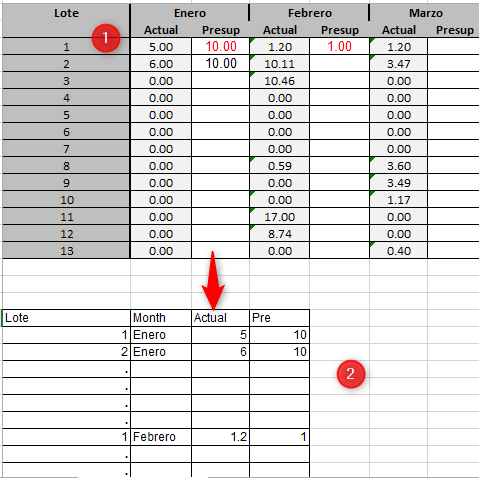
It is possible to convert table 1 to table 2 in PowerQuery. The first row of the months has combined cells. The objective is to be able to create table number 2 for better DataSet.

Thanks A Lot2020-07-09_11h40_40.png
1 ACCEPTED SOLUTION
v-juanli-msft
Community Support
Community Support

Hi @mrbajana 

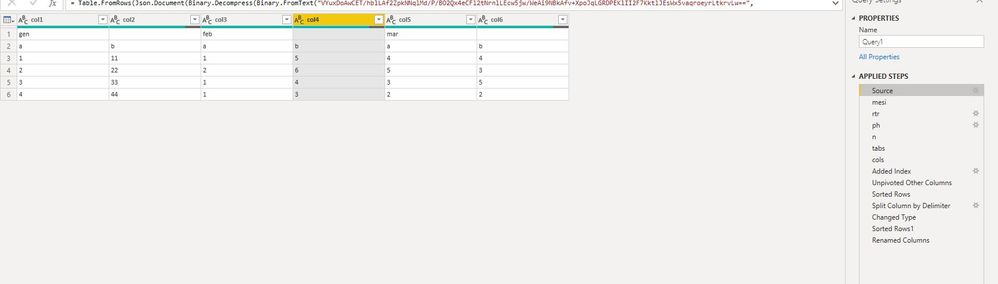
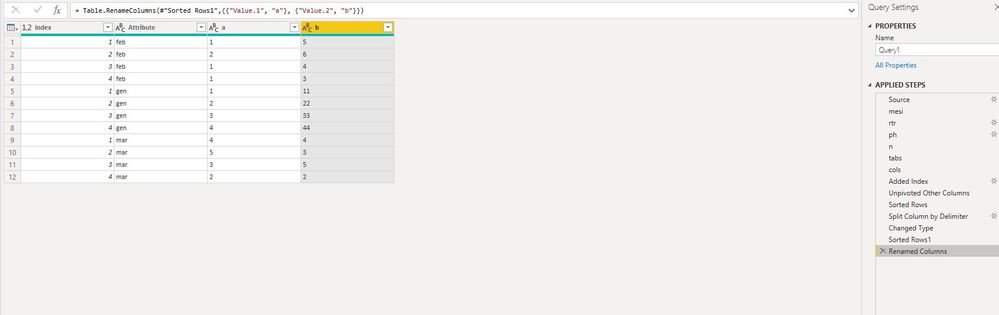
As tested, camargos88  and Rocco_sprmnt21 's suggestions are helpful.

Capture8.JPGCapture9.JPG

let
    Source = Table.FromRows(Json.Document(Binary.Decompress(Binary.FromText("VYuxDoAwCET/hblLAf2ZpkNNqlMd/P/BO2Qx4eCFl2tNrnlLEcw5jw/WeAi9NBkAfv+XpoJqLGRDPEKlII2F7KktlJEsWx5vaqroeyrLtkrvLw==", BinaryEncoding.Base64), Compression.Deflate)), let _t = ((type nullable text) meta [Serialized.Text = true]) in type table [col1 = _t, col2 = _t, col3 = _t, col4 = _t, col5 = _t, col6 = _t]),
    mesi = List.RemoveMatchingItems( Record.FieldValues(Source{0}),{""}),
    rtr = Table.Skip(Source,1),
    ph = Table.PromoteHeaders(rtr, [PromoteAllScalars=true]),
    n=List.Count(mesi),
    tabs=List.Accumulate({0..n-1},ph,(s,c)=> Table.CombineColumns(s,{cols{2*c}, cols{2*c+1}},Combiner.CombineTextByDelimiter(":", QuoteStyle.None),mesi{c})),

    cols=Table.ColumnNames(ph),

    #"Added Index" = Table.AddIndexColumn(tabs, "Index", 1, 1),
    #"Unpivoted Other Columns" = Table.UnpivotOtherColumns(#"Added Index", {"Index"}, "Attribute", "Value"),
    #"Sorted Rows" = Table.Sort(#"Unpivoted Other Columns",{{"Attribute", Order.Ascending}, {"Value", Order.Ascending}}),
    #"Split Column by Delimiter" = Table.SplitColumn(#"Sorted Rows", "Value", Splitter.SplitTextByDelimiter(":", QuoteStyle.Csv), {"Value.1", "Value.2"}),
    #"Changed Type" = Table.TransformColumnTypes(#"Split Column by Delimiter",{{"Value.1", type text}, {"Value.2", type text}}),
    #"Sorted Rows1" = Table.Sort(#"Changed Type",{{"Attribute", Order.Ascending}, {"Index", Order.Ascending}}),
    #"Renamed Columns" = Table.RenameColumns(#"Sorted Rows1",{{"Value.1", "a"}, {"Value.2", "b"}})
in
    #"Renamed Columns"


Best Regards
Maggie
Community Support Team _ Maggie Li
If this post helps, then please consider Accept it as the solution to help the other members find it more quickly.

View solution in original post

4 REPLIES 4
v-juanli-msft
Community Support
Community Support

Hi @mrbajana 

As tested, camargos88  and Rocco_sprmnt21 's suggestions are helpful.

Capture8.JPGCapture9.JPG

let
    Source = Table.FromRows(Json.Document(Binary.Decompress(Binary.FromText("VYuxDoAwCET/hblLAf2ZpkNNqlMd/P/BO2Qx4eCFl2tNrnlLEcw5jw/WeAi9NBkAfv+XpoJqLGRDPEKlII2F7KktlJEsWx5vaqroeyrLtkrvLw==", BinaryEncoding.Base64), Compression.Deflate)), let _t = ((type nullable text) meta [Serialized.Text = true]) in type table [col1 = _t, col2 = _t, col3 = _t, col4 = _t, col5 = _t, col6 = _t]),
    mesi = List.RemoveMatchingItems( Record.FieldValues(Source{0}),{""}),
    rtr = Table.Skip(Source,1),
    ph = Table.PromoteHeaders(rtr, [PromoteAllScalars=true]),
    n=List.Count(mesi),
    tabs=List.Accumulate({0..n-1},ph,(s,c)=> Table.CombineColumns(s,{cols{2*c}, cols{2*c+1}},Combiner.CombineTextByDelimiter(":", QuoteStyle.None),mesi{c})),

    cols=Table.ColumnNames(ph),

    #"Added Index" = Table.AddIndexColumn(tabs, "Index", 1, 1),
    #"Unpivoted Other Columns" = Table.UnpivotOtherColumns(#"Added Index", {"Index"}, "Attribute", "Value"),
    #"Sorted Rows" = Table.Sort(#"Unpivoted Other Columns",{{"Attribute", Order.Ascending}, {"Value", Order.Ascending}}),
    #"Split Column by Delimiter" = Table.SplitColumn(#"Sorted Rows", "Value", Splitter.SplitTextByDelimiter(":", QuoteStyle.Csv), {"Value.1", "Value.2"}),
    #"Changed Type" = Table.TransformColumnTypes(#"Split Column by Delimiter",{{"Value.1", type text}, {"Value.2", type text}}),
    #"Sorted Rows1" = Table.Sort(#"Changed Type",{{"Attribute", Order.Ascending}, {"Index", Order.Ascending}}),
    #"Renamed Columns" = Table.RenameColumns(#"Sorted Rows1",{{"Value.1", "a"}, {"Value.2", "b"}})
in
    #"Renamed Columns"


Best Regards
Maggie
Community Support Team _ Maggie Li
If this post helps, then please consider Accept it as the solution to help the other members find it more quickly.

Anonymous
Not applicable

I'm sure there is a better way to do what you ask, but try to use a scheme like this pending a more suitable solution.

All the steps are done by GUI


let
    Source = Table.FromRows(Json.Document(Binary.Decompress(Binary.FromText("HYm5EcAwDMN2Ye3GzwJ5ttCpSOL9Z4iIAjgeGKGupm4dBpEeZQuNmsM6DSK9vLPmtC6DSB/vqrms2yDSVuYP", BinaryEncoding.Base64), Compression.Deflate)), let _t = ((type text) meta [Serialized.Text = true]) in type table [a1 = _t, a2 = _t, b1 = _t, b2 = _t, c1 = _t, c2 = _t]),
    #"Changed Type" = Table.TransformColumnTypes(Source,{{"a1", Int64.Type}, {"a2", Int64.Type}, {"b1", type text}, {"b2", type text}}),
    #"Added Index" = Table.AddIndexColumn(#"Changed Type", "Index", 1, 1),
    #"Merged Columns" = Table.CombineColumns(#"Added Index",{"c1", "c2"},Combiner.CombineTextByDelimiter(":", QuoteStyle.None),"Merged.2"),
    #"Merged Columns1" = Table.CombineColumns(Table.TransformColumnTypes(#"Merged Columns", {{"a1", type text}, {"a2", type text}}, "it-IT"),{"a1", "a2"},Combiner.CombineTextByDelimiter(":", QuoteStyle.None),"Merged"),
    #"Merged Columns2" = Table.CombineColumns(#"Merged Columns1",{"b1", "b2"},Combiner.CombineTextByDelimiter(":", QuoteStyle.None),"Merged.1"),
    #"Unpivoted Other Columns" = Table.UnpivotOtherColumns(#"Merged Columns2", {"Index"}, "Attribute", "Value"),
    #"Sorted Rows" = Table.Sort(#"Unpivoted Other Columns",{{"Attribute", Order.Ascending}, {"Value", Order.Ascending}}),
    #"Split Column by Delimiter" = Table.SplitColumn(#"Sorted Rows", "Value", Splitter.SplitTextByDelimiter(":", QuoteStyle.Csv), {"Value.1", "Value.2"}),
    #"Changed Type1" = Table.TransformColumnTypes(#"Split Column by Delimiter",{{"Value.1", type text}, {"Value.2", type text}})
in
    #"Changed Type1"


Anonymous
Not applicable

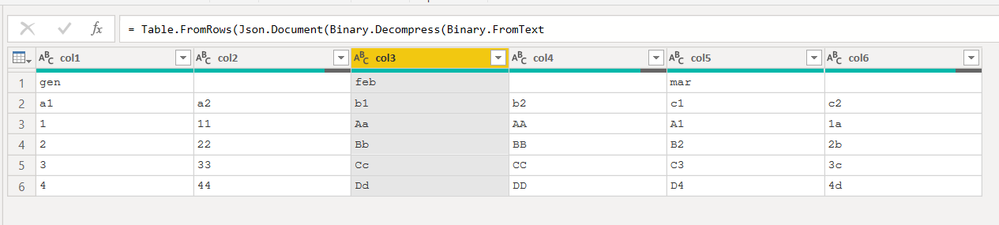
Hi @mrbajana  waiting for you to respond to the request of @camargos88 , which is also mine, I assume that you have a table of this structure:


image.png


if so, a more general solution than the one already proposed is the following.

Try it and let us know ...


let
    Source = Table.FromRows(Json.Document(Binary.Decompress(Binary.FromText("Jcy7DYAwDEXRXVynIWEBAltEKZwPVFCwf4GvkdDR1XNEKXLNR4LYd872x60vUUMRXaw0Go1qVKd69Du5wKawgW/qZ55HyPw6Z/Ct+TlZJtg77OBb9/NqucIx4ADfhtT6AQ==", BinaryEncoding.Base64), Compression.Deflate)), let _t = ((type text) meta [Serialized.Text = true]) in type table [col1 = _t, col2 = _t, col3 = _t, col4 = _t, col5 = _t, col6 = _t]),
    mesi = List.RemoveMatchingItems( Record.FieldValues(Source{0}),{""}),
    rtr = Table.Skip(Source,1),
    ph = Table.PromoteHeaders(rtr, [PromoteAllScalars=true]),
    n=List.Count(mesi),
    tabs=List.Accumulate({0..n-1},ph,(s,c)=> Table.CombineColumns(s,{cols{2*c}, cols{2*c+1}},Combiner.CombineTextByDelimiter(":", QuoteStyle.None),mesi{c})),

    cols=Table.ColumnNames(ph),

    #"Added Index" = Table.AddIndexColumn(tabs, "Index", 1, 1),
    #"Unpivoted Other Columns" = Table.UnpivotOtherColumns(#"Added Index", {"Index"}, "Attribute", "Value"),
    #"Sorted Rows" = Table.Sort(#"Unpivoted Other Columns",{{"Attribute", Order.Ascending}, {"Value", Order.Ascending}})
in
    #"Sorted Rows"


camargos88
Community Champion
Community Champion

Hi @mrbajana ,


Can you provide some data, so I can copy and try it ?


Did I answer your question? Mark my post as a solution!

Proud to be a Super User!


Helpful resources

Announcements
FabCon and SQLCon Barcelona 2026

FabCon & SQLCon – Barcelona 2026

Join us in Barcelona for FabCon and SQLCon, the Fabric, Power BI, SQL, and AI community event. Save €200 with code FABCMTY200.

60 days of Data Days Carousel

Data Days 2026

Join Data Days 2026: 60 days of free live/on-demand sessions, challenges, study groups, and certification opportunities.

Power BI DataViz World Championships carousel

Power BI DataViz World Championships - June 2026

A new Power BI DataViz World Championship is coming this June! Don't miss out on submitting your entry.

Top Solution Authors