cancel
Showing results for 
Search instead for 
Did you mean: 

Learn from the best! Meet the four finalists headed to the FINALS of the Power BI Dataviz World Championships! Register now

Reply
Mars3442
Helper I
Helper I

Pivot multiple value

Hi everyone,

I want to ask for help solving my problem


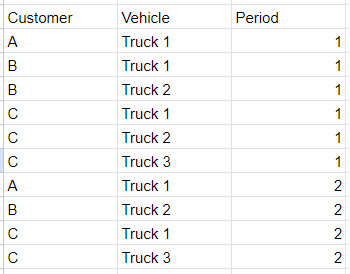
I have a table like this

Mars3442_0-1705980948624.png

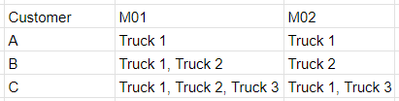
I need to group the vehicle based on customer and period


My expectation table like this

Mars3442_0-1705981147160.png


What should I do if I want to get my expectation table?


Please help me to solve this problem


Thank you..

2 ACCEPTED SOLUTIONS
Anonymous
Not applicable

Hi @Mars3442 ,

Please follow these steps:

1.Create a calculation table and write the following expression.

Table 2 =

var _table1=

DISTINCT('Table'[Customer])

return

ADDCOLUMNS(

    _table1,

    "M01",

    CONCATENATEX(

        FILTER(ALL('Table'),

       'Table'[Customer]=EARLIER('Table'[Customer])&&'Table'[Period]=1),'Table'[Vehicle],","),

    "M02",

      CONCATENATEX(

        FILTER(ALL('Table'),

       'Table'[Customer]=EARLIER('Table'[Customer])&&'Table'[Period]=2),'Table'[Vehicle],",")


)

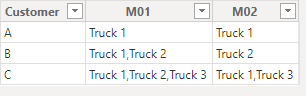
2.The result obtained is shown below.

vkaiyuemsft_0-1705992062663.png

If your Current Period does not refer to this, please clarify in a follow-up reply.


Best Regards,

Clara Gong

If this post helps, then please consider Accept it as the solution to help the other members find it more quickly.

View solution in original post

slorin
Super User
Super User

Hi,

1. Transform "Period" 1, 2, ... --> M01, M02, ...

2. Pivot with Text.Combine


let
Source = Your_Source,
Period = Table.TransformColumns(Source, {{"Period", each "M" & Number.ToText(_, "00"), type text}}),
Pivot = Table.Pivot(Period, List.Distinct(Period[Period]), "Period", "Vehicle", each Text.Combine(_, ", "))
in
Pivot

Stéphane


View solution in original post

2 REPLIES 2
slorin
Super User
Super User

Hi,

1. Transform "Period" 1, 2, ... --> M01, M02, ...

2. Pivot with Text.Combine


let
Source = Your_Source,
Period = Table.TransformColumns(Source, {{"Period", each "M" & Number.ToText(_, "00"), type text}}),
Pivot = Table.Pivot(Period, List.Distinct(Period[Period]), "Period", "Vehicle", each Text.Combine(_, ", "))
in
Pivot

Stéphane


Anonymous
Not applicable

Hi @Mars3442 ,

Please follow these steps:

1.Create a calculation table and write the following expression.

Table 2 =

var _table1=

DISTINCT('Table'[Customer])

return

ADDCOLUMNS(

    _table1,

    "M01",

    CONCATENATEX(

        FILTER(ALL('Table'),

       'Table'[Customer]=EARLIER('Table'[Customer])&&'Table'[Period]=1),'Table'[Vehicle],","),

    "M02",

      CONCATENATEX(

        FILTER(ALL('Table'),

       'Table'[Customer]=EARLIER('Table'[Customer])&&'Table'[Period]=2),'Table'[Vehicle],",")


)

2.The result obtained is shown below.

vkaiyuemsft_0-1705992062663.png

If your Current Period does not refer to this, please clarify in a follow-up reply.


Best Regards,

Clara Gong

If this post helps, then please consider Accept it as the solution to help the other members find it more quickly.

Helpful resources

Announcements
Join our Fabric User Panel

Join our Fabric User Panel

Share feedback directly with Fabric product managers, participate in targeted research studies and influence the Fabric roadmap.

February Power BI Update Carousel

Power BI Monthly Update - February 2026

Check out the February 2026 Power BI update to learn about new features.

FabCon Atlanta 2026 carousel

FabCon Atlanta 2026

Join us at FabCon Atlanta, March 16-20, for the ultimate Fabric, Power BI, AI and SQL community-led event. Save $200 with code FABCOMM.

Top Solution Authors