This is best Fabric, Power BI, SQL and AI community event. How do we know? The last event sold out! Save €200 with code FABCMTY200.
Register nowA new Data Days event is coming soon! This time we’re going bigger than ever. Fabric, Power BI, SQL, AI and more. Don't miss out.
Hi everyone,
I want to ask for help solving my problem
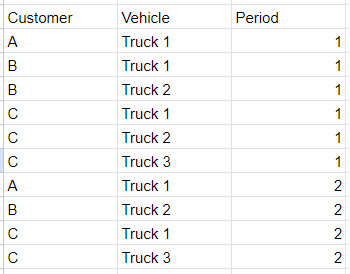
I have a table like this
I need to group the vehicle based on customer and period
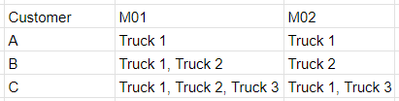
My expectation table like this
What should I do if I want to get my expectation table?
Please help me to solve this problem
Thank you..
Solved! Go to Solution.
Hi @Mars3442 ,
Please follow these steps:
1.Create a calculation table and write the following expression.
Table 2 =
var _table1=
DISTINCT('Table'[Customer])
return
ADDCOLUMNS(
_table1,
"M01",
CONCATENATEX(
FILTER(ALL('Table'),
'Table'[Customer]=EARLIER('Table'[Customer])&&'Table'[Period]=1),'Table'[Vehicle],","),
"M02",
CONCATENATEX(
FILTER(ALL('Table'),
'Table'[Customer]=EARLIER('Table'[Customer])&&'Table'[Period]=2),'Table'[Vehicle],",")
)
2.The result obtained is shown below.
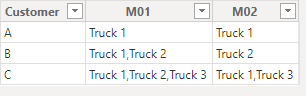
If your Current Period does not refer to this, please clarify in a follow-up reply.
Best Regards,
Clara Gong
If this post helps, then please consider Accept it as the solution to help the other members find it more quickly.
Hi,
1. Transform "Period" 1, 2, ... --> M01, M02, ...
2. Pivot with Text.Combine
let
Source = Your_Source,
Period = Table.TransformColumns(Source, {{"Period", each "M" & Number.ToText(_, "00"), type text}}),
Pivot = Table.Pivot(Period, List.Distinct(Period[Period]), "Period", "Vehicle", each Text.Combine(_, ", "))
in
Pivot
Stéphane
Hi,
1. Transform "Period" 1, 2, ... --> M01, M02, ...
2. Pivot with Text.Combine
let
Source = Your_Source,
Period = Table.TransformColumns(Source, {{"Period", each "M" & Number.ToText(_, "00"), type text}}),
Pivot = Table.Pivot(Period, List.Distinct(Period[Period]), "Period", "Vehicle", each Text.Combine(_, ", "))
in
Pivot
Stéphane
Hi @Mars3442 ,
Please follow these steps:
1.Create a calculation table and write the following expression.
Table 2 =
var _table1=
DISTINCT('Table'[Customer])
return
ADDCOLUMNS(
_table1,
"M01",
CONCATENATEX(
FILTER(ALL('Table'),
'Table'[Customer]=EARLIER('Table'[Customer])&&'Table'[Period]=1),'Table'[Vehicle],","),
"M02",
CONCATENATEX(
FILTER(ALL('Table'),
'Table'[Customer]=EARLIER('Table'[Customer])&&'Table'[Period]=2),'Table'[Vehicle],",")
)
2.The result obtained is shown below.
If your Current Period does not refer to this, please clarify in a follow-up reply.
Best Regards,
Clara Gong
If this post helps, then please consider Accept it as the solution to help the other members find it more quickly.
Check out the May 2026 Power BI update to learn about new features.
Sign up to receive a private message when registration opens and key events begin.
If you have recently started exploring Fabric, we'd love to hear how it's going. Your feedback can help with product improvements.