Hopefully I've understood what you want, as you do not show the desired results based on the source data.
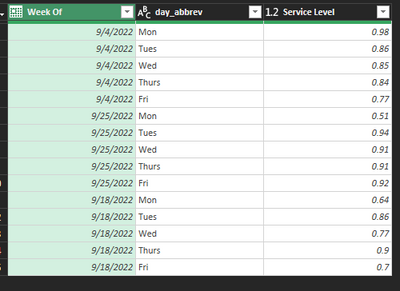
I assume you want the percent change for each weekdays Service Level.
Read the comments and explore the Applied Steps to understand the algorithm:
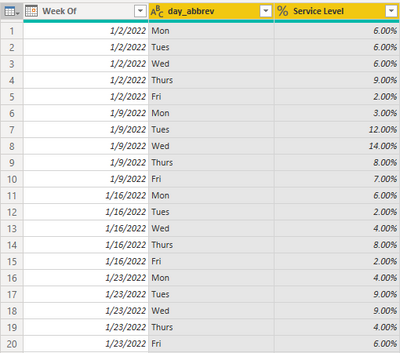
Original Data
let

//change next line to reflect your actual data source
    Source = Excel.CurrentWorkbook(){[Name="Table9"]}[Content],

//set correct data types
    #"Changed Type" = Table.TransformColumnTypes(Source,{
        {"Week Of", type date},
        {"day_abbrev", type text},
        {"Service Level", type number}
        }),

//Sort by Week Of, Descending
    #"Sorted Rows" = Table.Sort(#"Changed Type",{{"Week Of", Order.Descending}}),

//Group by Weekday
//   Generate List of percent changes based on week to week change
//   Return Week Of Date and Percent change columns
    #"Grouped Rows" = Table.Group(#"Sorted Rows", {"day_abbrev"}, {
        {"Change", (t)=>
            Table.FromColumns({t[Week Of]} &
        {List.Generate(
            ()=>[d=(t[Service Level]{0} - t[Service Level]{1}) / t[Service Level]{1}, idx=0],
            each [idx] < (Table.RowCount(t)),
            each [d=try (t[Service Level]{[idx]+1} - t[Service Level]{[idx]+2}) / t[Service Level]{[idx]+2} otherwise null, idx=[idx]+1],
            each [d])}),
            type table[Column1=date, Column2=Percentage.Type]}
    }),
    #"Expanded Percent Change" = Table.ExpandTableColumn(#"Grouped Rows", "Change",
        {"Column1", "Column2"},{"Week Of", "Percent Change"}),

//Pivot on Week Of, with no aggregaton
    #"Pivoted Column" = Table.Pivot(Table.TransformColumnTypes(#"Expanded Percent Change",
        {{"Week Of", type text}}, "en-US"),
        List.Distinct(Table.TransformColumnTypes(#"Expanded Percent Change",
            {{"Week Of", type text}}, "en-US")[#"Week Of"]), "Week Of", "Percent Change"),

//add day number column for sorting
// then sort by day number and remove that column
    #"Added Custom" = Table.AddColumn(#"Pivoted Column", "day number",
        each List.PositionOf({"Mon","Tues","Wed","Thurs","Fri"},[day_abbrev])),
    #"Sorted Rows1" = Table.Sort(#"Added Custom",{{"day number", Order.Ascending}}),
    #"Removed Columns" = Table.RemoveColumns(#"Sorted Rows1",{"day number"})
in
    #"Removed Columns"
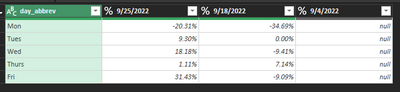
Results