cancel
Showing results for 
Search instead for 
Did you mean: 

Did you hear? There's a new SQL AI Developer certification (DP-800). Start preparing now and be one of the first to get certified. Register now

Reply
gfranco
New Member

Pervasive SQL V11 Connection ODBC failed

Hi team,


I want to ask you how the steps required to connect with DB Pervasive SQL V.11 via ODBC. -64 bits.

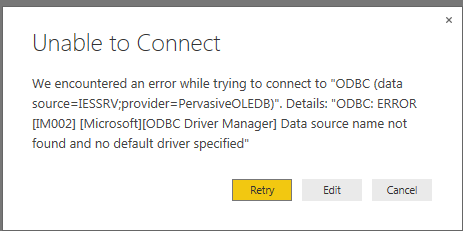
This is not allow me to get specific connection. I got connection failed driver was not found I just installed 64 bits client on my Windows 7 64 bits.


data source=IESRV;provider=PervasiveODBC -or

data source=IESSRV;provider=PervasiveOLEDB

unabletoconnect.png


Let me know how do I proceed to get the connection done.


Cheers,

1 ACCEPTED SOLUTION
curth
Power BI Team
Power BI Team

That does not look like a valid ODBC connection string. You need either a DRIVER= specifying the driver along with all the properties you need to connect or a DSN= which refers to a locally-configured ODBC data source.

View solution in original post

1 REPLY 1
curth
Power BI Team
Power BI Team

That does not look like a valid ODBC connection string. You need either a DRIVER= specifying the driver along with all the properties you need to connect or a DSN= which refers to a locally-configured ODBC data source.

Helpful resources

Announcements
April Power BI Update Carousel

Power BI Monthly Update - April 2026

Check out the April 2026 Power BI update to learn about new features.

Fabric SQL PBI Data Days

Data Days 2026 coming soon!

Sign up to receive a private message when registration opens and key events begin.

New to Fabric survey Carousel

New to Fabric Survey

If you have recently started exploring Fabric, we'd love to hear how it's going. Your feedback can help with product improvements.

Power BI DataViz World Championships carousel

Power BI DataViz World Championships - June 2026

A new Power BI DataViz World Championship is coming this June! Don't miss out on submitting your entry.