Don't miss your chance to take the Fabric Data Engineer (DP-600) exam for FREE! Find out how by attending the DP-600 session on April 23rd (pacific time), live or on-demand.
Learn moreNext up in the FabCon + SQLCon recap series: The roadmap for Microsoft SQL and Maximizing Developer experiences in Fabric. All sessions are available on-demand after the live show. Register now
Hi team,
I want to ask you how the steps required to connect with DB Pervasive SQL V.11 via ODBC. -64 bits.
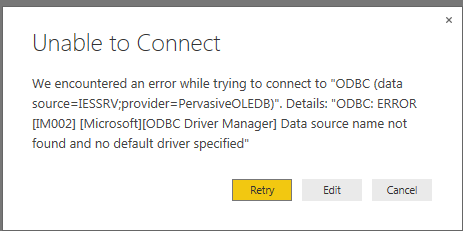
This is not allow me to get specific connection. I got connection failed driver was not found I just installed 64 bits client on my Windows 7 64 bits.
data source=IESRV;provider=PervasiveODBC -or
data source=IESSRV;provider=PervasiveOLEDB
Let me know how do I proceed to get the connection done.
Cheers,
Solved! Go to Solution.
That does not look like a valid ODBC connection string. You need either a DRIVER= specifying the driver along with all the properties you need to connect or a DSN= which refers to a locally-configured ODBC data source.
If you have recently started exploring Fabric, we'd love to hear how it's going. Your feedback can help with product improvements.
A new Power BI DataViz World Championship is coming this June! Don't miss out on submitting your entry.
Experience the highlights from FabCon & SQLCon, available live and on-demand starting April 14th.
| User | Count |
|---|---|
| 5 | |
| 3 | |
| 3 | |
| 3 | |
| 2 |
| User | Count |
|---|---|
| 7 | |
| 5 | |
| 5 | |
| 5 | |
| 4 |