Join us at FabCon Atlanta from March 16 - 20, 2026, for the ultimate Fabric, Power BI, AI and SQL community-led event. Save $200 with code FABCOMM.
Register now!Vote for your favorite vizzies from the Power BI Dataviz World Championship submissions. Vote now!
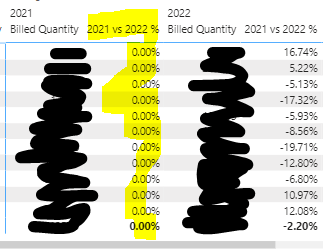
Hi, please advise - I have used the below quick measure to calculate the % difference between billed quantity from 2021 to 2022, however there's another column popping up with 0.00% values. Please advise how to exclude this column from my table visual - Thanks!
Solved! Go to Solution.
Hi @Nicky_12345 ,
The second column is displayed because of how your visual is built. It looks like you are using a matrix where your measures ("Billed Quantity" + "2021 vs 2022 %") are broken down by some kind of category (the first column on the left which is not shown in your picture) as well as date/year (column "2021" + "2022"). So both of your measures have a filter on year (Year = 2021 OR Year = 2022) which leads to 2 different columns per year.
To solve this you could create two more measures:
| Did I answer your question❓➡️ Please, mark my post as a solution ✔️ |
| Also happily accepting Kudos 🙂 |
| Feel free to connect with me on LinkedIn! | |
| #proudtobeasuperuser | |
@tackytechtom Please advise how to create another measure for sum of sales for July 2022 and then another measure for August 2022. Thanks!
Hi @Nicky_12345 ,
The second column is displayed because of how your visual is built. It looks like you are using a matrix where your measures ("Billed Quantity" + "2021 vs 2022 %") are broken down by some kind of category (the first column on the left which is not shown in your picture) as well as date/year (column "2021" + "2022"). So both of your measures have a filter on year (Year = 2021 OR Year = 2022) which leads to 2 different columns per year.
To solve this you could create two more measures:
| Did I answer your question❓➡️ Please, mark my post as a solution ✔️ |
| Also happily accepting Kudos 🙂 |
| Feel free to connect with me on LinkedIn! | |
| #proudtobeasuperuser | |
Hi tomfox,
Thank you so much, it works! 😄
Vote for your favorite vizzies from the Power BI World Championship submissions!
If you love stickers, then you will definitely want to check out our Community Sticker Challenge!
Check out the January 2026 Power BI update to learn about new features.
| User | Count |
|---|---|
| 11 | |
| 9 | |
| 8 | |
| 7 | |
| 6 |