cancel
Showing results for 
Search instead for 
Did you mean: 

The Power BI Data Visualization World Championships is back! Get ahead of the game and start preparing now! Learn more

Reply
Nicky_12345
Frequent Visitor

Percent increase/decrease between 2 years only - 2021 vs 2022

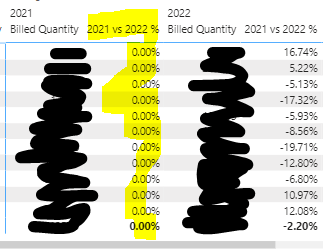
Hi, please advise - I have used the below quick measure to calculate the % difference between billed quantity from 2021 to 2022, however there's another column popping up with 0.00% values. Please advise how to exclude this column from my table visual - Thanks!


2021 vs 2022 % =
VAR __BASELINE_VALUE =
    CALCULATE(
        SUM('Append1'[Billed Quantity]),
        'Calendar'[Date].[Year] IN { 2021 }
    )
VAR __MEASURE_VALUE = SUM('Append1'[Billed Quantity])
RETURN
    IF(
        NOT ISBLANK(__MEASURE_VALUE),
        DIVIDE(__MEASURE_VALUE - __BASELINE_VALUE, __BASELINE_VALUE)
    )
 
This is my current table visual per Product Category using the above measure:
 
Nicky_12345_0-1662904083610.png


1 ACCEPTED SOLUTION
tackytechtom
Most Valuable Professional

Hi @Nicky_12345 ,


The second column is displayed because of how your visual is built. It looks like you are using a matrix where your measures ("Billed Quantity" + "2021 vs 2022 %") are broken down by some kind of category (the first column on the left which is not shown in your picture) as well as date/year (column "2021" + "2022"). So both of your measures have a filter on year (Year = 2021 OR Year = 2022) which leads to 2 different columns per year. 


To solve this you could create two more measures:

Billed Quantity 2021=
    CALCULATE(
        SUM('Append1'[Billed Quantity]),
        'Calendar'[Date].[Year] IN { 2021 }
    )


Billed Quantity 2022=
    CALCULATE(
        SUM('Append1'[Billed Quantity]),
        'Calendar'[Date].[Year] IN { 2022 }
    )
 
Then use the three mesaures in your visual and do not drag in date/year.
 
Let me know if this helps 🙂


Did I answer your question➡️ Please, mark my post as a solution ✔️

Also happily accepting Kudos 🙂

Feel free to connect with me on LinkedIn! linkedIn

#proudtobeasuperuser 

View solution in original post

3 REPLIES 3
Nicky_12345
Frequent Visitor

@tackytechtom Please advise how to create another measure for sum of sales for July 2022 and then another measure for August 2022. Thanks!

tackytechtom
Most Valuable Professional

Hi @Nicky_12345 ,


The second column is displayed because of how your visual is built. It looks like you are using a matrix where your measures ("Billed Quantity" + "2021 vs 2022 %") are broken down by some kind of category (the first column on the left which is not shown in your picture) as well as date/year (column "2021" + "2022"). So both of your measures have a filter on year (Year = 2021 OR Year = 2022) which leads to 2 different columns per year. 


To solve this you could create two more measures:

Billed Quantity 2021=
    CALCULATE(
        SUM('Append1'[Billed Quantity]),
        'Calendar'[Date].[Year] IN { 2021 }
    )


Billed Quantity 2022=
    CALCULATE(
        SUM('Append1'[Billed Quantity]),
        'Calendar'[Date].[Year] IN { 2022 }
    )
 
Then use the three mesaures in your visual and do not drag in date/year.
 
Let me know if this helps 🙂


Did I answer your question➡️ Please, mark my post as a solution ✔️

Also happily accepting Kudos 🙂

Feel free to connect with me on LinkedIn! linkedIn

#proudtobeasuperuser 

Hi tomfox,


Thank you so much, it works! 😄 

Helpful resources

Announcements
Power BI DataViz World Championships

Power BI Dataviz World Championships

The Power BI Data Visualization World Championships is back! Get ahead of the game and start preparing now!

December 2025 Power BI Update Carousel

Power BI Monthly Update - December 2025

Check out the December 2025 Power BI Holiday Recap!

FabCon Atlanta 2026 carousel

FabCon Atlanta 2026

Join us at FabCon Atlanta, March 16-20, for the ultimate Fabric, Power BI, AI and SQL community-led event. Save $200 with code FABCOMM.

Top Solution Authors