Get certified for free when you join Fabric Data Days 2026 and dive into Fabric, Power BI, SQL, AI, and other essential data skills.
Join nowJuly 7 - July 17 | Round 2 of the Power BI Dataviz World Championships. Don't miss your chance! Learn more
Hi Life savers,
here is my report URL :
here is my parameter name:
firstnameparam
here is my query name:
query1
now i changed URL to
https://app.powerbi.com/view?r=eyJrIjoiYTQ4NmVjNDctM2ViMi00ZjFhLWEzMTctYTA2NmMwYjUxNWJmIiwidCI6IjFlN... eq 'faheem'
but no luck
can any 1 save my day !
thanks in advance
Solved! Go to Solution.
Hi @FAHEEMLATIF ,
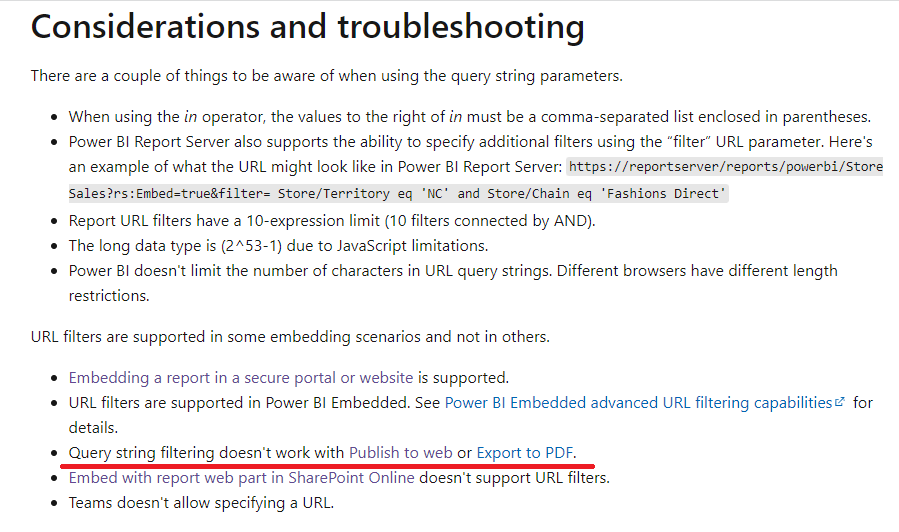
Query string filtering doesn't work with Publish to web.
Screenshot from: Filter a report using query string parameters in the URL - Power BI | Microsoft Docs
Best Regards,
Stephen Tao
If this post helps, then please consider Accept it as the solution to help the other members find it more quickly.
Hi @FAHEEMLATIF ,
Query string filtering doesn't work with Publish to web.
Screenshot from: Filter a report using query string parameters in the URL - Power BI | Microsoft Docs
Best Regards,
Stephen Tao
If this post helps, then please consider Accept it as the solution to help the other members find it more quickly.
Hi @FAHEEMLATIF ,
Query string filtering doesn't work with Publish to web.
Screenshot from: Filter a report using query string parameters in the URL - Power BI | Microsoft Docs
Best Regards,
Stephen Tao
If this post helps, then please consider Accept it as the solution to help the other members find it more quickly.
Hi @FAHEEMLATIF ,
hard to say where the fault lies without knowing the model.
Do you know the video of Guy in a Cube?
https://www.youtube.com/watch?v=8ASw-J0PuN8
Marcus Wegener works as Full Stack Power BI Engineer at BI or DIE.
His mission is clear: "Get the most out of data, with Power BI."
twitter - LinkedIn - YouTube - website - podcast - Power BI Tutorials
Join us in Barcelona for FabCon and SQLCon, the Fabric, Power BI, SQL, and AI community event. Save €200 with code FABCMTY200.
Join Fabric Data Days 2026: 60 days of free live/on-demand sessions, challenges, study groups, and certification opportunities.
| User | Count |
|---|---|
| 8 | |
| 5 | |
| 5 | |
| 4 | |
| 4 |