cancel
Showing results for 
Search instead for 
Did you mean: 

July 7 - July 17 | Round 2 of the Power BI Dataviz World Championships. Don't miss your chance! Learn more

Reply
Codemunchkin
Frequent Visitor

Merging Table is Skipping Rows

Hi,


I am merging 2 tables on an index, once merge takes place the final table has missing/incorrect values in the first few rows. I am not sure why it's doing that. I have attached the file. 


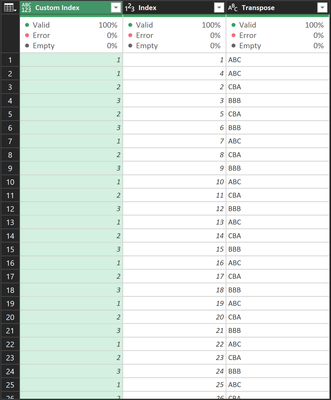
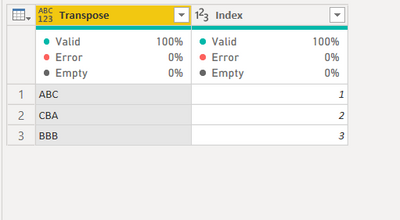
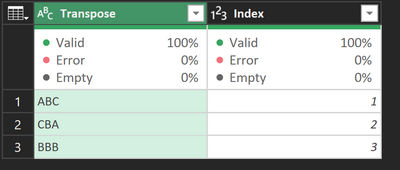
This is the look up table:

Codemunchkin_0-1635548009426.png


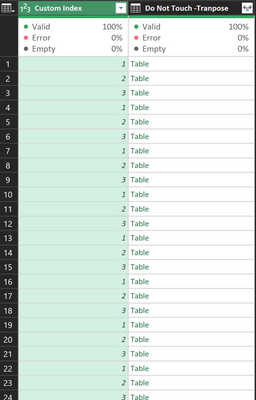
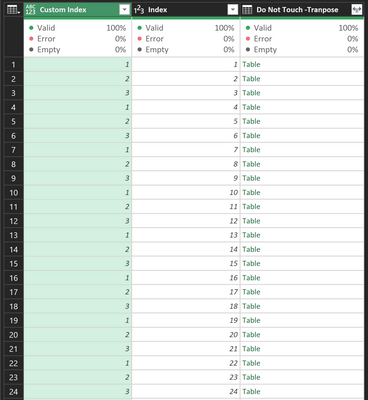
This is the merged table before I expand the column:

Codemunchkin_1-1635548118495.png

The merge is happening on Index column(look up table) and Custom Index column in the other table.


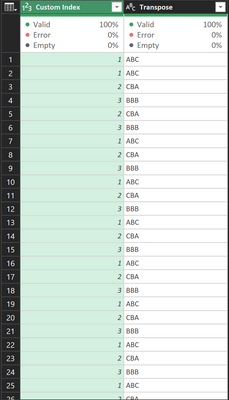
Now after expanding the column I get this:


Codemunchkin_2-1635548229265.png


I am not sure what I am doing wrong here, any help would be appreciated. Thanks in advance! I have attached the excel file aswell!


https://docs.google.com/spreadsheets/d/1ZjFGxXDmSNK_Tkg4KRsbL6Hia2kwYtUJ/edit?usp=sharing&ouid=10439...


1 ACCEPTED SOLUTION

So I looked at your file and your "Do Not Touch - Custom Index for Data" query looks like it's almost what you're looking for. If you sort by [Index], then you do get ABC, CBA, BBB repeat.


It's not skipping rows (check the row count), it's just not putting them in the order you expect.

View solution in original post

4 REPLIES 4
Anonymous
Not applicable

Hi @Codemunchkin 


How did you do the merge? And what are the expected results? Like this?
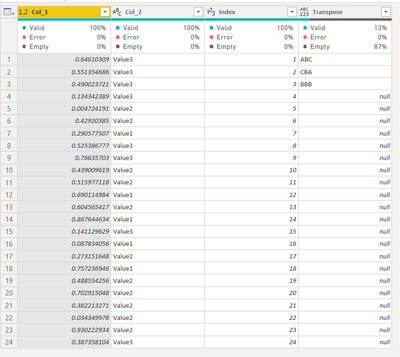
 

Vera_33_0-1635553975665.png

Your Transpose table only contains 3 rows? Then merged on Index column?
Vera_33_1-1635554027866.png

I have these two tables, you can paste in Advanced Editor via blank query

Transpose

let
    Source = Table.FromRows(Json.Document(Binary.Decompress(Binary.FromText("i45WCilKzCsuyC9OVYrViVZydHLWcXZy1HFyclKKjQUA", BinaryEncoding.Base64), Compression.Deflate)), let _t = ((type nullable text) meta [Serialized.Text = true]) in type table [Column1 = _t]),
    #"Promoted Headers" = Table.PromoteHeaders(Source, [PromoteAllScalars=true]),
    #"Changed Type" = Table.TransformColumnTypes(#"Promoted Headers",{{"Transpose", type text}}),
    #"Trimmed Text" = Table.TransformColumns(#"Changed Type",{{"Transpose", each Text.Split(_,",")}}),
    #"Expanded Transpose" = Table.ExpandListColumn(#"Trimmed Text", "Transpose"),
    #"Added Index" = Table.AddIndexColumn(#"Expanded Transpose", "Index", 1, 1, Int64.Type)
in
    #"Added Index"

 Table

let
    Source = Table.FromRows(Json.Document(Binary.Decompress(Binary.FromText("i45WCilKzCsuyC9OVYrViVZydHLWcXZy1HFyclKKjQUA", BinaryEncoding.Base64), Compression.Deflate)), let _t = ((type nullable text) meta [Serialized.Text = true]) in type table [Column1 = _t]),
    #"Promoted Headers" = Table.PromoteHeaders(Source, [PromoteAllScalars=true]),
    #"Changed Type" = Table.TransformColumnTypes(#"Promoted Headers",{{"Transpose", type text}}),
    #"Trimmed Text" = Table.TransformColumns(#"Changed Type",{{"Transpose", each Text.Split(_,",")}}),
    #"Expanded Transpose" = Table.ExpandListColumn(#"Trimmed Text", "Transpose"),
    #"Added Index" = Table.AddIndexColumn(#"Expanded Transpose", "Index", 1, 1, Int64.Type)
in
    #"Added Index"
Hi,


Both of your queries output the same table. I think you sent the same code twice.


So I edited the question a bit, the merge is happening on Index column(look up table) and Custom Index column in the other table. The resultant table should be matching with custom index column and outputting the column Transpose.


The merge was an inner merge.


The custom index column is different from index column!


You see custom index column goes from 1 to 3 and then repeats, the merge should be on those values, but when I expand the Tranpose column then values are not in the same order!


Codemunchkin_1-1635555569481.png


This is what ends up happening, it should be ABC, CBA, BBB then repeat


Codemunchkin_2-1635555699446.png


So I looked at your file and your "Do Not Touch - Custom Index for Data" query looks like it's almost what you're looking for. If you sort by [Index], then you do get ABC, CBA, BBB repeat.


It's not skipping rows (check the row count), it's just not putting them in the order you expect.

Anonymous
Not applicable

Hi @Codemunchkin 


I think @AlexisOlson  has answered your question, it did not skip your rows, just simply did not appear in the order of your original Index, you can sort it. I use Index column to sort all the time as I can't control the order

Helpful resources

Announcements
FabCon and SQLCon Barcelona 2026

FabCon & SQLCon – Barcelona 2026

Join us in Barcelona for FabCon and SQLCon, the Fabric, Power BI, SQL, and AI community event. Save €200 with code FABCMTY200.

60 days of Data Days Carousel

Data Days 2026

Join Data Days 2026: 60 days of free live/on-demand sessions, challenges, study groups, and certification opportunities.

Power BI DataViz World Championships carousel

Power BI DataViz World Championships - June 2026

A new Power BI DataViz World Championship is coming this June! Don't miss out on submitting your entry.

Top Solution Authors
Top Kudoed Authors