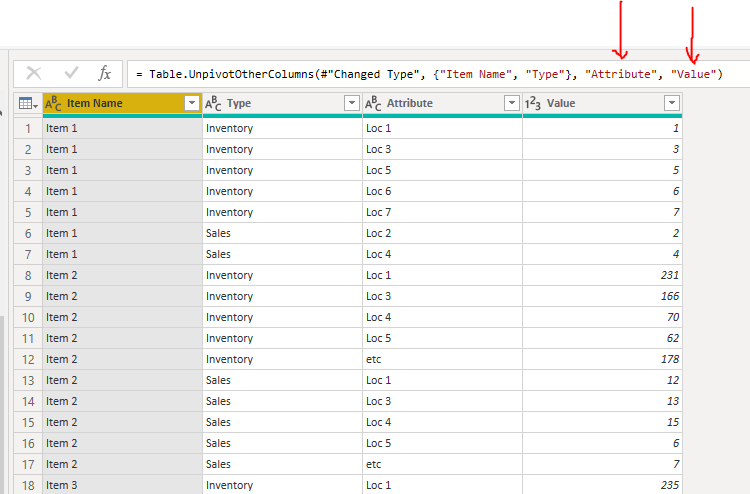
Hello to all! I am completely new to this community and to powerbi and query in general but already found the great benefits you might have by properly using this tool. now that i have started using it i already stumbled over my first big issue which i could not solve by myself. I have the following situation - i have an excel sheet which shows me the inventory and sales of several products in different locations. The problem is that any product repeats itself twice (2 Rows - 1 x Inventory + 1 x Sales) and then the appropriate values per location are displayed on the columns (Loc A | Loc B | Loc C etc.). What i would need to do now, is to replicate these 2 lines (Inventory & Sales) for ANY of these location columns and insert the appropriate values there. So basically i partially need to transpose only the columns of Locations onto the lines => this is what it actually looks like
| Item Name | Type | Loc 1 | Loc 2 | Loc 3 | Loc 4 | Loc 5 | Loc 6 | Loc 7 | Loc 8 | etc |
| Item 1 | Inventory | 1 | | 3 | | 5 | 6 | 7 | | |
| Item 1 | Sales | | 2 | | 4 | | | | | |
| Item 2 | Inventory | 231 | | 166 | 70 | 62 | | | | 178 |
| Item 2 | Sales | 12 | | 13 | 15 | 6 | | | | 7 |
| Item 3 | Inventory | 235 | 34 | 182 | 49 | 43 | 43 | 43 | 115 | 191 |
| Item 3 | Sales | 13 | 5 | 6 | 12 | 11 | 6 | 15 | 7 | 12 |
| | | | | | | | | | | |
Now what i would need to do is that fow any item and Type the LOCATION culumns must be "transposed" onto the lines which should look somehow like this
| Item | Type | Location | Value |
| Item1 | Inventory | Loc 1 | 1 |
| Item1 | Inventory | Loc 2 | |
| Item1 | Inventory | Loc 3 | 3 |
| Item1 | Inventory | Loc 4 | |
| etc. all Inventory types | | | |
| Item1 | Sales | Loc 1 | |
| Item1 | Sales | Loc 2 | 2 |
| etc. all Sales Type | | | |
| Item2 | Inventory | Loc 1 | 231 |
| and so on and so forth | | | |
| | | | |
I guess that i am not the first one having these kind of issue or need but unfortunately i was not able to find anything which could give me a hint of what i could do to solve this in an elegant manner. Any help would be highly appreciated !!
Thanks a lot !!