cancel
Showing results for 
Search instead for 
Did you mean: 

The Power BI Data Visualization World Championships is back! Get ahead of the game and start preparing now! Learn more

Reply
Anonymous
Not applicable

Parameters for JSON API data - Maintain Query daily

How can I maintain a report from a JSON API service when the JSON URL I am using is parameterized and needs to be updated to retrieve new data.
 
The current working URL I have is Source = Json.Document(Web.Contents("https://api.tatts.com/sales/vmax/web/data/racing/2017/4/12/sr/full")),
 
The api as described here(http://media.tatts.com/documentations/IData/IData.html#Data/Racing) follows this pattern
 
data/racing/{year}/{month}/{day}/{meetingcode}/full
 
where I need the users to be able to put in a date or choose from available dates and supply or use a dropdown (like excel data validation lists) to choose the meeting code.
 
Manually editing the query in the advanced editor didn't work how do I achieve this?
data/racing/{year}/{month}/{day}/{meetingcode}/full
1 ACCEPTED SOLUTION
Anonymous
Not applicable

Hi @Anonymous,

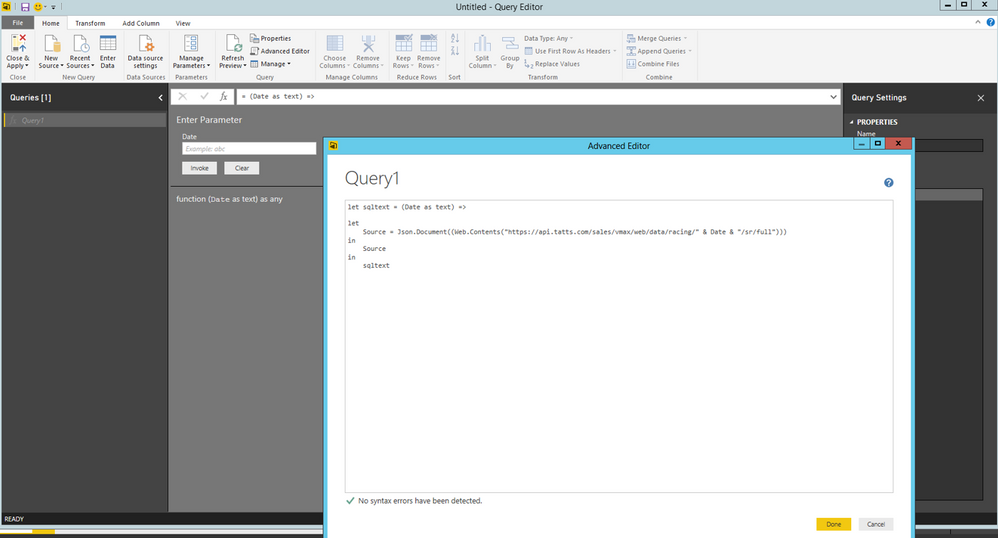
Add a new blank query in Power BI Desktop, then paste  the following code in Advanced Editor.

let sqltext = (Date as text) =>

let
    Source = Json.Document((Web.Contents("https://api.tatts.com/sales/vmax/web/data/racing/" & Date & "/sr/full")))
in
    Source  
in
    sqltext


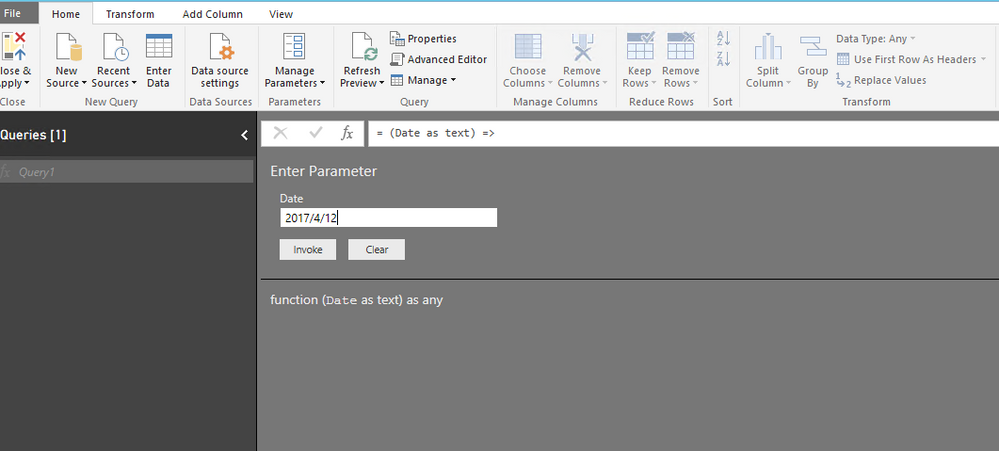
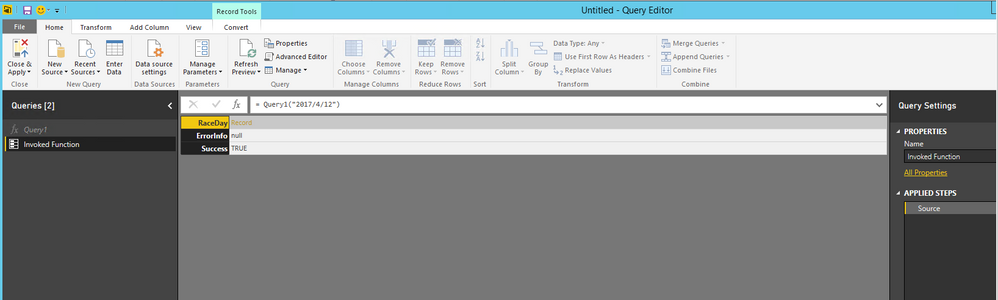
Then you can input date in the sqltext function to return result of that date. See my example below.

1.PNG2.PNG3.PNG


Thanks,
Lydia Zhang

View solution in original post

6 REPLIES 6
Anonymous
Not applicable

in Octber Power BI Server & Power Desktop The Solution works in Power BI Desktop only

Cannot save to Power BI Server after upgrading to Power BI Server October 2020 (Build 15.0.1104.264) not in (Build 15.0.1104.300), Released: January 8, 2021.

Could someone share any workaround to this issue ?


Anonymous
Not applicable

Hi @Anonymous,

Add a new blank query in Power BI Desktop, then paste  the following code in Advanced Editor.

let sqltext = (Date as text) =>

let
    Source = Json.Document((Web.Contents("https://api.tatts.com/sales/vmax/web/data/racing/" & Date & "/sr/full")))
in
    Source  
in
    sqltext


Then you can input date in the sqltext function to return result of that date. See my example below.

1.PNG2.PNG3.PNG


Thanks,
Lydia Zhang

I think I follow your solution but what if the API for the URL uses relative time units for example: Now - 1Month + 3Days.

We are loading time series data and it could potentailly be millions of rows. I want to use the Json.Document to initially load 2 days worth of data but then allow the user to select a date range. But I need the API to use relative time units. Is there a way to allow the user to select dates that then are transformed to relative time units to use as the parameters?

Hi Lydia,

I have a web API as below:

https://churchmetrics.com/api/v1/campuses/12345/weekly_totals.json?category_id=234567


Numbers in the API are parametrized, i.e., 12345 (represents location ID) and 234567 (specific data for the location, i.e., attendance, new comers, etc.)

There are 10 different locations and each location has 4 different types of data that I want to extract.


I have created two lists in power query editor, i.e., one for locations and the other list for types of data. I want to use parameters to be able to fetch all the values (i.e., 40 values) in single query using parameters. Is it possible to do in Power Query?

Please advise.


This is resolved using inputs from https://msdynamicsworld.com/story/use-parameters-and-custom-functions-call-apis-power-bi althoug I am unable to automate data refresh in Power BI service since I am using custom functions.

Anonymous
Not applicable

If its not possible do you know if this is something on the radar?

Helpful resources

Announcements
Power BI DataViz World Championships

Power BI Dataviz World Championships

The Power BI Data Visualization World Championships is back! Get ahead of the game and start preparing now!

December 2025 Power BI Update Carousel

Power BI Monthly Update - December 2025

Check out the December 2025 Power BI Holiday Recap!

FabCon Atlanta 2026 carousel

FabCon Atlanta 2026

Join us at FabCon Atlanta, March 16-20, for the ultimate Fabric, Power BI, AI and SQL community-led event. Save $200 with code FABCOMM.

Top Solution Authors