Don't miss your chance to take exam DP-600 or DP-700 on us!
Request nowLearn from the best! Meet the four finalists headed to the FINALS of the Power BI Dataviz World Championships! Register now
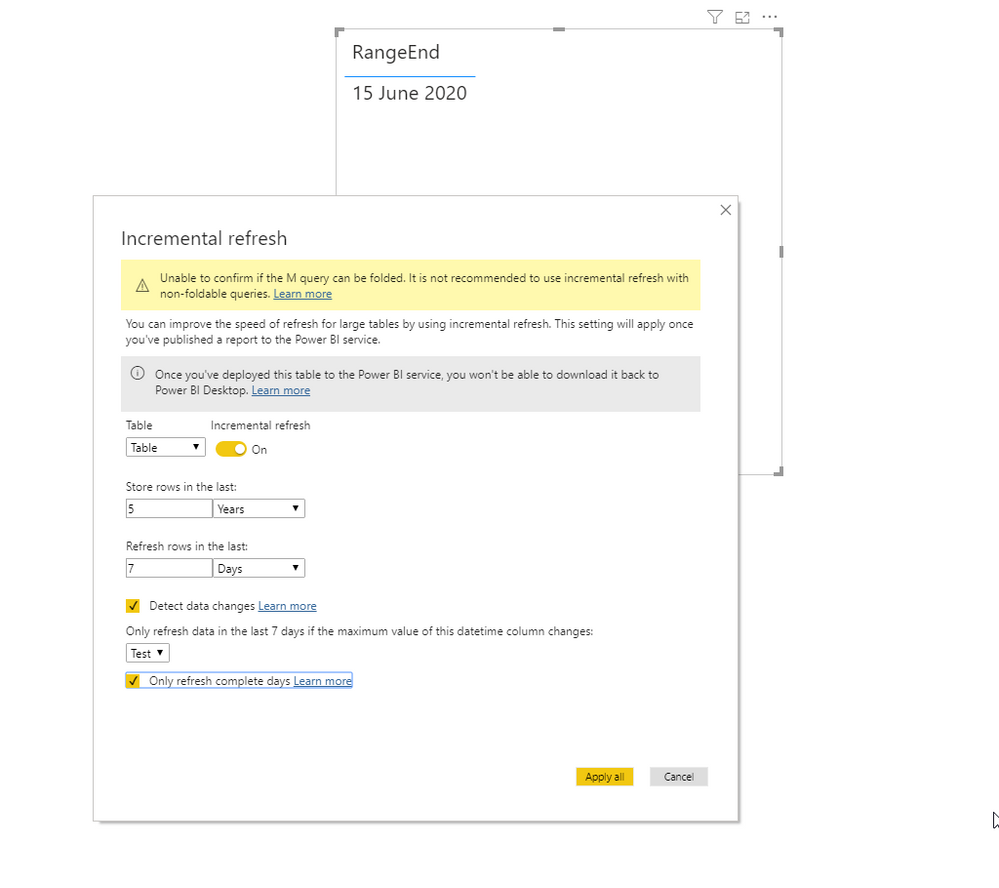
For incremental refresh I want to make a parameter called RangeEnd that takes yesterday's date. I thought I could use a list query Date.AddDays(DateTime.LocalNow(), -1) to make this parameter dynamic. But I can't get it to work. Here it says dynamic parameters are not possible. Is this still true? Does anyone know a way around this?
Solved! Go to Solution.
Hi @richard-powerbi
Based on your link:
Date.AddDays(DateTime.LocalNow(), -1) meta [IsParameterQuery=true, Type="DateTime", IsParameterQueryRequired=true]
And test:
let
Source = Table.FromRows(Json.Document(Binary.Decompress(Binary.FromText("Lcy5EYBAEMTAXNbGQMDxxLJ1+acBNcJpT+qutebSRdziHo844hmveMfH6o+tMcceB3jABT5wwneZLw==", BinaryEncoding.Base64), Compression.Deflate)), let _t = ((type nullable text) meta [Serialized.Text = true]) in type table [Column1 = _t]),
#"Changed Type" = Table.TransformColumnTypes(Source,{{"Column1", Int64.Type}}),
Test = Table.AddColumn(#"Changed Type", "Test", each DateTime.Date(Date.AddMonths(RangeEnd, -[Column1])), type date),
#"Filtered Rows" = Table.SelectRows(Test, each [Test] > DateTime.Date(RangeStart) and [Test] <= DateTime.Date(RangeEnd))
in
#"Filtered Rows"Hi @richard-powerbi
Based on your link:
Date.AddDays(DateTime.LocalNow(), -1) meta [IsParameterQuery=true, Type="DateTime", IsParameterQueryRequired=true]
And test:
let
Source = Table.FromRows(Json.Document(Binary.Decompress(Binary.FromText("Lcy5EYBAEMTAXNbGQMDxxLJ1+acBNcJpT+qutebSRdziHo844hmveMfH6o+tMcceB3jABT5wwneZLw==", BinaryEncoding.Base64), Compression.Deflate)), let _t = ((type nullable text) meta [Serialized.Text = true]) in type table [Column1 = _t]),
#"Changed Type" = Table.TransformColumnTypes(Source,{{"Column1", Int64.Type}}),
Test = Table.AddColumn(#"Changed Type", "Test", each DateTime.Date(Date.AddMonths(RangeEnd, -[Column1])), type date),
#"Filtered Rows" = Table.SelectRows(Test, each [Test] > DateTime.Date(RangeStart) and [Test] <= DateTime.Date(RangeEnd))
in
#"Filtered Rows"@Smauro So I understand it correctly that the only trick you did was add the code below?
meta [IsParameterQuery=true, Type="DateTime", IsParameterQueryRequired=true]Ahhh so it's this trick:
https://www.excelguru.ca/blog/2018/05/30/creating-dynamic-parameters-in-power-query/
Thanks!
Share feedback directly with Fabric product managers, participate in targeted research studies and influence the Fabric roadmap.
Check out the February 2026 Power BI update to learn about new features.
| User | Count |
|---|---|
| 10 | |
| 9 | |
| 8 | |
| 7 | |
| 7 |