Share feedback directly with Fabric product managers, participate in targeted research studies and influence the Fabric roadmap.
Sign up nowGet Fabric certified for FREE! Don't miss your chance! Learn more
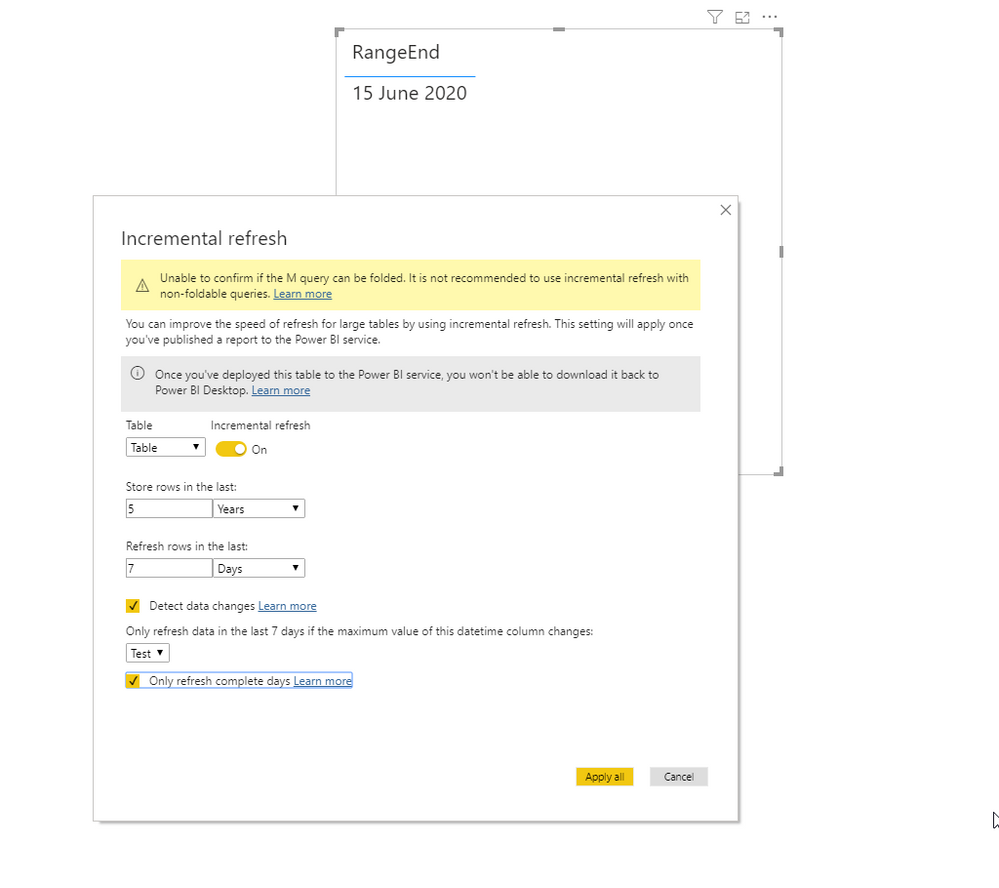
For incremental refresh I want to make a parameter called RangeEnd that takes yesterday's date. I thought I could use a list query Date.AddDays(DateTime.LocalNow(), -1) to make this parameter dynamic. But I can't get it to work. Here it says dynamic parameters are not possible. Is this still true? Does anyone know a way around this?
Solved! Go to Solution.
Hi @richard-powerbi
Based on your link:
Date.AddDays(DateTime.LocalNow(), -1) meta [IsParameterQuery=true, Type="DateTime", IsParameterQueryRequired=true]
And test:
let
Source = Table.FromRows(Json.Document(Binary.Decompress(Binary.FromText("Lcy5EYBAEMTAXNbGQMDxxLJ1+acBNcJpT+qutebSRdziHo844hmveMfH6o+tMcceB3jABT5wwneZLw==", BinaryEncoding.Base64), Compression.Deflate)), let _t = ((type nullable text) meta [Serialized.Text = true]) in type table [Column1 = _t]),
#"Changed Type" = Table.TransformColumnTypes(Source,{{"Column1", Int64.Type}}),
Test = Table.AddColumn(#"Changed Type", "Test", each DateTime.Date(Date.AddMonths(RangeEnd, -[Column1])), type date),
#"Filtered Rows" = Table.SelectRows(Test, each [Test] > DateTime.Date(RangeStart) and [Test] <= DateTime.Date(RangeEnd))
in
#"Filtered Rows"Hi @richard-powerbi
Based on your link:
Date.AddDays(DateTime.LocalNow(), -1) meta [IsParameterQuery=true, Type="DateTime", IsParameterQueryRequired=true]
And test:
let
Source = Table.FromRows(Json.Document(Binary.Decompress(Binary.FromText("Lcy5EYBAEMTAXNbGQMDxxLJ1+acBNcJpT+qutebSRdziHo844hmveMfH6o+tMcceB3jABT5wwneZLw==", BinaryEncoding.Base64), Compression.Deflate)), let _t = ((type nullable text) meta [Serialized.Text = true]) in type table [Column1 = _t]),
#"Changed Type" = Table.TransformColumnTypes(Source,{{"Column1", Int64.Type}}),
Test = Table.AddColumn(#"Changed Type", "Test", each DateTime.Date(Date.AddMonths(RangeEnd, -[Column1])), type date),
#"Filtered Rows" = Table.SelectRows(Test, each [Test] > DateTime.Date(RangeStart) and [Test] <= DateTime.Date(RangeEnd))
in
#"Filtered Rows"@Smauro So I understand it correctly that the only trick you did was add the code below?
meta [IsParameterQuery=true, Type="DateTime", IsParameterQueryRequired=true]Ahhh so it's this trick:
https://www.excelguru.ca/blog/2018/05/30/creating-dynamic-parameters-in-power-query/
Thanks!
Share feedback directly with Fabric product managers, participate in targeted research studies and influence the Fabric roadmap.
If you love stickers, then you will definitely want to check out our Community Sticker Challenge!
Check out the January 2026 Power BI update to learn about new features.
| User | Count |
|---|---|
| 12 | |
| 11 | |
| 11 | |
| 7 | |
| 6 |