Don't miss your chance to take exam DP-600 or DP-700 on us!
Request nowLearn from the best! Meet the four finalists headed to the FINALS of the Power BI Dataviz World Championships! Register now
Hi All,
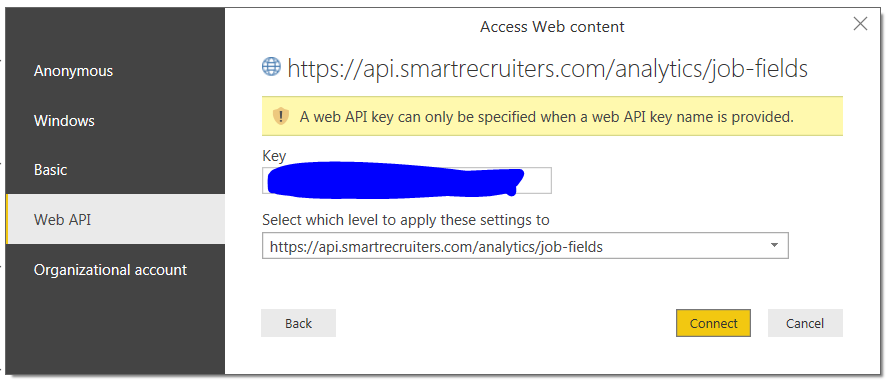
I'm trying to pull the data from an API offered by SmartRecruiters (SR).
Some datails on the service can be found here: https://dev.smartrecruiters.com/customer-api/live-docs/customer-api-2/#/
I continuously get an error saying: "A web API key can only be specified when a web API key name is povided".
I do have a key generated by SR admin - and he assured me there was no such a thing like key name.
I'm missing sth here.
Any help appriciated!
Kind regards,
Chris.
@Anonymous,
Please specify an API key name in the hearers area of Web.Contents using Advanced Editor, then check if the error goes away.
There is also a similar thread for your reference.
http://community.powerbi.com/t5/Desktop/Connect-Power-BI-Desktop-to-insightly/td-p/209079
Regards,
Lydia
Hi v-yuezhe-msft,
thank you for a tip.
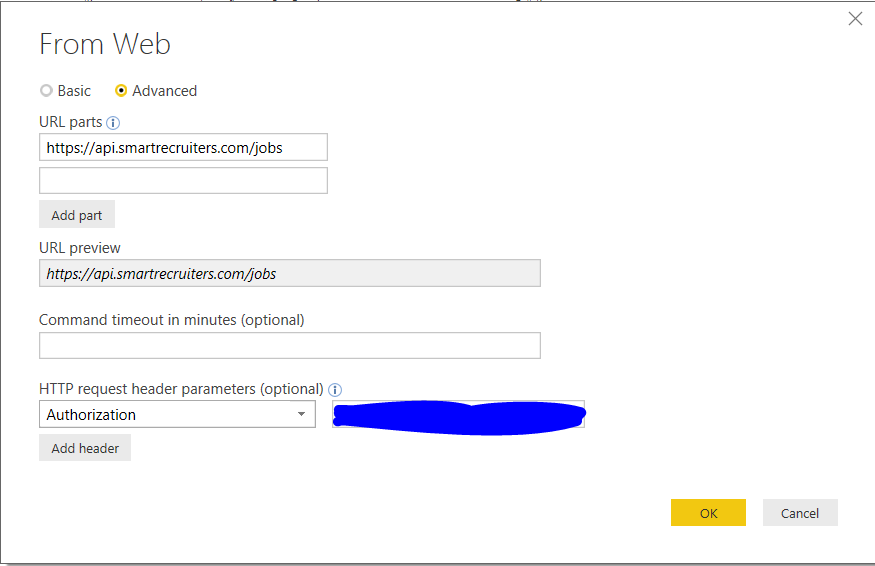
I've experimented with it - I'm just missing something probably really obvious to you!
Attaching a screen - can you make another suggestion?
Any help much appriciated!
Chris.
@Anonymous,
Add a blank query in your PBIX file, directly write Power Query code in the Advanced Editor of the blank query as described in the following similar thread.
http://community.powerbi.com/t5/Desktop/Connect-Power-BI-Desktop-to-insightly/td-p/209079
Regards,
Lydia
Share feedback directly with Fabric product managers, participate in targeted research studies and influence the Fabric roadmap.
Check out the February 2026 Power BI update to learn about new features.
| User | Count |
|---|---|
| 9 | |
| 9 | |
| 9 | |
| 8 | |
| 6 |